




Key Takeaways
-
Steam doesn't rely on universal promo codes: Most savings come from official sales, account-specific coupons, and publisher promotions.
-
Know the difference between codes: Steam Coupons reduce eligible game prices, Wallet Codes add account balance, and Product Keys activate games.
-
Find legitimate deals: Check Steam Specials, your Steam Inventory, publisher websites, and authorized game retailers.
-
Check the conditions before redeeming: Coupons have expiration dates and eligible products, while third-party keys may have activation restrictions.
-
Avoid suspicious offers: Free code generators and websites requesting your Steam login details can put your account at risk.
-
Protect your connection: A VPN such as UFO VPN can help encrypt your internet traffic when browsing deals over public Wi-Fi, but it won't generate discount codes or change your Steam purchase eligibility.
Safety Reminder: Avoid Fake Steam Discount Codes and Scams

Searching for free Steam codes can lead you to websites that promise unlimited Wallet funds or free game keys. Be careful: some of these offers are designed to collect account credentials or trick users into completing suspicious tasks.
1. Avoid Free Steam Code Generators
Websites claiming to generate unlimited Steam Wallet Codes or free game activation keys are not legitimate sources of guaranteed codes.
Steam Wallet funds and game keys must come from valid purchases or authorized promotional offers. Avoid downloading unknown software or completing suspicious surveys to receive a supposedly free code.
2. Never Share Your Steam Login or Wallet Code
Your Steam account credentials and Wallet Codes should remain private.
Be cautious if someone asks you to provide a code to verify your account, unlock a prize, or receive a payment.
Steam also warns users about gift card scams. If someone asks you to purchase Steam Gift Cards to pay taxes, settle a debt, or claim a prize, treat it as a scam.
3. Check Retailer Reputation and Refund Policies
Before purchasing a discounted game key, check the retailer's reputation and product information.
Pay particular attention to:
-
Whether the seller is authorized.
-
Whether the key is new and unused.
-
Whether the game activates on Steam.
-
Whether the key has regional restrictions.
-
Whether the seller offers a refund or replacement for invalid keys.
A low price is not worth losing your money or compromising your Steam account.
4. Watch Out for Region-Locked or Revoked Game Keys
Some Steam game keys are restricted to specific countries or regions.
A key may be valid but still fail to activate in your location. Always read the activation conditions before purchasing. Using a proxy or VPN alone to bypass regional gift restrictions may result in account restrictions, but you can verify your identity to unlock more regional bonus.
5 Ways to Get Discount Codes for Steam
If you're searching for legitimate Steam discount codes, start with official Steam channels and reputable game retailers. These sources are generally more reliable than random websites promising free codes.
1. Check Steam's Official Store and Seasonal Sales
The Steam Store is one of the easiest places to find discounts without needing a coupon code. Visit the Steam Specials page to browse currently discounted games. You can filter deals by category, price, genre, and other preferences.
Steam also hosts four major seasonal sales every year:
| Seasonal Sale | Typical Period | What to Expect |
|---|---|---|
| Spring Sale | March | Discounts across multiple game genres |
| Summer Sale | June–July | Broad selection of discounted titles |
| Autumn Sale | Around October–November | Seasonal promotions and publisher deals |
| Winter Sale | December–January | Major year-end game discounts |
For 2026, Steam's published schedule lists the Winter Sale from December 17, 2026, to January 4, 2027.
You don't need a special promo code to participate in these sales. Eligible discounts are displayed directly on the store pages.
2. Get Steam Coupons Through Your Inventory
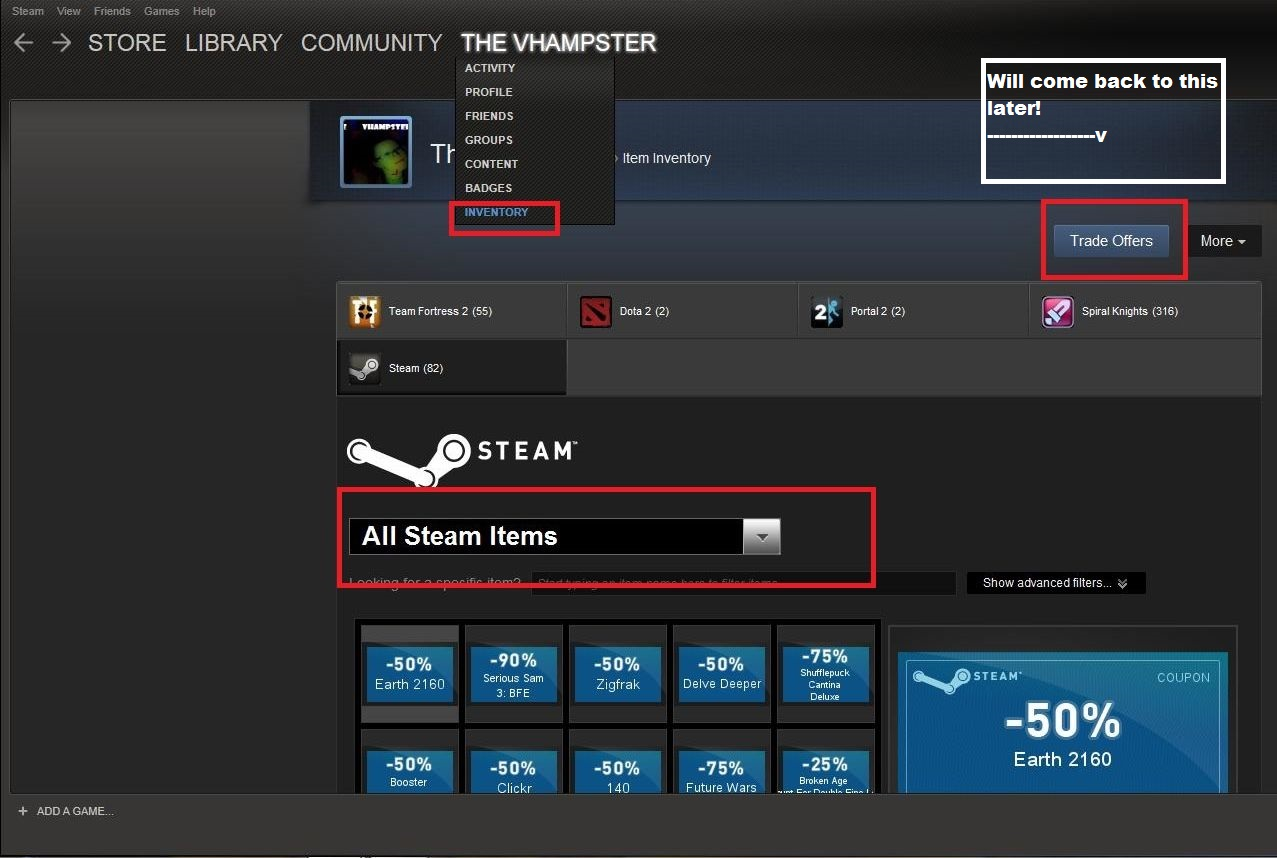
Steam Coupons can also appear in your account Inventory.
To check whether you have any available coupons:
-
Log in to your Steam account.
-
Hover over your profile name.
-
Select Inventory.
-
Open the Steam tab.
-
Review your available coupons.
-
Select View Applicable Games to see which titles qualify.
Each coupon has its own expiration date and eligible products. Some coupons may also be tradable or transferable through Steam's trading system, depending on their conditions.
When you add an eligible game to your cart, Steam automatically applies an available coupon. You can choose to remove it and save it for another purchase before completing checkout.
3. Follow Game Developers and Publishers for Special Offers
Game developers and publishers sometimes announce promotional campaigns through their official websites, newsletters, and social media accounts. Dates and max discounts can shift slightly by region.
- 11 bit studios Publisher Sale
Up to 90% off (Frostpunk series, This War of Mine, Moonlighter, INDIKA, and more; some all-time lows).
Runs Nov 2 – Nov 14. Includes a Survival Games Bundle. - XD Publisher Sale 2026
Up to 90% across the catalog.
Runs Nov 2 – ~Nov 16. - Dotemu & The Arcade Crew Publisher Sale
Up to 90% off.
Runs Nov 4 – Nov 18. Strong retro/indie focus. - HeroCraft PC Publisher Sale
Catalog-wide deals.
Runs Nov 7 – Nov 21. - RockGame Publisher Sale
Catalog deals plus Saloon Simulator 1.0 celebration.
Runs Nov 6 – Nov 20.
Includes demos and wishlist highlights. - Two Cakes Publisher Sale
Up to 70% off.
Runs Nov 9 – Nov 16. - Blobfish Games Developer Sale
Catalog discounts.
Runs Nov 2 – Nov 16.
If you have a particular game in mind, following its developer or publisher can help you discover deals before they expire.
Always check whether the offer applies to the Steam version. Some promotions are exclusive to a publisher's own launcher or another platform.
4. Find Steam Game Deals from Authorized Retailers
Third-party game retailers can be another source of discounts.
Some stores sell Steam-compatible game keys, while others provide their own promotional codes at checkout.
👍Recommended authorized options:
- Green Man Gaming — Strong publisher partnerships, frequent sales, reliable keys.
- Fanatical — Excellent for bundles and publisher-approved deals; good value on older titles.
- Humble Store / Humble Bundle — Official keys + charity element; regular store sales and weekly deals.
- Gamesplanet (US/UK/FR/DE variants) — Long-established authorized retailer.
- Others often listed as official: GamersGate, IndieGala, WinGameStore, Nuuvem (region-dependent), and select regional partners.
⚠️Before purchasing, check:
-
Whether the retailer is an authorized seller.
-
Whether the key activates on Steam.
-
Whether the key is restricted to specific countries.
-
Whether the offer applies to the correct game edition.
-
The retailer's refund and replacement policies.
Avoid choosing a seller based on price alone. An unusually cheap key from an unknown marketplace may be invalid, previously used, or region-restricted.
5. Use Game Deal Trackers to Compare Prices
Price-tracking websites can help you decide whether a deal is worth taking.
Here are two useful resources:
| Website | Main Function | Best For |
|---|---|---|
| SteamDB | Tracks Steam prices and historical price changes | Checking whether a game is at its lowest recorded price |
| IsThereAnyDeal | Compares game deals across supported stores | Finding offers from multiple retailers |
For example, if a game is currently 30% off, its historical price may help you determine whether to purchase now or wait for another promotion.
These tools don't generate Steam coupons, but they can help you avoid buying a game just because its current price looks attractive.
How to Use a Steam Discount Code
The redemption process depends on what type of code you have. A Steam Coupon, Wallet Code, Product Key, and retailer promo code all work differently.
1. How to Apply a Steam Coupon at Checkout
If you already have a Steam Coupon in your Inventory, follow these steps:
-
Open Steam and log in to your account.
-
Navigate to your Inventory.
-
Select the Steam tab and review your coupons.
-
Click View Applicable Games to find eligible titles.
-
Add an eligible game to your cart.
-
Check whether Steam has automatically applied your coupon.
-
Review the final price before clicking Purchase.
You don't usually need to manually enter a coupon code. Steam applies an eligible coupon automatically during checkout.
Important: You can use one coupon per item. Unless the coupon terms explicitly state otherwise, Steam Coupons generally cannot be combined with existing Steam Sale discounts.
2. How to Redeem a Steam Wallet Code
A Steam Wallet Code adds funds to your account. It doesn't directly reduce the price of a particular game.
To redeem one:
-
Log in to your Steam account.
-
Visit the Redeem a Steam Gift Card or Wallet Code page.
-
Enter your Wallet Code.
-
Click Continue.
-
Follow the instructions to add the funds to your Steam Wallet.
Once redeemed, you can use your Wallet balance to purchase eligible games, software, and other items on Steam.
Steam converts redeemed Wallet Code values into your account's Wallet currency, subject to its redemption rules.
3. How to Activate a Steam Game Key
A Steam Product Key is used to activate a game or DLC rather than apply a discount.
Here's how to activate one:
-
Open the Steam desktop client.
-
Click Add a Game in the bottom-left corner.
-
Select Activate a Product on Steam.
-
Follow the activation instructions.
-
Enter your Product Key.
-
Confirm the activation.
If the key is valid and compatible with your account, the corresponding product will be added to your Steam Library.
Before purchasing a key from a third-party retailer, check its activation platform, region restrictions, and product edition.
4. How to Use a Discount Code on Third-Party Game Stores
Some authorized retailers provide promotional codes for eligible Steam game purchases.
The process is generally straightforward:
-
Visit the retailer's official website.
-
Find the Steam-compatible game you want.
-
Add the game to your shopping cart.
-
Proceed to checkout.
-
Find the promotional code or discount code field.
-
Enter the code and apply it.
-
Check the final price and purchase conditions.
-
Complete the payment.
After purchasing, the retailer may provide a Steam Product Key. You can then activate that key through the Steam client if it is compatible with your account and region.
Don't confuse the two steps: The retailer's promo code applies to the retailer's checkout, while the Product Key is redeemed on Steam.
(Fixed) Why Is My Steam Discount Code Not Working?
1. The Coupon Has Expired
Steam Coupons have specified validity periods. Once a coupon expires, it is automatically removed from your Inventory.
Always check the expiration date before adding a game to your cart.
2. The Game Is Not Eligible for the Coupon
Not every Steam Coupon applies to every game.
Some coupons are restricted to specific titles or products. Open the coupon details and select View Applicable Games to check whether your intended purchase qualifies.
3. The Coupon Cannot Be Combined with a Sale
Steam generally does not allow coupons or loyalty discounts to stack with existing Steam Sale pricing unless the offer explicitly says otherwise.
For example, if a game is already discounted during the Summer Sale, an additional coupon may not apply.
Compare the final checkout prices rather than assuming that every available discount can be combined.
4. The Wallet Code Has Not Been Activated
If a Wallet Code doesn't work, the retailer may not have activated it correctly, or you may have entered the wrong characters.
Double-check the code and keep your purchase receipt. If the problem persists, contact the retailer where you purchased it.
5. The Product Key Is Invalid or Region-Restricted
Third-party Product Keys may have activation restrictions.
A key intended for a particular country or region may not work with your Steam account. Check the product description and contact the seller if the activation conditions are unclear. Or you can try a free proxy VPN to unlock regional bonus as a shortcut.
6. Steam Checkout or Network Issues
Sometimes Steam pages or checkout processes may fail because of temporary network problems, browser issues, or payment verification.
Try the following:
-
Restart the Steam client.
-
Check whether the Steam Store is loading correctly.
-
Verify your billing and payment information.
-
Try accessing Steam through its desktop client instead of a browser, or vice versa.
-
Check Steam Support for the specific purchase error.
If you use a VPN or proxy, Steam's purchasing guidance recommends disabling it when troubleshooting failed transactions. Steam states that purchases initiated through anonymous proxies will be declined.


[Bonus] How to Save More Money on Steam Without Discount Codes
Not every good Steam deal requires a promo code. In many cases, waiting for the right sale or tracking a game's historical price can save you just as much.
1. Add Games to Your Steam Wishlist
The Steam Wishlist is a simple way to keep track of games you want to purchase.
When a wishlisted game goes on sale, Steam can send you a notification. This helps you avoid repeatedly checking the store for price changes.
If you're planning to buy several games, add them to your Wishlist and wait for suitable offers.
2. Wait for Steam Seasonal Sales
Steam's major seasonal sales are useful opportunities to compare discounts across different genres.
Rather than purchasing every game as soon as it receives a small discount, consider waiting for a larger promotion.
The next major event on Steam's published 2026 schedule is the Winter Sale, running from December 17, 2026, through January 4, 2027.
3. Compare Current Prices with Historical Prices
A 50% discount may look impressive, but it doesn't automatically mean you're getting the best available deal.
Use SteamDB to review a game's price history and check whether its current price is close to its previous low.
This is particularly useful for popular titles that receive recurring discounts.
4. Look for Game Bundles and Publisher Discounts
Some publishers offer bundles containing multiple games, DLC, or franchise collections.
If you already plan to buy several titles from the same series, a bundle may offer better value than purchasing each item separately.
However, check which products are included and whether you already own any of them.
5. Check Authorized Retailer Offers Before Buying
Before completing a purchase, compare the Steam Store price with offers from authorized retailers.
Look at the final price after applying any retailer discount, including taxes and other fees where applicable.
Make sure the game key is compatible with Steam and can be activated in your country.
What Is a Steam Discount Code? Steam Discount Code Explained
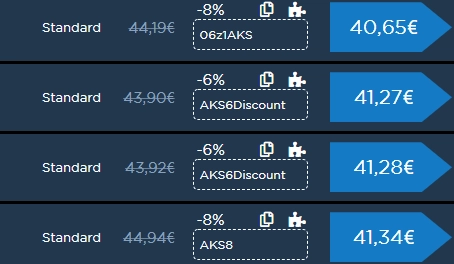
A Steam discount code is actually a promotional offer that helps players save money when purchasing eligible games or content. Depending on where the offer comes from, it may be a Steam-issued coupon, a publisher promotion, or a discount code provided by a third-party retailer.
Unlike traditional online shopping platforms, Steam does not generally offer universal promo codes that can be entered to discount any game. Instead, players can save through several methods, including:
-
Steam Coupons: Account-specific discounts that apply to eligible games and are usually applied automatically at checkout.
-
Steam Sale Discounts: Price reductions during seasonal sales, publisher promotions, and other special events.
-
Third-Party Promo Codes: Promotional codes entered on participating game retailers' websites, not directly on Steam.
-
Game Bundle Offers: Discounted packages that combine multiple games or downloadable content.
It's also important to distinguish discount codes from Steam Wallet Codes and Product Keys. Wallet Codes add funds to your account, while Product Keys activate specific games or DLC. Neither directly reduces a game's listed price.
FAQs
Can I Use Multiple Steam Coupons at Once?
Steam allows one coupon per item. You generally cannot apply multiple coupons to the same item. Check the terms of each coupon before purchasing.
Can Steam Coupons Be Combined with Sale Discounts?
Generally, no. Steam states that coupons and loyalty discounts do not stack with Steam Sale pricing unless the promotion explicitly says otherwise.
Can I Use a VPN to Get Cheaper Steam Games?
A VPN changes the public IP address visible to online services, but it does not change your Steam Store Country or establish eligibility for another region's prices without your identification proved. Steam prohibits disguising your location to bypass regional pricing restrictions. A VPN is better suited to protecting your connection when browsing online deals, especially on public Wi-Fi.