How to Change Your Location in Pokémon Go in 2026?
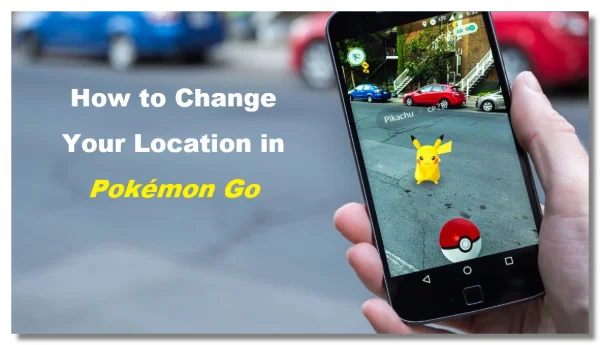
Changing your location in Pokémon Go usually means making the game believe you are somewhere else. Since the game relies primarily on GPS data, most solutions involve modifying or simulating your device’s location.
Below are three commonly used approaches that players try in 2026.
Way 1. Use a Reliable VPN for Pokémon Go
A VPN (Virtual Private Network) changes your device’s IP address by routing your internet traffic through a server in another region. While this does not directly change your GPS coordinates, it can still help in several situations when playing Pokémon Go.
For example, some players use a Pokémon Go VPN free when:
-
Accessing the game from networks with restrictions (schools, workplaces, or public Wi-Fi)
-
Reducing connection errors when servers behave differently by region
-
Matching their IP location with a spoofed GPS location to avoid detection inconsistencies
A privacy-focused VPN such as UFO VPN provides 2000+ global servers and stable connections that help maintain a smoother gameplay experience, especially when combined with other location tools.
Benefits of Using UFO VPN for Pokémon Go:
-
Bypass Network Restrictions – Access Pokémon GO on school, workplace, or public Wi-Fi networks that may block gaming apps.
-
Protect Your Privacy – Hide your real IP address and keep your online activity more private while playing.
-
Match IP with Spoofed Location – If you use GPS spoofing tools, connecting to a VPN server in the same region can reduce IP and location mismatches.
-
More Stable Connection – Help maintain a stable connection when accessing game servers from different networks.
-
Access Global Game Events – Easily connect to servers in different regions when participating in international Pokémon Go activities or communities.
Follow the steps below to set it up on your devices:


UFO VPN is an all-in-one VPN that offers unlimited access to 4K streaming like Netlfix, Disney Plus, no-ping gaming as PUBG, Roblox, CODM and social networking for YouTube, X, Facebook and more.




Unlock Pro Features
If you have upgraded to premium plan , feel free to enjoy premium servers for 4K streaming and advanced features like Kill Switch, Split Tunneling, and gaming acceleration. Your Mac is now fully optimized and protected. Inaddition to basic functions, we recommend you turn on

Verify Your IP Now
Use UFO VPN's " What is My IP " feature to see your new IP and location. This confirms your connection is secure, anonymous, and ready for safe browsing online anywhere at any time.







However, it’s important to understand the limitations:
-
VPN alone does not change your Pokémon Go GPS location.
The game primarily reads location data from your phone’s GPS sensors. So while a VPN can assist with connectivity and IP matching, it usually works best when paired with another location-changing method.


Way 2. Use a GPS Location Spoofer
If you want to change your location in Pokémon Go without moving, GPS spoofing tools are the most commonly used method:
| Tool | Supported Device | Key Features |
|---|---|---|
| iMyFone AnyTo | iOS / Android | Change GPS location with one click, joystick movement simulation |
| Tenorshare iAnyGo | iOS / Android | Route simulation, teleport mode, works without jailbreak |
| Dr.Fone Virtual Location | iOS / Android | GPS teleport and multi-spot movement simulation |
| 3uTools | iOS | Free desktop tool that allows basic location spoofing |
| Fake GPS Location | Android | Simple mock location app available on Android devices |
These apps simulate a fake GPS position, so the game believes you are somewhere else.
Change Pokémon Go Location on Android
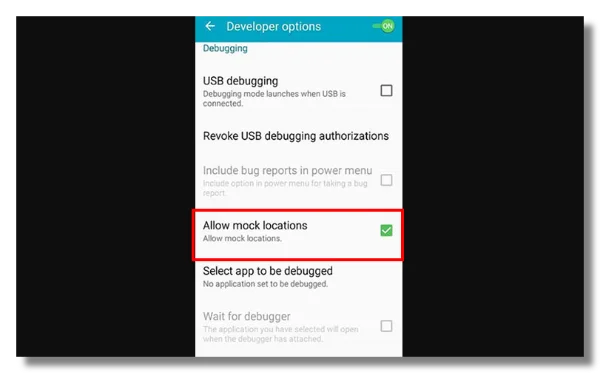
Android devices allow location simulation through “mock location” features in developer settings. After enabling developer mode, you can install a location spoofer app and choose a virtual location on the map.
Typical steps include:
-
Enable Developer Options in Android settings
-
Turn on Allow Mock Locations
-
Install a GPS spoofing app
-
Select the location you want to appear in
-
Launch Pokémon Go
Change Pokémon Go Location on iPhone/iPad
Changing location on iOS devices is slightly more restrictive because Apple limits mock location apps. Most iPhone players rely on desktop-based tools connected through a computer.
The typical process:
-
Install a location simulation program on your computer
-
Connect your iPhone via USB
-
Select a new location on the map
-
Launch Pokémon Go
Important Risk Considerations
Because spoofing changes your GPS location artificially, the game developer Niantic actively monitors unusual movement patterns.
Potential consequences include:
-
Soft bans (temporary restrictions on catching Pokémon)
-
Cooldown penalties
-
Account suspension in severe cases
To reduce risks, many players follow cooldown rules—waiting realistic travel times between long-distance jumps.
Way 3. Change Android Account Region
Another lesser-known approach is adjusting your Google Play region settings.
This method doesn’t directly spoof GPS either, but it can help if you:
-
Cannot download Pokémon Go in your country
-
Need access to regional updates
-
Want to use a store region that supports the game
Steps:
-
Open Google Play Store settings
-
Navigate to Account → Country and Profiles
-
Change the region to another supported country
-
Restart the Play Store
For bettere experience, you can combine this with VPN access when their local store doesn’t provide the game.
Best Places to Spoof Pokémon Go

If you’re finding best places to spoof Pokémon Go, you’ll often see the same cities recommended by experienced players.
These locations are known for dense PokéStops, frequent raids, and active communities.
New York City, USA
The area around Central Park has one of the highest concentrations of PokéStops and raids in the world.
Tokyo, Japan
Districts like Shibuya and Shinjuku are extremely active and often host large player communities.
Zaragoza, Spain
This city became famous among spoofers because its walking routes contain dozens of PokéStops close together.
Santa Monica Pier, USA
A classic Pokémon Go hotspot with frequent events and lure modules.
Sydney, Australia
Circular Quay and the Sydney Opera House area offer many PokéStops and scenic routes.
When spoofing locations, players usually choose cities with high spawn rates and active raids, maximizing their chances of catching rare Pokémon or participating in events.
Why Need to Change Your Pokémon Go Location?
For many players, changing their location in Pokémon GO isn’t just about convenience—it can unlock new gameplay opportunities.
1. Catch Regional Pokémon
Some Pokémon only spawn in specific continents.
For example, certain species may appear only in:
-
Asia
-
Europe
-
North America
Changing location allows players to collect Pokémon they normally couldn’t obtain.
2. Join Global Events
Major in-game events often occur in large cities or specific regions.
By changing location, players can participate remotely in:
-
Raid battles
-
Special community days
-
Limited-time events
3. Access High-Density Areas
Not every town has active Pokémon Go communities.
Players living in rural areas sometimes struggle with:
-
Few PokéStops
-
Rare raids
-
Low spawn rates
Spoofing a location to a major city can significantly improve gameplay opportunities.
4. Play Without Moving
Some trainers simply want to play Pokémon Go from home due to weather, distance, or time constraints.
Why Can't I Change My Pokemon Go Location?
Sometimes players attempt to spoof their location but find that Pokémon Go still detects their real position.
Several common reasons explain this issue.
1. GPS Signal Overrides
Your phone’s hardware GPS may override the simulated location if spoofing settings are not configured correctly.
This is especially common on Android when developer options are disabled.
2. Cooldown Restrictions
If you teleport from one continent to another instantly, the game may trigger a cooldown.
During this time, you may notice:
-
Pokémon fleeing immediately
-
PokéStops are not giving items
Waiting for the correct cooldown time usually resolves the problem.
3. IP and GPS Mismatch
If your GPS location shows Tokyo but your IP address appears in another country, the system might flag suspicious activity.
Using a stable network connection, or matching your IP region through a Japan VPN free, can sometimes reduce these inconsistencies.
4. Game Updates and Detection
Since its launch, Niantic has continuously improved anti-spoofing detection. Certain spoofing tools stop working after major game updates, so keeping software updated is important.
Final Thoughts
Changing your location in Pokémon GO can open up new gameplay opportunities—from catching regional Pokémon to exploring global hotspots. While GPS spoofing tools are the most effective method, VPN services can still help improve network access and maintain location consistency. By understanding the risks, cooldown rules, and available tools, players can experiment with location changes more safely and enjoy a broader Pokémon Go experience.
FAQs
Can you change location in Pokémon Go for free?
Yes, some GPS spoofing apps provide free versions that allow basic location simulation in Pokémon GO. However, free tools may have limited features or stability compared with paid options.
Can Pokémon Go detect spoofing?
Yes. The developer Niantic monitors abnormal movement patterns and GPS inconsistencies. If suspicious activity is detected, the game may apply cooldowns, soft bans, or other temporary restrictions.
Can a VPN change Pokémon Go location?
No. A VPN only changes your IP address, not your device’s GPS coordinates. It is sometimes used alongside GPS spoofing tools to help keep network locations more consistent.
Is Pokémon Go spoofing illegal?
In most countries, spoofing itself is not illegal. However, it violates the terms of service of Pokémon GO and may lead to warnings or account penalties.
What are the best places to spoof Pokémon Go?
Popular spoofing locations include cities with dense PokéStops and active players, such as New York, Tokyo, and Zaragoza. These areas often have frequent raids, high spawn rates, and large player communities.