What to Do Before Deleting a DeviantArt Account?
Before you pull the plug, remember to secure your data and cut ties properly. Once the 21-day grace period passes, there is no turning back. And this means your account and data will be permanently removed and cannot be recovered. Here's how to delete a Deviantart account without loose ends or unexpected issues later:
Back Up Your Portfolio
DeviantArt does not have a "Download All" button for your gallery. You must manually save your work.
-
Save Your Original Files: Check whether you still have your original
.psd,.clip, or high-resolution source files stored locally or in cloud backups. -
Download Gallery Images: Visit your DeviantArt gallery and download any images you no longer have copies of. This step is necessary if DeviantArt is your only storage location.
-
Request a DeviantArt Data Export: You can request a data file via Settings → Data Privacy → Request for Data. (This export mainly includes text-based data like comments, notes, or journals rather than artwork images.)
When backing up your data, it's best to connect to a free proxy VPN in UFO VPN. Its servers are fast and stable, helping prevent data loss caused by network issues.
Scrub Your Personal Information
Even after account deactivation, cached data may still appear in search engines. So before deleting, you should also clean your profile details by:
-
Removing your bio, real name, and location.
-
Replacing them with "[Deleted] " or leaving them blank.
This helps search engines update faster and reduces lingering personal data.
Cancel Your Core Membership and Billing
Deactivating your account does not automatically stop payments, especially if you paid via PayPal or a credit card external subscription.
1. Cancel Core on DeviantArt
-
Go to Account Settings → Billing & Payments
-
Cancel any active DeviantArt Core membership
2. Cancel via PayPal or Credit Card
If you paid through PayPal:
-
Log in to PayPal
-
Go to Automatic Payments
-
Cancel DeviantArt authorization manually
Failing to do this can result in continued charges even after deactivation. So double-check whether you have cancelled all the core memberships and billing before you leave.
Unlink Social Accounts and Third-Party Apps
If you signed up via Google, Facebook, or other services:
-
Go to Account Settings → Applications
-
Revoke access for all linked apps
Note: If you created your account via a social login (e.g., "Sign in with Google"), you may need to set a password first using "Forgot Password" before you can delete a Deviantart account.
How to Delete a DeviantArt Account?
DeviantArt calls account deletion "Deactivation." It can be tricky if you don't know the right steps. That's why many people ask, “How do I delete my DeviantArt account?” With a few simple and practical tips, the process is easier than you think. Follow the steps below to see how simple it can be:
Step 1. Sign in to the DeviantArt account you want to remove.
Step 2. Click your avatar (top-right corner) → Settings.
Step 3. In the left sidebar (or by scrolling), select Deactivation.
Step 4. Enter your password and select a reason for leaving (privacy concerns, inactive account, etc.).
Step 5. Click "Yes, deactivate my account", then confirm via the email link DeviantArt sends you.
Your account will now enter the 21-day grace period.
Common Reasons to Delete a DeviantArt Account & Quick Fixes
You may choose to delete Deviantart account due to numerous reasons. In this section, we will go through the most common reasons people choose to delete their accounts and offer quick fixes for each situation. By understanding different problems, you can decide whether deletion is really necessary or if a simple fix can solve it.
Regional or Network Access Issues
DeviantArt may be blocked in some regions, making login or account management difficult. This often happens due to local internet restrictions or network throttling on media-heavy websites.
Quick Fix: Switching network nodes often solves loading or access issues. Standard proxies may fail on media-heavy platforms, so using a reliable service like UFO VPN can help you log in smoothly and manage your account without timeouts.
In order to ensure fast, stable access to DeviantArt, download and set up UFO VPN in advance with the steps below:


UFO VPN is an all-in-one VPN that offers unlimited access to 4K streaming like Netlfix, Disney Plus, no-ping gaming as PUBG, Roblox, CODM and social networking for YouTube, X, Facebook and more.




Unlock Pro Features
If you have upgraded to premium plan , feel free to enjoy premium servers for 4K streaming and advanced features like Kill Switch, Split Tunneling, and gaming acceleration. Your Mac is now fully optimized and protected. Inaddition to basic functions, we recommend you turn on

Verify Your IP Now
Use UFO VPN's " What is My IP " feature to see your new IP and location. This confirms your connection is secure, anonymous, and ready for safe browsing online anywhere at any time.







Account Suspension or Restrictions
You may also attempt to delete accounts due to shadow bans or restrictions, as they may prevent posting, commenting, or interacting with other users normally.
Quick Fix: Check your email or DeviantArt Notes for moderation messages. Deleting an account does not remove bans tied to your IP or email.
Unverified Email or Login Problems
Accounts with unverified emails may face limits. You can't post artwork, comment, or fully access features. Login issues can also occur if your email is outdated or blocked.
Quick Fix: Change your email to a major provider (e.g., Gmail) and resend verification. If locked out, use the Recover Password tool first.
Active Subscriptions or Linked Payments
Many users delete accounts to stop charges, only to find that billing continues. Subscriptions linked to your account may still be active even after deactivation. You don't have a choice but to completely delete the account.
Quick Fix: Always cancel subscriptions before deactivation. Once deactivated, access to billing pages may be restricted.
Deactivation vs. Permanent Deletion: What's the Difference?
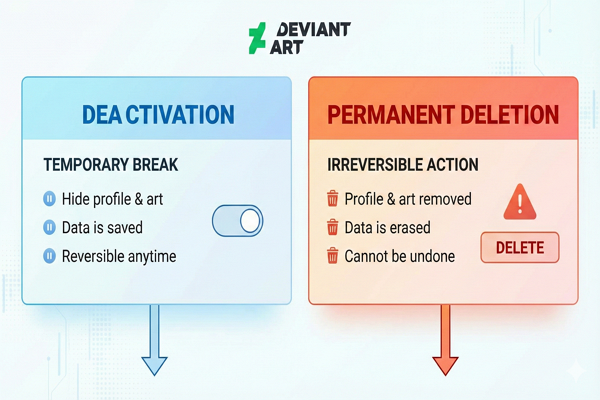
Deactivation
This is the standard "delete" button. Your profile disappears from the public, your art is hidden, and you cannot be searched. However, your data is effectively "frozen" for 21 days.
Thus, deactivating a DeviantArt account means deleting it with a delay. You can understand deactivation as a temporary "soft delete."
Permanent Deletion (Data Erasure)
After the 21-day grace period, your account is automatically deleted. It is permanently gone. You can't do anything to get it back.
So, is it better to deactivate or delete a DeviantArt account? To help you make a better decision, here's a table for you to compare the two:
| Feature | Deactivation | Permanent Deletion |
|---|---|---|
| Meaning | Temporarily hides your account | Completely removes your account and all data |
| Profile Visibility | Hidden from the public | Already gone |
| Artwork & Content | Hidden from search and the public | Permanently deleted |
| Grace Period | 21 days (your account can be restored) | N/A |
| Recovery | Can be restored within 21 days | Cannot recover |
| Effect on Data | Data frozen but saved | Data permanently erased |
| When It Happens | Immediately after deactivation | Automatically after a 21-day grace period |
Alternatives to Deletion: If You're Just Taking a Break
If you aren't ready to lose your username forever, consider these options instead:
Hide Your Artwork
You can put all your deviations into "Storage" rather than deleting them. This makes them invisible to the public but keeps them safe for you.
Manage AI Training Settings
If you are leaving because of AI scraping, you can now opt out.
-
Go to Settings → General
-
Enable “Tell AI datasets not to use your content”
Change Username or Email
If you just want a fresh start, you can change your username (often requires a Core membership) or simply change the email associated with the account to free up your main email for a new account.
Conclusion
Deleting your DeviantArt account is a straightforward process, but it requires careful preparation to ensure you don't lose valuable work or incur unwanted charges. With these tips mentioned above, now you may know how to delete your DeviantArt account. Back up your artwork, cancel subscriptions, and clean your profile before starting the process. Remember, the 21-day grace period gives you time to reconsider - but once it ends, the deletion is final.
FAQs
Is deleting the DeviantArt account permanent?
Yes - but only after the 21-day grace period ends.
Can I recover a deleted DeviantArt account?
You can recover it within 21 days by logging in and clicking Reactivate. After that, recovery is impossible.
Will my comments disappear after deletion?
No. Comments usually remain but show as posted by a "Deactivated Account." If you want them gone, you must manually delete them before deactivating your account.
Can I delete a DeviantArt account without a password?
No. You must confirm your password. Use Forgot Password if needed.
Can I reactivate my DeviantArt account after 21 days?
No. After 21 days, the account is permanently removed and cannot be restored.
Can I delete a DeviantArt account on mobile?
Yes, you can delete your DviantArt account via a mobile browser. Open DeviantArt.com, request Desktop Site, then go to Avatar → Settings → Deactivation.