Where Is IGGGames Available in 2026
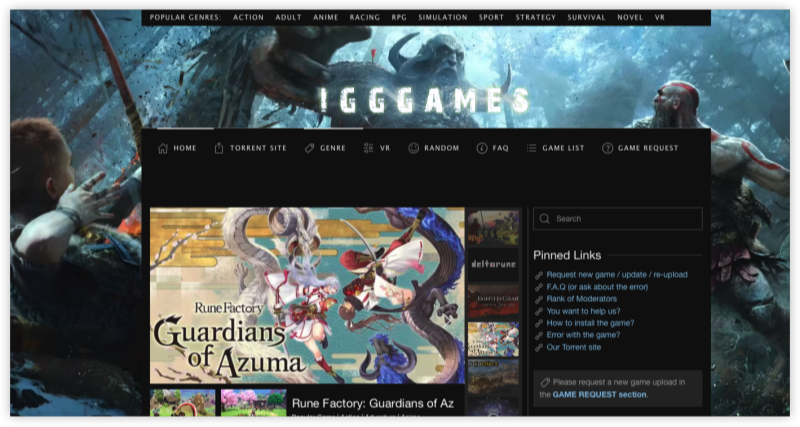
IGGGames is a go-to site for gamers seeking free downloads of cracked PC titles. By now, IGGGames is blocked or partially restricted in the following regions:
-
United States
-
United Kingdom
-
Germany
-
France
-
India
-
Australia
-
Canada
-
Saudi Arabia
-
UAE
This list is continually expanding due to increasing copyright enforcement and regional digital regulations.
Is IGGGames Safe to Use
The safety of IGGGames depends largely on how you use it and what precautions you take. Here's a breakdown:
-
Malware Risks: Some download links may redirect users to shady ad networks or sites that distribute malware. It’s crucial to use a trusted antivirus tool and avoid clicking on pop-ups or suspicious redirects.
-
Bundled Files: IGGGames packages may contain unwanted software or cracks that trigger antivirus alerts. Always scan files before extracting or running them.
-
Community Reputation: While IGGGames has a strong following, its open nature means malicious actors may occasionally exploit it to spread harmful files.
Pro Tip: Always read user comments on the game page before downloading. Look out for warnings about broken files, malware, or fake uploads.
Is IGGGames Legal
From a legal perspective, using IGGGames to download copyrighted games for free is considered piracy in most countries. Here’s what you need to know:
-
Illegal in Most Countries: Downloading and playing cracked games without purchasing a license violates copyright law in regions like the U.S., UK, Australia, France, and many EU countries.
-
Enforcement Varies: While individual users are rarely targeted, ISPs or copyright agencies may track illegal downloads.
-
Blocked in Several Regions: Due to legal pressure, IGGGames is blocked or restricted in many parts of the world.
Quick Tip: If you're looking for a risk-free alternative, consider platforms like Steam, Epic Games Store, or GOG which often offer free or discounted titles legally.
Safe Solutions to Unblock IGGGames
If you can’t access IGGGames from your location, using a VPN or proxy server for IGGGames is the most effective solution.
Solution 1: Use a Free IGGGames VPN
UFO VPN is most recommended for IGGGames users with 3000+ servers in 100+ countries. This free proxy VPN lets you choose which apps go through the VPN and masks your real IP with encryption.
Pros:
- 100% free for desktop and mobile
-
Reliable unblocking of restricted sites
-
Secure AES-256 encryption
-
Easy-to-use interface
- work with free India VPN server and Iran VPN server
Cons:
-
Some features may require a premium plan
Steps:


UFO VPN is an all-in-one VPN that offers unlimited access to 4K streaming like Netlfix, Disney Plus, no-ping gaming as PUBG, Roblox, CODM and social networking for YouTube, X, Facebook and more.




Unlock Pro Features
If you have upgraded to premium plan , feel free to enjoy premium servers for 4K streaming and advanced features like Kill Switch, Split Tunneling, and gaming acceleration. Your Mac is now fully optimized and protected. Inaddition to basic functions, we recommend you turn on

Verify Your IP Now
Use UFO VPN's " What is My IP " feature to see your new IP and location. This confirms your connection is secure, anonymous, and ready for safe browsing online anywhere at any time.







Solution 2: IGGGames Proxy Sites
If VPN isn’t an option, you can try using mirror or proxy sites. However, these often change domains and can be risky.
-
igg-games.to -
igg-games.unblocked.mx -
igg-games.mirrorproxy.net
⚠️ Always verify these with up-to-date lists and use tools like UBlock Origin or NoScript for extra security.
Solution 3: Turn to Legal IGGames Alternatives
If you'd rather stay on the right side of the law, consider these:
-
Steam – Free games, sales, massive community
-
Epic Games Store – Weekly free titles
-
GOG – DRM-free games legally owned forever
-
itch.io – Indie games, often free or pay-what-you-want

Bonus: Tips Before Downloading from IGGGames
-
Use a VPN at all times (UFO VPN recommended)
-
Scan all downloads with antivirus software
-
Use sandboxing tools like Sandboxie to run EXE files safely
-
Avoid clicking ads and never enter personal details
-
Check comments for user-reported issues
Conclusion
IGGGames may be a popular hub for free PC games unblocked, but it comes with serious security and legal risks. If you're determined to access it, using UFO VPN is one of the safest ways to bypass restrictions and stay anonymous online. Still, it's important to weigh the pros and cons—consider legal alternatives for a safer, more reliable gaming experience.
FAQs
Is IGGGames safe to download from?
It depends. Some files may contain malware or bundled software, so always use antivirus protection and avoid suspicious links. Stick to top-rated uploads with community feedback.
Is IGGGames legal in my country?
If your country enforces copyright laws strictly (e.g., the U.S., UK, Germany), then downloading from IGGGames is illegal. You could face ISP warnings or legal consequences.
Why is IGGGames blocked in my region?
Governments and ISPs often block IGGGames due to copyright complaints or digital piracy crackdowns. It’s especially common in countries like India, France, and Australia.
How do I unblock IGGGames?
You can use a VPN like UFO VPN to change your virtual location to a region where the site isn’t blocked. Make sure to clear your browser cache and cookies after connecting.
Can I use proxy sites instead of a VPN?
Proxy sites are a backup option but are less secure than VPNs. They’re often unstable or unsafe, and may expose your IP. Use them only with caution and always pair with a VPN.