What Is ManyVids & How Does It Work?

Like OnlyFans, ManyVids is an online platform where creators can share and sell digital content directly to their audience. You can browse different creators and content in one place, while creators can use the platform to publish content and earn money from their audience.
It mainly works as a creator-to-audience marketplace. Instead of producing the content itself, the platform provides the space and tools for creators to publish content and monetize their work.
The basic model looks like this:
- Creators upload content: Creators publish videos and other content through their ManyVids profiles.
- You discover content: You can explore creators and different types of content available on the platform.
- The platform handles transactions: ManyVids provides the system for paid content and related transactions.
- Creators earn from their content: Creators can make money when you purchase or interact with their paid content.
- ManyVids connects both sides: The platform provides the infrastructure that brings creators and their audiences together.
This model means your experience can vary depending on the creator, content, payment method, and location. It also explains why privacy and account security are worth considering before you use the platform.
Is ManyVids Safe or Legit?
There is no single answer to whether ManyVids is safe or not because online safety involves more than whether a website is legitimate. You may want to look at the platform itself, account security, payment safety, and privacy separately. Here is a quick breakdown of the main areas worth checking before you use ManyVids.
Is ManyVids a Legitimate Website?
ManyVids is an established online platform for creator content and digital purchases. However, a legitimate platform can still have risks if you interact with fake pages, suspicious links, or individual accounts.
👉 Before using the site, it's better to:
- Visit the official ManyVids website rather than a link from an unknown source.
- Check that the website address is correct before entering account details.
- Be careful with unexpected messages or links asking you to log in or make a payment.
How Safe Is Your ManyVids Account?
Your account security also depends on how you manage your login information.
| Safety habit | Why it matters |
|---|---|
| Use a unique password | Reduces the impact of a password leak on another site |
| Avoid sharing login details | Keeps your account under your control |
| Review account settings | Helps you understand what information you provide |
| Be careful with login links | Can help you avoid phishing pages |
Is ManyVids Safe for Payments?
Payment safety is another area to consider, especially when purchasing digital content.
💡 Keep these points in mind:
- Check the payment page before entering your details.
- Use the payment methods provided through the official platform.
- Review the amount before confirming a transaction.
- Avoid sending payment details directly to someone through an unofficial channel.
- Keep an eye on your payment account for unfamiliar charges.
What About Your Privacy on ManyVids?
Privacy can involve more than the information you enter into your account. Your browser, network, device, and account activity can all affect your overall online privacy.
For a more private experience, consider:
- Limiting the personal information you share.
- Avoiding unsecured public Wi-Fi when accessing your account.
- Reviewing your browser and account privacy settings.
- Using a VPN if you want to add another layer of privacy to your internet connection.
Overall, ManyVids can be viewed as a legitimate platform, but that does not remove the need for normal online safety habits. The safest approach is to consider the platform, your account, payments, and privacy separately rather than relying on a simple yes-or-no answer.
🎈 You may also like to know: Is ManyVids Free? Bypass Paywalls & Make the Most Out of It
Simple Ways to Access ManyVids & Stay Safe
If ManyVids does not open on your network, the cause could be a network restriction, regional availability, DNS issue, browser problem, or a temporary outage. Instead of assuming the site is down, you can try a few simple ways to identify the problem and regain access.
Way1. Activate a Reliable VPN for a More Private Connection
A VPN sends your internet traffic through a VPN server and masks your IP address from the websites you visit. It can also help you access ManyVids when your current network restricts the site.
UFO VPN is one option you can try. It lets you connect through a different server location, which may help bypass network restrictions while adding another layer of privacy to your connection.


UFO VPN is an all-in-one VPN that offers unlimited access to 4K streaming like Netlfix, Disney Plus, no-ping gaming as PUBG, Roblox, CODM and social networking for YouTube, X, Facebook and more.




Unlock Pro Features
If you have upgraded to premium plan , feel free to enjoy premium servers for 4K streaming and advanced features like Kill Switch, Split Tunneling, and gaming acceleration. Your Mac is now fully optimized and protected. Inaddition to basic functions, we recommend you turn on

Verify Your IP Now
Use UFO VPN's " What is My IP " feature to see your new IP and location. This confirms your connection is secure, anonymous, and ready for safe browsing online anywhere at any time.







Way 2. Try a Different Network
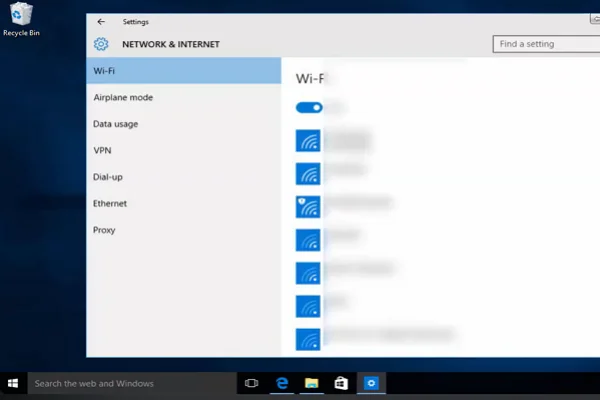
Your current network may be the reason ManyVids is not loading. A quick way to check is to switch your connection:
- Move from Wi-Fi to mobile data.
- Try a different Wi-Fi network.
- Avoid unsecured public networks when possible.
If ManyVids works on another connection, the problem is more likely related to your original network.
Way 3. Switch to Another Browser
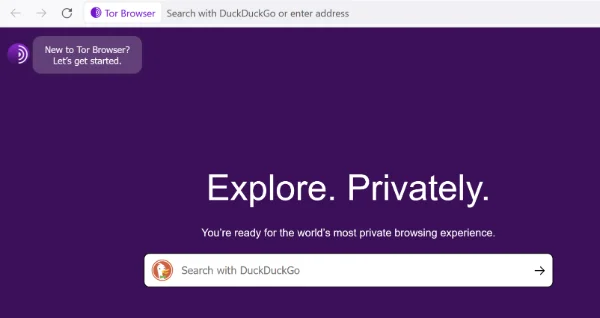
A browser issue can sometimes prevent a website from loading properly. Try opening ManyVids in another browser or a private browsing window.
This can help you determine whether browser extensions, stored data, or other browser settings are causing the problem.
Way 4. Clear Your Browser Cache and Cookies
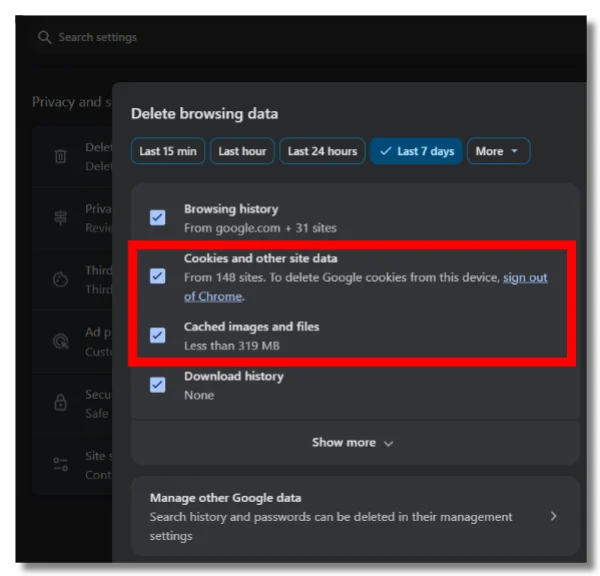
If ManyVids used to work but has suddenly stopped loading, old cached data may be interfering with the page.
👉 Try this:
- Clear cached images and files.
- Remove ManyVids-related cookies if needed.
- Close and reopen your browser.
- Load ManyVids again.
You can also try logging in again after clearing the stored data.
Way 5. Check Whether ManyVids Is Temporarily Down
Sometimes the problem has nothing to do with your device or connection. The website itself may be experiencing a temporary outage or maintenance.
If ManyVids is unavailable across different browsers and networks, wait for a while and try again. This can help you avoid changing your settings when the issue is simply on the website's side.
ManyVids VS OnlyFans: Which One Is Better?
ManyVids and OnlyFans both connect creators with paying audiences, but their content models and user experiences are not exactly the same. Instead of treating them as identical services, you can compare the features that matter most to you.
| Feature | ManyVids | OnlyFans |
|---|---|---|
| Main model | Creator marketplace | Creator subscription platform |
| Content access | Individual purchases and other options | Mainly subscription-based access |
| Creator discovery | Browse and search creators and content | Primarily follow and subscribe to creators |
| Payment model | Depends on the content or creator | Usually based on creator subscriptions |
| User experience | More focused on buying individual content | More focused on ongoing creator subscriptions |
The better option depends on whether you prefer purchasing individual content or following creators through a subscription model.
Best Alternatives to ManyVids
If ManyVids is unavailable in your region or you simply want to explore other platforms, you have several alternatives to consider.
✅ Clips4Sale for Individual Creator Content
Clips4Sale focuses heavily on downloadable and on-demand creator clips. It can be an option if you prefer browsing individual videos rather than committing to a recurring subscription.
✅ OnlyFans leak websites
OnlyFans is widely known for its subscription-based creator model. You can follow creators and access their content according to the subscription or other paid options they offer.
✅ Fansly for a Similar Subscription Experience
Fansly provides another creator-focused platform with subscription and paid-content options. Its interface and creator tools make it a familiar alternative if you want to try something similar.
Final Words
A safer online experience comes from paying attention to where you sign in, how you pay, and how your connection is handled. If you are still asking is Manyvids safe, taking a few basic precautions can help you use the platform with more confidence. If network restrictions are also getting in the way, UFO VPN can provide another connection route while adding an extra layer of privacy to your browsing.
FAQs
Can I use ManyVids without creating an account?
It depends on the part of the platform you want to use. Some content may be visible without signing in, while certain features or purchases may require an account.
Does ManyVids work on mobile devices?
ManyVids can be accessed through a web browser on compatible mobile devices. Your experience may vary depending on your browser, device, and network connection.
Can I change my ManyVids account information?
You can manage certain account details through your account settings. The available options may depend on the type of information you want to change.
Why is ManyVids asking me to verify my age?
Because the platform may contain age-restricted content, you may be asked to confirm that you meet the applicable age requirement before accessing certain areas or content.
Can I use ManyVids while traveling abroad?
Access may vary by country because websites, networks, and local regulations can differ by location. If the site doesn't load while traveling, first check your connection and whether your network restricts access.