What Is TubeGalore?
tubegalore is a site, where you can filter for what you like to see, but from many sites, not only one.

Before looking at its safety, it helps to understand what TubeGalore actually does. Unlike a traditional video-hosting platform, it primarily works as an aggregator that collects and organizes links to adult videos from various websites.
👇 TubeGalore at a Glance
| Aspect | Details |
|---|---|
| Type | Adult video aggregation website |
| Main purpose | Collects and organizes links to videos |
| Content | Primarily adult-oriented videos |
| How it works | Redirects or links visitors to video sources |
| Account required | Generally not required for basic browsing |
| Main concerns | Privacy, third-party content, ads, redirects, and regional access |
In simple terms, TubeGalore acts more like a directory than a single video-hosting service. This distinction matters because your browsing experience may also depend on the third-party websites linked through the platform.
Is TubeGalore Safe?

There is no simple yes-or-no answer to is TubeGalore safe. The website itself may be accessible without installing software or creating an account, but that does not automatically make every interaction risk-free.
⚠️ What to Watch Out For
- Third-party redirects: Some links may take you to external websites with different privacy and security practices.
- Aggressive advertising: Adult websites may use pop-ups, redirects, or misleading ads that create additional security risks.
- Tracking: Cookies, scripts, and third-party trackers may collect information about your browsing activity.
- Malicious downloads: Unexpected download prompts should be treated with caution, especially when a page claims that a special player or update is required.
- Unverified content: Aggregated websites may have limited control over the content and links they display.
Bottom line: Browsing TubeGalore does not necessarily mean your device will be compromised, but you should not treat the site or every linked page as automatically safe. An easier way to stay protected is to activate a reliable VPN like UFO VPN, which can encrypt your internet connection and add an extra layer of privacy while browsing.

About the Legitimacy
Safety and legality are two different questions. A website may be accessible and legitimate as a service while some of the content it links to could raise separate copyright or legal concerns.
Whether is TubeGalore legal depends on several factors, including where you live, how the site obtains or links to content, and the copyright status of individual videos.
A useful way to look at it is:
- The website itself: Operating an aggregation or linking site is not automatically illegal.
- The linked content: Individual videos may be subject to copyright or other legal restrictions.
- Your location: Laws concerning adult content, copyright, and online access vary between countries.
- Your activity: Watching, downloading, saving, or redistributing content can involve different legal considerations.
So, rather than assuming TubeGalore is either completely legal or illegal, check the laws that apply in your country and avoid downloading or sharing content when its rights are unclear.
Safe Ways to Unblock TubeGalore
If TubeGalore is unavailable on your network, the cause could be a regional restriction, network filter, DNS issue, or temporary outage. Start with the simplest and most reliable option, then move on to other troubleshooting methods if needed.
🛡️ Use a VPN to Bypass Network Restrictions
A VPN is one of the easiest ways to access TubeGalore when it is restricted by your network or location. It routes your traffic through a VPN server and encrypts the connection between your device and the server.
For a simple option, UFO VPN offers one-tap connections and servers in 100+ countries, making it easy to switch locations when you encounter regional access issues.


UFO VPN is an all-in-one VPN that offers unlimited access to 4K streaming like Netlfix, Disney Plus, no-ping gaming as PUBG, Roblox, CODM and social networking for YouTube, X, Facebook and more.




Unlock Pro Features
If you have upgraded to premium plan , feel free to enjoy premium servers for 4K streaming and advanced features like Kill Switch, Split Tunneling, and gaming acceleration. Your Mac is now fully optimized and protected. Inaddition to basic functions, we recommend you turn on

Verify Your IP Now
Use UFO VPN's " What is My IP " feature to see your new IP and location. This confirms your connection is secure, anonymous, and ready for safe browsing online anywhere at any time.







🌐 Switch to a Different Network
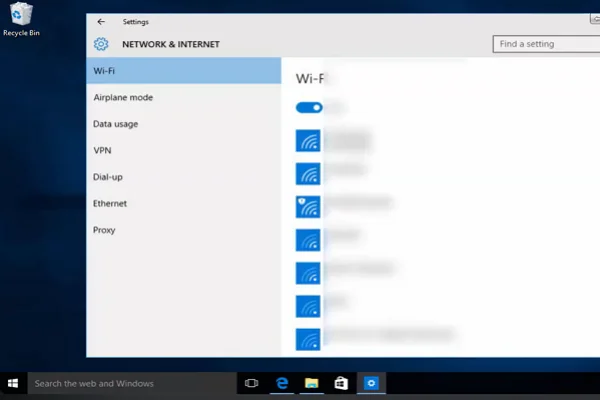
If you would rather troubleshoot the connection first, try accessing TubeGalore through another trusted network. For example, if it does not load on your home Wi-Fi, switch to mobile data and test it again.
💡 Key steps:
- Disconnect from your current Wi-Fi network.
- Connect through mobile data or another trusted network.
- Open TubeGalore again.
- Compare the result with your original connection.
If the website works normally on the second network, the problem is likely related to your original network.
🧹 Clear Your Browser's Cache and Site Data
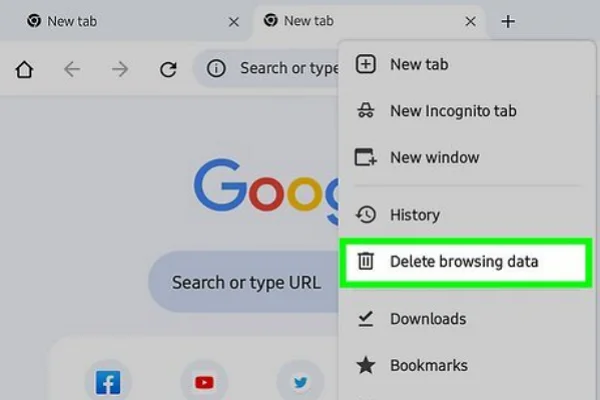
Sometimes a website fails to load because of outdated cookies, cached files, or corrupted site data rather than an actual block.
💡 Key steps:
- Open your browser settings.
- Find the privacy or browsing-data section.
- Clear cached files and relevant site cookies.
- Restart the browser.
- Try accessing TubeGalore again.
This method is especially useful if TubeGalore worked normally on the same device before.
🔎 Try Another DNS Service
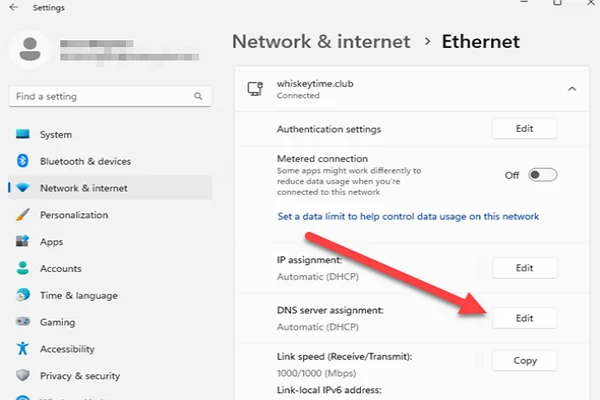
A DNS issue can prevent your browser from finding a website's domain correctly. Switching to a reputable public DNS service may help if your current DNS resolver is causing the problem.
💡 Key steps:
- Open your device's network settings.
- Find the DNS configuration.
- Replace the default DNS with a reputable public DNS service.
- Save the changes and reconnect to the network.
- Try opening TubeGalore again.
Keep in mind that changing your DNS does not make you anonymous or encrypt your internet traffic.
🕵️ Try a Web Proxy
A web proxy works as an intermediary between your browser and the destination website. It may help when TubeGalore is blocked by your current network, and you only need basic access.
However, free web proxies often offer less privacy than reputable VPNs. Some may also display additional ads, redirects, or tracking scripts, so choose one carefully.
🚫 Check Whether TubeGalore Is Actually Down
Sometimes the problem has nothing to do with your network. TubeGalore may simply be experiencing a temporary outage.
Try opening several other websites first. If they load normally while TubeGalore does not, the problem may be specific to the site. In that case, changing your DNS or VPN server will not necessarily fix a temporary outage.
To quickly check whether TubeGalore is down, you can also use one of these website status-checking tools:
- Is It Down Right Now? – Checks whether a website is currently reachable.
- DownDetector – Shows user reports and outage trends.
- Down for Everyone or Just Me – Checks whether a site is down for everyone or just you.
- Host-Tracker – Checks website availability from multiple locations.
- UptimeRobot – Monitors website uptime and availability.
- UpdownRadar – Shows website status and user outage reports.
- Websitedown.info – Checks whether a website is currently accessible.
If several of these tools show that TubeGalore is down, the issue is likely on the site's side. If they show that TubeGalore is online but you still cannot access it, your network, DNS settings, or regional restrictions may be the cause.


Pro Tip to Stay Private While Browsing TubeGalore
Getting access is only half the story. If privacy matters to you, your browsing habits and browser settings are just as important as the connection method.
Use a reputable VPN
Keep your browser updated
Use private browsing mode
Block suspicious pop-ups
Check links before opening them
Use secure HTTPS connections
Don't download unknown files
Don't click suspicious ads or pop-ups
Don't enter unnecessary personal information
Don't use untrusted free proxies
Don't install unknown browser extensions
Don't ignore security warnings
Final Say
TubeGalore may be convenient for finding adult videos, but convenience should not come at the cost of basic online safety. The safest approach is to treat unfamiliar links, downloads, redirects, and requests for personal information with caution. If access is restricted, start with simple network or browser troubleshooting before moving to privacy tools. Most importantly, stay within the laws that apply to you and avoid content or activity whose source or rights are unclear.
FAQs
Does TubeGalore require an account?
Basic browsing may not require an account, but the requirements can vary depending on how the website operates at the time you access it.
Can TubeGalore work on a mobile phone?
Yes. A mobile browser may be enough to access the website, although the experience can vary depending on your device, browser, and network.
Does TubeGalore host all of its videos?
Not necessarily. As an aggregation website, TubeGalore may link to or organize content from different sources rather than hosting every video directly.
Can TubeGalore see my IP address?
A website can generally receive technical information such as your IP address when you connect to it. What happens to that information depends on the site's data practices and privacy policy.
What should I do if TubeGalore keeps opening new tabs?
Close unexpected tabs without interacting with suspicious prompts, check your browser extensions, and consider clearing the site's data. If the behavior continues, avoid the page rather than downloading software it recommends.