Status Check: Is Coomer Down for Everyone or Just for You?
Before trying any fixes, it’s important to confirm whether the Coomer site not working issue is global or only affecting you. A quick status check can save time and prevent unnecessary troubleshooting.
Here are 10+ reliable tools to check if the site is live:
- DownDetector – Real-time outage reports based on user feedback.
- IsItDownRightNow – Checks site status with response time data.
- DownForEveryoneOrJustMe – Simple global uptime checker.
- Site24x7 – Monitors website availability and performance.
- Pingdom – Tests uptime and page load speed worldwide.
- UptimeRobot – Tracks downtime history and alerts.
- StatusCake – Website monitoring with global test nodes.
- HostTracker – Multi-location availability testing tool.
- Uptrends – Provides detailed uptime and error diagnostics.
- Website Planet Checker – Quick accessibility test with insights.
- ServicesDown - Offers user-submitted outage reports and live status updates.
- Outage.Report - Crowdsourced platform for tracking global website downtime issues.
- IsItWP - Includes a free tool to verify website operational status.
🔥 Latest Official Coomer Site Links
Coomer domains change frequently due to access restrictions, server shifts, and mirror updates. Because of this, working links may rotate or become unavailable at any time.
Below are three recently verified links that are currently accessible. You can copy and paste them directly into your browser to navigate to the corresponding entry points:
- https://official.coomer.com.co/
- https://onlyfans.coomer.com.co/artists/updated
- https://site1.coomer.com.co/
Common Causes for Coomer Site Stops Working
If the site isn’t loading, there could be multiple reasons behind it. Understanding these causes helps you choose the right fix.
-
429/502/504 Errors: These are server-side issues indicating that Coomer's hosting servers are either overloaded with too many requests (429), receiving invalid responses from upstream servers (502), or timing out while trying to process data (504).
-
DDoS Protection: Coomer often employs strict security layers (like Cloudflare) to prevent Distributed Denial-of-Service attacks. Sometimes, legitimate users get caught in these security loops, failing the browser verification checks.
-
URL Changes: The platform frequently migrates to new domain extensions to evade domain seizures or bans, rendering old bookmarks obsolete.
-
Cookies, Scrapers, and Downloaders: Aggressive third-party tools (scrapers and mass downloaders) that pull bulk media can trigger rate limits. If your browser cookies are corrupted or the site detects bot-like downloader activity from your IP, you will be blocked automatically.
-
Missing Access: You might simply lack the correct permissions, or your regional Internet Service Provider has actively blocked the domain, restricting your access entirely.
-
Other User-Side Issues: Outdated browser caches, misconfigured DNS settings, or conflicting browser extensions like strict ad-blockers can locally prevent the site from rendering properly on your end.


Step-by-Step Guide to Fix Coomer Can't Open
Once you have identified the potential causes, it is time to take action. Here are practical methods to restore your access.
Way 1. Wait, Wait, and Wait
If the status checkers indicate a global outage or server maintenance, the best and only solution is simply to wait. Official server crashes require time for their technical team to resolve, so patience is key here.
Importer is likely down or backlogged, seems to happen every few months. They don't have an official communication channel so you'll just need to wait

Way 2. Check Internet Connection
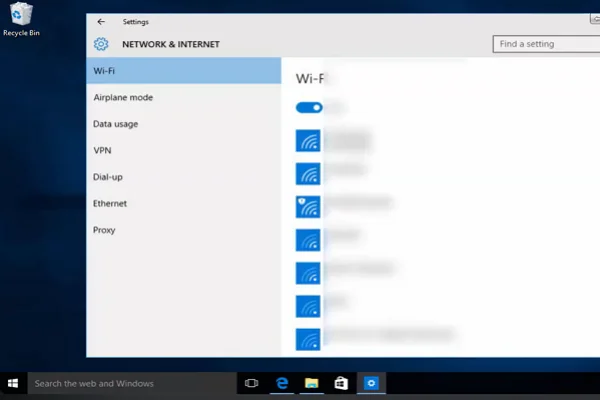
A weak or unstable connection can stop pages from loading or cause timeouts. Ensuring a stable network is the first step before trying more advanced fixes.
Key Steps:
- Restart your router and modem
- Switch between Wi-Fi and mobile data
- Open other websites to test connectivity
- Run a speed test to confirm stability
Way 3. Activate a VPN
A VPN encrypts your traffic and masks your IP address, allowing you to bypass strict ISP blocks and gain access to restricted regions. Using a reliable tool like UFO VPN helps bypass regional censorship and evade IP bans smoothly so you can browse securely.


UFO VPN is an all-in-one VPN that offers unlimited access to 4K streaming like Netlfix, Disney Plus, no-ping gaming as PUBG, Roblox, CODM and social networking for YouTube, X, Facebook and more.




Unlock Pro Features
If you have upgraded to premium plan , feel free to enjoy premium servers for 4K streaming and advanced features like Kill Switch, Split Tunneling, and gaming acceleration. Your Mac is now fully optimized and protected. Inaddition to basic functions, we recommend you turn on

Verify Your IP Now
Use UFO VPN's " What is My IP " feature to see your new IP and location. This confirms your connection is secure, anonymous, and ready for safe browsing online anywhere at any time.







Way 4. Refresh the Coomer Site

Temporary loading errors or stalled sessions can prevent the page from displaying properly. A hard refresh forces the browser to reload all elements.
Key Steps:
- Press Ctrl + F5 (Windows) or Cmd + Shift + R (Mac)
- Or click the browser refresh button
- Wait for the page to fully reload
Way 5. Restart Your Devices
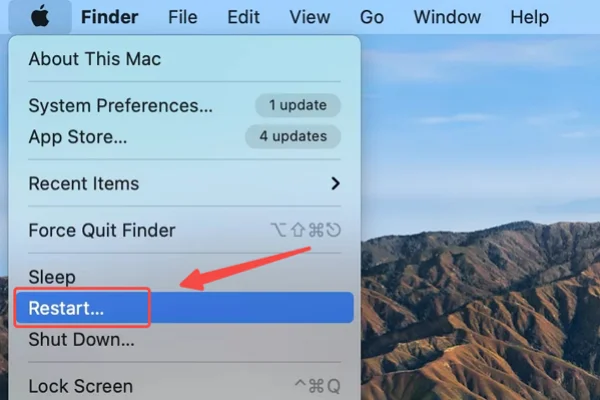
System glitches or background conflicts may affect browser performance. Restarting clears temporary bugs and resets connections.
Key Steps:
- Turn off your device completely
- Wait 10–20 seconds
- Turn it back on
- Reopen your browser and access the site
Way 6. Clear Browser Cache
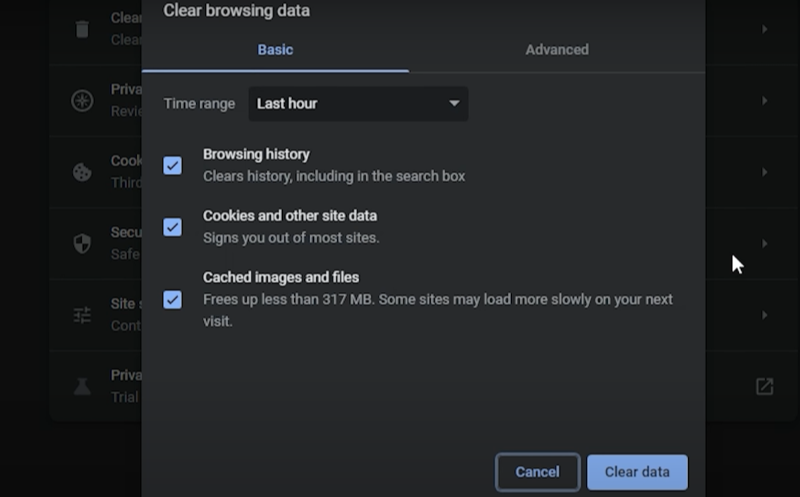
Cached files can become outdated or corrupted, causing loading issues. Clearing them forces the browser to fetch fresh data.
Key Steps:
- Open browser settings
- Navigate to privacy or history section
- Clear cache and cookies
- Restart the browser and try again
Way 7. Change Browser
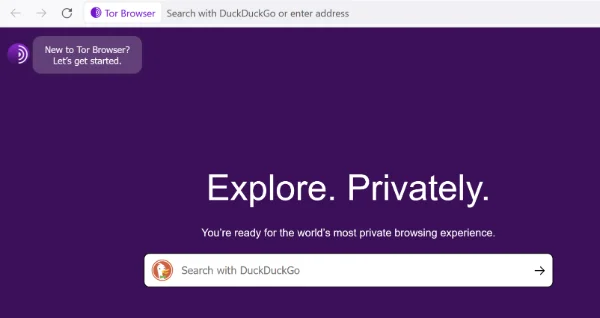
Different browsers handle scripts and security settings differently. Switching browsers can help identify compatibility issues.
Key Steps:
- Install another browser (e.g., Chrome, Firefox, Tor, Edge)
- Open the Coomer site in the new browser
- Compare loading results
Way 8. Disable Browser Extensions
Some extensions (like ad blockers) may block scripts or connections, preventing the site from loading properly.
Key Steps:
- Open your browser’s extensions page
- Disable all extensions
- Reload the site
- Enable extensions one by one to find conflicts
Way 9. Update the App to the Latest Version
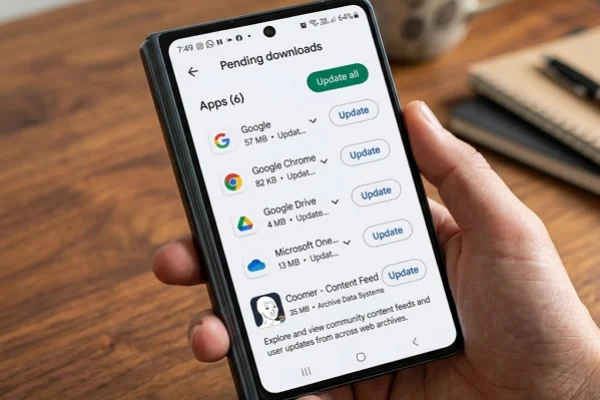
This is particularly useful if you are using the mobile devices. Outdated apps may have bugs or compatibility issues that prevent proper loading or access.
Key Steps:
- Open your app store
- Search for the app
- Check for available updates
- Install and restart the app
Way 10. Check DNS Settings
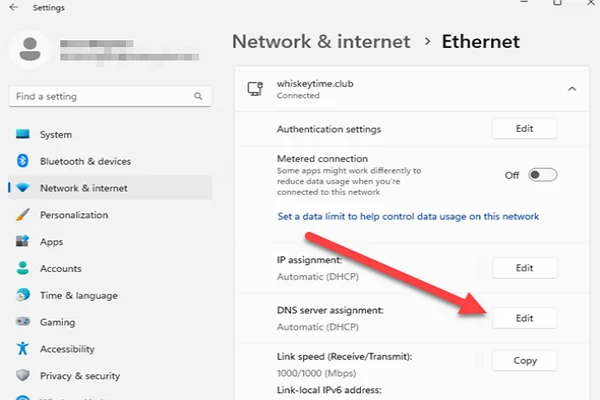
Incorrect or slow DNS servers can block or delay site access. Switching to a public DNS often improves connectivity.
Key Steps:
- Open network settings
- Locate DNS configuration
- Set DNS to 8.8.8.8 or 1.1.1.1
- Save and reconnect to the network
Way 11. Update the OS of Your Devices

Older operating systems may lack support for modern web standards, causing loading failures or errors.
Key Steps:
- Go to system settings
- Check for updates
- Download and install updates
- Restart your device
Way 12. Enable JavaScript
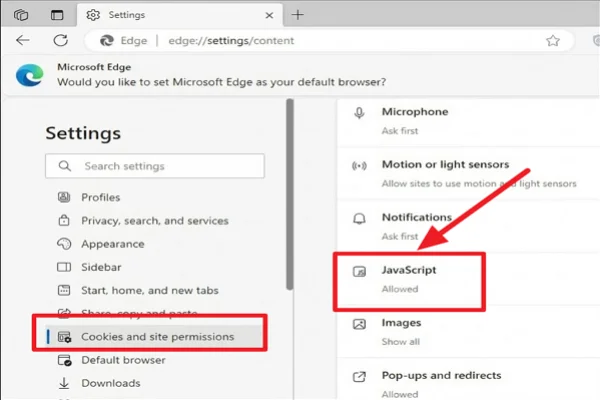
Many websites rely on JavaScript to load content dynamically. If disabled, pages may appear broken or blank.
Key Steps:
- Open browser settings
- Go to site or content settings
- Enable JavaScript
- Refresh the page
Way 13. Reach out to Coomer Support

If all fixes fail, contacting support may provide insight into account or server-specific issues.
Key Steps:
- Locate the official support channel
- Describe your issue clearly
- Attach screenshots or error messages
- Wait for a response
If Still Can't Load: Try Alternative Sites like Coomer
If the main Coomer site remains inaccessible despite all troubleshooting steps, don’t worry — there are several reliable sites like Coomer that offer similar functionality for browsing archived adult creator content from OnlyFans, Patreon, Fansly, Fanbox, and more.
1. Kemono.su

It is widely regarded as the strongest and most consistent alternative today. It works as a comprehensive public archive that aggregates high-quality paywalled content from multiple subscription platforms and organizes it into clean, searchable creator pages with frequent updates.
Pros:
- Broadest platform support among competitors
- Excellent search and tagging features
- Reliable video and image playback
- Active development and maintenance
- Generally high uptime
Cons:
- Can experience slowdowns during peak traffic
- Stricter anti-scraping protections
2. Fapello

Fapello is a fast indexing site that focuses on leaked and preview adult content. It features a clean, minimalist interface designed for quick loading and easy access to trending OnlyFans material.
Pros:
- Very fast loading speeds
- Simple and intuitive navigation
- Large collection of trending models
Cons:
- Less organized for in-depth archive browsing
- Contains more advertisements
- Limited full post context and depth
3. SimpCity

SimpCity operates primarily as an active community forum rather than a traditional archive. Users share and discuss the latest OnlyFans leaks, nudes, and files through threaded discussions.
Pros:
- Highly active user discussions
- Frequent fresh content shares
- Strong community feedback on working links
Cons:
- Requires manual searching through threads
- Higher risk of broken or dead links
- Usually needs account registration for full access
4. Erome
Erome is a user-driven platform that blends content viewing with direct user uploads. It offers a more social and dynamic experience compared to pure scraper archives, with plenty of amateur and creator-shared adult videos and photos.
Pros:
- Strong video support
- Easy and casual browsing
Cons:
- Smaller archive compared to major scrapers
- Content quality is quite mixed
5. Coomer.party

Coomer.party (along with its mirror domains) serves as a close clone of the original Coomer. It uses a similar scraping approach and familiar layout to archive adult creator content from subscription platforms.
Pros:
- Very similar user interface to Coomer
- Decent media organization
Cons:
- Suffers from the same domain instability
- Prone to server overload during high traffic
6. EroThots

This site provides a fast, gallery-style experience centered on thumbnails and quick previews of popular adult creators and OnlyFans models.
Pros:
- Fast thumbnail loading
- Good selection of trending creators
- Minimalist and clutter-free design
Cons:
- Limited depth per creator page
- Heavier on promotional content
7. Bunkr
Bunkr functions mainly as a file hosting platform. It is commonly used to store and share large batches of archived adult content, such as high-resolution images and videos from OnlyFans leaks.
Pros:
- Excellent support for big video and image files
- Straightforward direct downloads
- High storage capacity for media
Cons:
- Lacks proper creator search or profiles
- Feels less user-friendly for casual browsing
8. Nekohouse.su
It specializes in Japanese adult platforms like Fanbox and Fantia, while also covering selected Western creators. It serves as a focused archive for Asian content within the broader OnlyFans-style ecosystem.
Pros:
- Strong coverage of Asian/Japanese content
- Clean and organized interface
Cons:
- Smaller overall library
- Slower updates for non-Japanese material
9. LeakGallery

Also known as TheFap, it emphasizes rapid indexing of fresh leaked photos and short clips. It presents content in a clean, visual gallery format for fast scanning.
Pros:
- Very quick updates for new leaks
- Visually driven and easy to scan
Cons:
- Shallower archives with less depth
- Higher chance of low-quality or repetitive content
10. PimpBunny

This site is a lightweight aggregator that pulls together leaked and preview adult material across various subscription platforms, offering simple and direct access to NSFW content.
Pros:
- Simple and direct access
- Mobile-friendly design
Cons:
- Inconsistent organization
- Relatively smaller content library


Bonus: Coomer Site Proxies That Are Still Working
The Coomer main domain changes frequently due to various restrictions and operational reasons. Even if the main site is down, proxy mirrors often remain accessible. If both fixes and Coomer alternative fail, trying proxy sites can help.
These proxies usually follow recognizable patterns like “coomer.su” or similar variations.
Here are 19 commonly seen Coomer proxy sites:
- Coomer.st - Alternative domain with similar structure
- Coomer.org.uk - Informational mirror with status updates.
- Coomer.org - Backup link to bypass ISP-level restrictions.
- Coomer.to - Offshore-style domain commonly used for resilience.
- Coomer.live - Real-time mirror with active syncing
- Coomer.su – One of the most widely used mirror domains
- Coomer.party – Known proxy with frequent updates
- Coomer.fun – Lightweight mirror with fast loading
- Coomer.network – Alternative domain for accessibility
- Coomer.site – Generic mirror variation
- Coomer.cloud – Cloud-hosted mirror version
- Coomer.tools – Tool-based proxy access point
- Coomer.click – Redirect-based proxy mirror
- N4.coomer.st - Subdomain mirrors often used for load balancing.
- Coomer.info - Informational gateway or secondary access point.
- Coomer.biz - Clean-connection proxy for smooth gallery browsing.
- Coomer.net - Classic mirror used for traffic load balancing.
- Coomer.cc - Lightweight mirror optimized for fast mobile access.
- Coomer.vip - Proxy that may offer faster routing during peak times.
Final Say
This guide covers practical ways to fix Coomer site not working issues. Start by checking whether the problem is global or just affecting you. Then, try the 10+ methods provided above step by step. If the site still won’t load, consider using proxy sites like Coomer.st or exploring Sites like Coomer as alternatives.
Anyway, fixing access issues often requires patience. Instead of repeatedly asking why you can’t use Coomer, try eliminating possible causes one by one until you find what works.
FAQs
Is Coomer permanently shut down?
No. Like many similar platforms, it faces periodic domain changes and outages but usually returns through new mirrors.
Why does Coomer keep changing domains?
Frequent domain changes are mainly due to DMCA complaints, hosting provider pressure, and efforts to evade blocks.
Can I use Coomer without a VPN?
Yes, in many regions it works fine without one, but a VPN helps if you're facing ISP blocks or regional restrictions.
Are Coomer proxies safe to use?
Use caution. Stick to well-known mirrors, enable antivirus software, and avoid entering personal information. A good VPN adds extra protection.
What should I do if videos or images won't load even when the site opens?
Clear cache/cookies, disable extensions, try a different browser, or switch VPN servers. Server-side rate limiting (429 errors) is also common for media files.