What Is Brawl Stars & Why It's So Popular
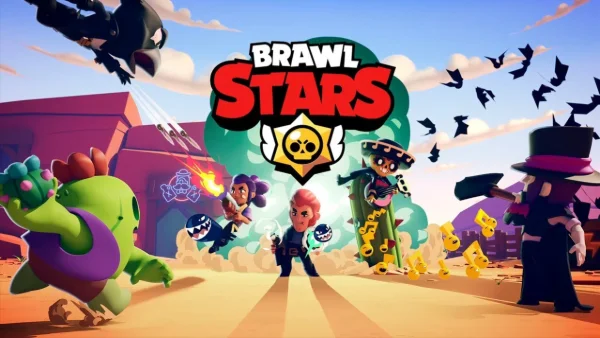
Brawl Stars is a fast-paced multiplayer mobile game developed by Supercell. It is available on both Android and iOS devices and is designed mainly for short matches that last a few minutes.
Players control characters called Brawlers and compete in different game modes, such as 3v3 battles, solo survival, and special event modes. Each Brawler has unique attacks, abilities, and play styles, which keeps the game fresh and engaging.
The main reasons Brawl Stars is so popular include:
- Easy controls for mobile users
- Short match time, suitable for quick breaks
- Regular updates with new Brawlers and maps
- Competitive ranking and casual modes
Because it runs smoothly on most smartphones and does not require long play sessions, you can easily access Brawl Stars online unblocked during school hours.
Why Brawl Stars Is Blocked In School Areas
Players at school love it for bus rides or breaks, but blocks just stop that fun. Why would that happen?
Schools block games like Brawl Stars for several reasons. Most school networks use firewalls to limit access to non-educational content.
Schools often block this game to:
- Prevent distractions during class time
- Reduce network traffic and bandwidth usage
- Block online multiplayer connections
- Enforce school internet policies
Since Brawl Stars requires real-time online servers, school firewalls often detect and block its traffic. This is why students look for Brawl Stars unblocked at school using alternative access methods.
How to Get Brawl Stars Unblocked at School
Fortunately, you can still enjoy the fun time playing this game with your classmates and friends. There are several ways to access Brawl Stars unblocked at school, each with different requirements.
1. Use A VPN
A VPN works by encrypting your internet traffic and routing it through a different server. This hides your activity from the school network and bypasses local restrictions.
How it works:
-
You install a VPN app on your device
-
The VPN creates an encrypted tunnel
-
School firewalls cannot see the real traffic
-
Brawl Stars connects normally through the VPN
When choosing a VPN, speed and security matter. A free proxy VPN in UFO VPN is often recommended because it offers stable connections and a simple setup. It also helps protect your data when using public or school Wi-Fi. Here's how you can easily install it on your phones:


UFO VPN is an all-in-one VPN that offers unlimited access to 4K streaming like Netlfix, Disney Plus, no-ping gaming as PUBG, Roblox, CODM and social networking for YouTube, X, Facebook and more.




Unlock Pro Features
If you have upgraded to premium plan , feel free to enjoy premium servers for 4K streaming and advanced features like Kill Switch, Split Tunneling, and gaming acceleration. Your Mac is now fully optimized and protected. Inaddition to basic functions, we recommend you turn on

Verify Your IP Now
Use UFO VPN's " What is My IP " feature to see your new IP and location. This confirms your connection is secure, anonymous, and ready for safe browsing online anywhere at any time.







2. Proxy Sites
Proxy sites act as a middle layer between your browser and the blocked website.
How it works:
- You visit a proxy website
- Enter the blocked game URL
- The proxy fetches the content for you
Proxy sites are easy to use and do not require installation. However, they usually only work for browser-based versions such as Brawl Stars simulator unblocked, not the official mobile app.
3. Cloud Gaming
Cloud gaming runs the game on a remote server instead of your device.
How it works:
- The game runs on cloud servers
- You stream the gameplay through your browser
- Inputs are sent over the internet
This method is useful for low-end devices and Chromebooks. However, it requires a stable and fast connection.
4. Browser Clones
Browser clones are web-based copies of the game mechanicś́s mechanics.
Two common types include:
- HTML5 simulators that mimic gameplay
- Emulated versions hosted on unblocked sites
These versions are often simplified and may not include full features.
5. Unblocked Game Portals
Unblocked game portals are websites made to bypass school filters. They usually host browser-based or emulated versions of unblocked Brawl Stars.
How it works:
- No installation is required
- Works well on Chromebooks and school PCs
- Often provides Brawl Stars simulator unblocked
However, these portals are not official. Some may include pop-up ads, fake buttons, or unsafe scripts. Logging in with a main account is not recommended.
5. Mobile Data (Hotspot)
Using mobile data is a direct way to play Brawl Stars unblocked at school.
How it works:
- Bypasses school Wi-Fi completely
- Works with the official Brawl Stars app
- Access Brawl Starters Without a VPN or proxy
The downside is higher data usage and faster battery drain. Some schools may also restrict hotspot use.
If you are still confused about which method suits you the most, refer to the following table:
| Method | Risk Level | Difficulty | Notes |
|---|---|---|---|
| VPN | Medium | Easy | Speed depends on server quality |
| Proxy Sites | High | Very Easy | Limited to browser versions |
| Cloud Gaming | Medium | Medium | Needs stable internet |
| Browser Clones | High | Easy | Not official, features limited |
| Unblocked Game Portals | High | Easy | No install, ads and fake links possible |
| Mobile Data (Hotspot) | Low | Very Easy | Uses personal data, battery drain |
How to Play Brawl Stars On PC (Simulator Needed)
Playing on a PC offers a competitive edge due to keyboard precision. Since there is no official PC version, you need an Android Emulator. This software simulates a phone on your computer.
Recommended Emulators
⭐ BlueStacks: The most popular choice. It has a specific "Shooting Mode" for Brawl Stars that maps the mouse to aiming. It requires a decent computer to run smoothly.
⭐ MEmu Play: Known for high performance on weaker computers. It supports high frame rates and smart keymapping.
⭐ LDPlayer: Very lightweight. It loads fast and rarely crashes, making it great for quick school breaks on a laptop.
Setup Steps
- Download and install one of the emulators above
- Launch the software and sign in to the Google Play Store with your account
- Search for "Brawl Stars" and click install
- Open the game. The emulator will automatically suggest keyboard controls (WASD to move, Mouse to shoot)
With emulating apps like Bluestacks and Nox player, you are able to play the game as if you were playing on a mobile device. However, you shouldn’t expect the same performance as it is optimized for mobile devices.

Is It Possible to Play Brawl Stars Online Without Download?
Yes. If you cannot install apps or emulators (for example, on a school Chromebook), you can play Brawl Stars online unblocked directly in a web browser. Several platforms host these versions. Some are full simulators, while others are mini-games.
Here are the top sites to find a Brawl Stars simulator unblocked:
1) BrawlStars-Unblocked.github.io
This is a project hosted on GitHub. It is a browser-based version that mimics the core gameplay. Since GitHub is an essential tool for coding classes, schools rarely block it.
Key Features:
- No ads interrupting gameplay
- Loads instantly
- Works perfectly on low-end Chromebooks
- Server traffic sometimes causes lag during lunch hours
2) Classroom6x.com (Brawl Stars Section)
A massive library of unblocked games designed specifically for school environments. It offers a version of the game that runs in a small window.
Key features:
- You can play indefinitely without "energy" limits
- No login required
- Specifically tested to work through firewalls
- Some game modes are simplified or missing compared to the app
3) Ozogames.com
This site focuses on cloud-based 3v3 battles. It boasts a roster of over 70 Brawlers available to try.
Key features:
- Mobile-friendly interface
- Low-latency (lag) input
- You might still need a VPN if your school blocks the "Gaming" category strictly
4) Ebugame.com
Claiming to be the 2026 update version, this site attempts to mirror the latest Brawlers and skins recently released.
Key features:
- Completely free
- Zero download time
- The site relies heavily on ads, which can be annoying between matches
5) Tyrone's Unblocked Games (Brawl Stars)
A classic in the unblocked community. Tyrone’s site embeds a specific Brawl Stars unblocked 76 style simulator.
Key features:
- Extremely stable site uptime
- Offers a collection of other games if you get bored
- The user interface looks outdated and cluttered
6) Unblocked Games 76
This is a go-to destination for students. Brawl Stars unblocked 76 is a specific category here. It hosts a "Box Simulator" and a battle simulator.
Key features:
- Maintained by a community of players
- Very fast server response times
- Some schools have caught on and added "76" sites to their blocklists, requiring a proxy to access
7) NullsBrawl (Private Server Alternative)
This is not a standard browser site but a private server accessed via a specific APK or web link. It gives you unlimited resources.
Key features:
- Unlocks every skin and Brawler instantly for testing
- High risk of the account being banned if you try to link it to the main game
- Not an official product
These platforms are convenient. You do not need to deal with complex installation or setup wizards. They are compatible with old devices that have low storage or weak processors. If you dislike the latest official update, some of these platforms let you experience older versions of the game. They are perfect for casual players who just want to kill ten minutes.
However, you must understand one thing: Supercell does not officially release a browser version of Brawl Stars. All the sites listed above are third-party creations. They are clones, simulators, or unauthorized ports. This carries risks:
⚠️ Scams: Some sites may ask for your Supercell ID login. Never enter it.
⚠️ Malware: Be careful of pop-ups asking you to update "Flash" or "Chrome."
⚠️ Bans: If you manage to log into your real account on a modified web version, Supercell’s anti-cheat system will detect it and permanently ban your account.
Safety Notes: Play Brawl Stars at School Without Risk
While playing Brawl Stars unblocked at school is fun, you need to protect your digital identity. Follow these rules to stay safe.
-
Use Safe Emulators: Stick to BlueStacks, LDPlayer, or MEmu. Lesser-known emulators often bundle "crapware" or crypto-miners that slow down your school computer and steal data. Always verify the download source is the official website.
-
Reliable VPN: As mentioned, use a trusted service like UFO VPN. Free, sketchy VPNs sell your browsing data to advertisers. A good VPN encrypts your connection so no one can intercept your passwords.
-
Download from Official Channels: Only download the APK or app from the Google Play Store or Apple App Store. "Modded" APKs found on random forums often contain keyloggers.
-
Don't Use School Credentials: Never use your school email address to sign up for gaming sites. Keep your educational identity separate from your gaming identity.
Bonus Tips to Elevate Gaming Experience
Once you have bypassed the blocks and secured your device, use these tips to get the best gameplay experience.
1. Maintain Stable Net Speed
Speed is everything in a MOBA. When using a VPN to play brawl stars unblocked at school, your internet speed might drop. You must switch to the fastest available server protocol. If you choose UFO VPN, use the One-Click Connection feature. This automatically selects the server with the lowest latency (ping). Manually switching servers takes time and disconnects you from the game, leading to penalties for "going AFK."
2. Use Legal "Cheat" Tricks
There are some legal and safe tricks for Brawl Stars players. But you still have to be very cautious when you are using them.
If you want to try a new Brawler but don't have the gems, do not look for "gem generators"—they are scams. Instead, use the brawl stars simulator unblocked sites mentioned earlier (like Nulls or the Box Simulators on UnblockedGames76). These are "legal" in the sense that they don't affect the main game. They let you open infinite boxes and play maxed-out characters for free. Check user reviews to ensure the tool actually works and isn't just an ad farm.
3. Optimize Graphics Settings
If you are playing on a school computer or an old phone, lag is your enemy. Go into the game settings.
-
Turn off "Haptics" (vibration).
-
Lower the resolution if possible.
-
This increases your Frame Rate (FPS), making your aim smoother.
4. Use Wired Headphones
Bluetooth headphones have a delay (latency). In Brawl Stars, hearing an enemy Shelly use her Super a split second too late means death. Wired headphones provide instant audio feedback.
5. Turn on "Do Not Disturb" Mode
Nothing ruins a match like a phone call or a text message popping up over your aim button. Turn on "Do Not Disturb" mode on your phone or emulator to block notifications while you play.
Summing Up
Playing Brawl Stars unblocked at school is entirely possible with the right tools. And you should always prioritize safety. Remember to use trusted software, avoid entering personal data on third-party sites, and respect your school's equipment. Now that you know how to break the limits, you can keep your trophy push going even during your downtime.
FAQs
Does Brawl Stars require age verification?
Yes, the game is rated for users 9+ or 13+, depending on the region. When you first launch the app, it asks for your age to filter chat and purchase options.
Is it possible to play Brawl Stars on a Chromebook?
Yes. Most modern Chromebooks support the Google Play Store. You can install the official app directly. If the Play Store is blocked, use the browser-based clones listed above.
Can I play Brawl Stars on Mac?
Yes. If you have a newer Mac with an M1, M2, or M3 chip, you can download the iPad version of Brawl Stars directly from the Mac App Store. For older Intel Macs, you must use an emulator like BlueStacks.
Will using a VPN get me banned from Brawl Stars?
Generally, no. Supercell does not ban users solely for using a VPN. However, if you use a VPN to buy items in a cheaper currency (region spoofing), you will be banned. Using it just to bypass school Wi-Fi is usually safe.
What is the best browser site for Brawl Stars?
For a quick game without ads, the BrawlStars-Unblocked.github.io version is usually the cleanest. For variety, Unblocked Games 76 is the community favorite.