What Is Unblocked Games 66?
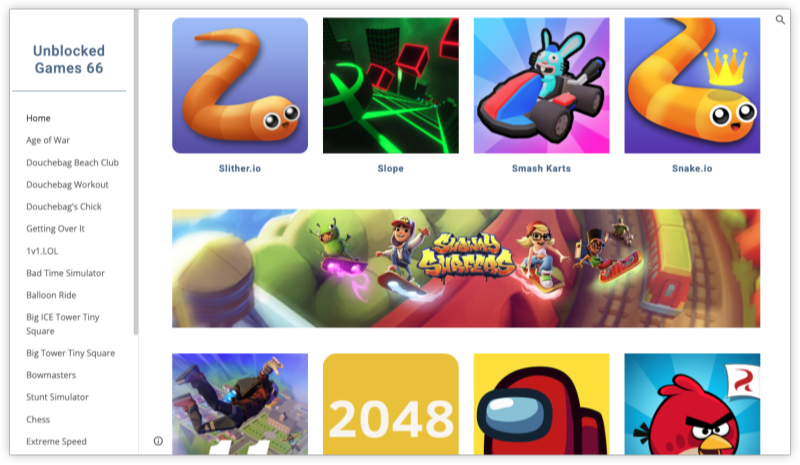
Unblocked Games 66, with its variant Unblocked Games 66 EZ, is a popular online gaming platform that offers hundreds of browser-based games—no downloads required, no paywalls, and (most importantly) it bypasses typical school and office firewalls. Whether you're a fan of car racing, puzzle-solving, or stickman fights, this site has something for every type of casual gamer.
Its popularity exploded because it provides:
-
Easy access to games behind content filters.
-
Fast loading speeds on low-end devices.
-
HTML5 and Flash-based titles playable on school Chromebooks or office desktops.
Where to Play Unblocked Games 66
Although the site isn’t geo-blocked per se, access can vary depending on local laws, ISP filtering, or school firewalls. Here's a quick list of where it generally works and the systems that support it.
Countries Where It’s Widely Accessible
-
United States
-
Canada
-
Mexico
-
Brazil
-
Argentina
-
Germany
-
France
-
United Kingdom
-
Netherlands
-
Spain
-
Australia
-
India
-
Philippines
-
South Africa
-
Nigeria
-
Pakistan
-
Indonesia
-
Vietnam
Note: In countries like China, UAE, and some school districts in the U.S., access may be restricted without a free proxy VPN.
Supported Operating Systems
-
Windows (7, 10, 11)
-
macOS
-
Linux (Ubuntu, Fedora)
-
ChromeOS (Chromebooks – most common in schools!)
-
*iOS & Android (via browser apps like Chrome or Firefox, but with limited UI)
How to Play Unblocked Games 66 Easily
Whether you're using a school Chromebook, public Wi-Fi, or a personal PC, here’s how to safely play:
1. Connect to a Secure VPN
Many schools and offices block game domains. A VPN (Virtual Private Network) routes your connection through an external server, helping you access blocked content while encrypting your activity.
Best free VPNs for Unblocked Games 66:
-
Download UFO VPN for Windows/ download UFO VPN for Mac (lightweight, Chromebook support)
-
ProtonVPN (free plan, good speeds)
-
Windscribe (generous free data)


UFO VPN is an all-in-one VPN that offers unlimited access to 4K streaming like Netlfix, Disney Plus, no-ping gaming as PUBG, Roblox, CODM and social networking for YouTube, X, Facebook and more.




Unlock Pro Features
If you have upgraded to premium plan , feel free to enjoy premium servers for 4K streaming and advanced features like Kill Switch, Split Tunneling, and gaming acceleration. Your Mac is now fully optimized and protected. Inaddition to basic functions, we recommend you turn on

Verify Your IP Now
Use UFO VPN's " What is My IP " feature to see your new IP and location. This confirms your connection is secure, anonymous, and ready for safe browsing online anywhere at any time.







2. Use a Private Browser Window
Open Incognito (Chrome) or Private Mode (Firefox) to:
-
Avoid cookies or tracking.
-
Prevent school networks from caching history.
-
Speed up loading.
3. Visit a Mirror or Proxy Site - on School Chromebooks
Some school networks block the primary URL. Use these known mirror links:
-
sites.google.com/site/unblockedgames66ez -
https://unblockedgames66.games -
https://sites.google.com/site/unblocked66games
⚠️ Avoid clicking pop-up ads. Some mirrors host misleading banners.
4. Search & Launch Your Game
Popular categories include:
-
🏎️ Car Games: Madalin Stunt Cars, Moto X3M
-
⚔️ Action: Stickman Warriors, Slope
-
🧠 Puzzle: 2048, Minecraft Classic
-
🏀 Sports: Basketball Stars, Soccer Skills
If you're on a monitored network:
-
Use headphones to avoid attention.
-
Avoid typing in personal details.
-
Play in short bursts during breaks.
Pro: More Sites like Unblocked Games 66
Unblocked Games 66 isn’t the only platform out there. Here's how it stacks up:
| Platform | Features | Pros | Cons |
|---|---|---|---|
| Unblocked Games 66 | 1000+ titles, Google mirror support | Fast, easy UI | Ads on some mirrors |
| Clean interface, no pop-ups | Better UX | Smaller game catalog | |
| Unblocked Games 76 | Wide game variety, frequent updates | Great for car/racing fans | UI can be clunky |
| CoolMath Games | Focus on logic & educational games | No VPN needed sometimes | Lacks action games |
| IO Games Site | Real-time multiplayer IO games | Unique experience | Needs faster connection |
While playing unblocked games at school or work:
-
Don’t install unknown extensions claiming to unblock games.
-
Don’t download files from suspicious game sites.
-
Don’t share your VPN credentials—VPN abuse can get the entire network flagged.
FAQs
1. Is it legal to use Unblocked Games 66 at school?
It’s not illegal, but it may go against school policy. Always check your institution’s guidelines.
2. Can I play Unblocked Games 66 on my phone or tablet?
Yes! Use mobile browsers and a VPN app like UFO VPN to access the same games on Android/iOS.
3. What should I do if the Unblocked Games 66site is blocked?
Try a mirror link or connect to a VPN server in another country.
4. Are unblocked games safe to play?
As long as you stick to reputable mirrors and don’t download anything, yes.
5. Can teachers or IT track my activity when playing Unblocked Games 66?
Without a VPN, yes. That’s why using a secure VPN is key for privacy.