logo

UFO VPN : Best Free VPN You Can Actually Trust

Strong encryption & free access to global apps & websites.

  • No credit card
  • 100% free plan
  • 2000+ servers
blog banner bg

Unblocked Games 66 EZ: What It Is, Where to Play, and How to Play

Unblocked Games 66 EZ remains one of the top destinations for students and casual gamers looking for easy access to browser-based games. With an ever-expanding library and simple access methods, it’s a go-to solution when other games are blocked. This blog will provide you with safe solutions to play Unblocked Games 66 EZ and all information you need to know about this platform.
Updated on 09/04/2025
5 minutes

Also available in:  Русский

Table of Contents

What Is Unblocked Games 66 & 66 EZ?
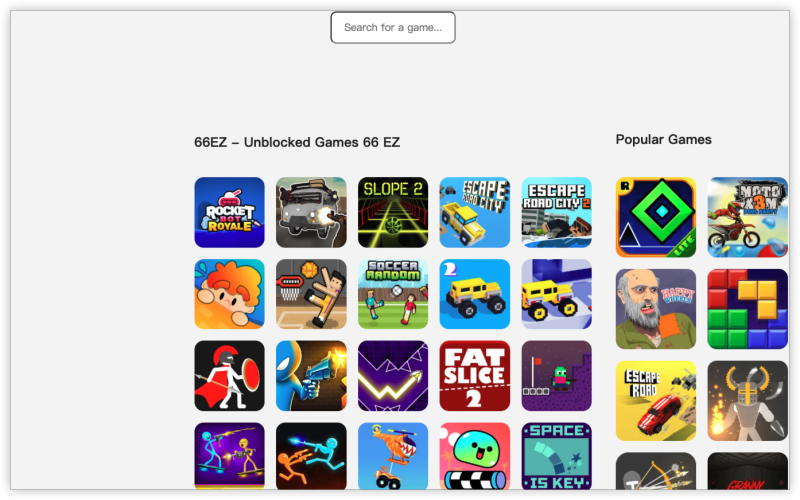
Unblocked Games 66 EZ

Unblocked Games 66 and its variant Unblocked Games 66 EZ are popular web platforms that host a wide variety of browser-based games. These sites are designed to bypass restrictions on networks like schools, universities, or offices—allowing users to play games without triggering firewalls or content filters.

💡 “EZ” stands for Easy Access—these are often mirror or simplified versions of the main Unblocked Games 66 site, optimized for faster loading and better unblocking performance.

You can play Unblocked Games 66 EZ in many countries where school or office internet restrictions are common, such as the United States, Canada, Australia, and parts of Europe. These games are especially popular on school or public computers that use firewalls to block entertainment websites. To access them, users typically go through mirror sites, proxy websites, or use a VPN like UFO VPN to bypass local restrictions.

Key Features

Feature Details
No Login Required Play games instantly without creating an account.
🕹️ Hundreds of Games From classics like Happy Wheels to Run 3, Slope, and Minecraft.
🚫 Bypasses School Blocks Designed to be accessible even on restricted school or work networks.
🔄 Regular Updates New games and bug fixes are often added.
🌐 Browser-Based No installation—just visit and play.

Game Libraries in Unblocked Games 66EZ

Unblocked Games 66 EZ offers a diverse game library, including:

  • Action Games – e.g., Tank Trouble, Zombocalypse

  • Puzzle Games – e.g., 2048, Cut the Rope

  • Adventure Games – e.g., Fireboy and Watergirl

  • Racing Games – e.g., Madalin Stunt Cars, Moto X3M

  • Sports Games – e.g., Basketball Legends, Football Heads

  • Multiplayer Games – e.g., Shell Shockers, Krunker.io
Related Posts
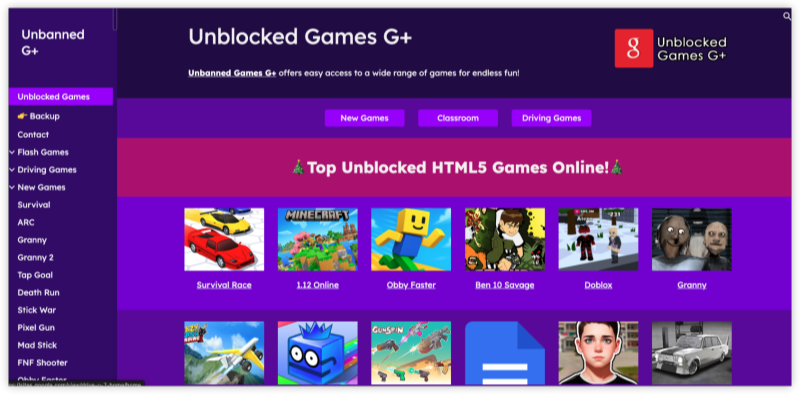
Unblocked Games G+ at Google Site
Gaming
date icon 2025-07-23 15:02:42
Unblocked Games G+ Closed? How to Play Unblocked Games G Plus Safely
Gaming
date icon 2025-07-23 11:32:45
How to Unblock Games on School Computer & Chromebook | UFO VPN

Is Unblocked Games 66 EZ Safe?

This is a common concern—and a smart one.

The Good News

  • The games are browser-based, so you don’t download anything.

  • Most versions don’t require personal data.

  • Safe when accessed via verified mirrors or platforms like GitHub or Google Sites.

The Risks

  • Some fake or copycat sites contain malware or ads.

  • Clicking on pop-ups or unknown links may redirect you to unsafe domains.

  • Schools monitor activity, so even a safe site may get you in trouble.

How to Stay Safe:
Use a secure VPN like UFO VPN to encrypt your traffic and access verified mirrors only. Always avoid entering personal info and consider using incognito mode.

Unlock, Protect and Go Free
Access any site
Lifetime free
3000+ global IPs
1-click connection

How to Play Unblocked Games 66 EZ Quickly

Method 1: Use a VPN (Best for Schools & Offices)

Step 1
Grab the free Windows VPN installer right below. UFO VPN is lightweight and secure on all Windows systems. Double-click the downloaded file and complete the installation. Once installed, launch UFO VPN.
windows1
Step 2
Select a VPN Server
Inside the app, you can click the "Connect" button for quick connection, or browse the list of servers by Location or categroy: Video& Stream, Game, etc. Choosing the right server ensures fast speeds and smooth access.
windows2
Pro Tip

UFO VPN is an all-in-one VPN that offers unlimited access to 4D streaming like Netlfix, Disney Plus, no-ping gaming as PUBG, Roblox, CODM and social networking for YouTube, X, Facebook and more.


Step 3
Enable Advanced Features
In addition to basic functions, we recommend you turn on extra protections via Ad Blocker and features like Kill Switch, Split Tunneling and Smart Hop. Users can optimize online gaming/streaming/chatting as much as possible.
windows3
Step 4
Check Your New IP
Use UFO VPN's built-in " What is My IP" feature to see your new IP address and location. This confirms your VPN is working, hides your real IP, and ensures privacy while browsing.
windows4
Step 1 Download and install UFO VPN for macOS
Click the button below to download offcial Mac VPN free. Open the .dmg file, drag UFO VPN to your Applications folder, and launch it. You're just a few clicks away from secure browsing.
macos1
Step 2 Pick Your IP Server
Tap "Connect" button for the fastest server automatically. Or you can select a server from the global server list in 100+ countries. UFO VPN is an UFO VPN is an all-in-one VPN or gaming, video streaming, social platforms, and AI tools.
macos2
Step 3

Unlock Pro Features

If you have upgraded to premium plan , feel free to enjoy premium servers for 4K streaming and advanced features like Kill Switch, Split Tunneling, and gaming acceleration. Your Mac is now fully optimized and protected. Inaddition to basic functions, we recommend you turn on

macos3
Step 4

Verify Your IP Now

Use UFO VPN's " What is My IP " feature to see your new IP and location. This confirms your connection is secure, anonymous, and ready for safe browsing online anywhere at any time.


macos4
Step 1 Download and install UFO VPN for iPhone/iPad
Download this free iOS VPN via official link or App Store. Once installed, launch the app to get started. UFO VPN is now trusted by over 2 million users worldwide with optimzed service.
ios1
Step 2 Select a Perfect Server
Hit "Connect" button for the fastest server near you instantly. Or you can choose a favorite location/platform from the server list manually for full control. UFO VPN is an all-in-one VPN companion for gaming, streaming, social media, and AI tools.
ios2
Step 3 Lookup IP and Enable Pro Features
Now you can check your current IP via built-in IP lookup tool. Pro features in premium plan offer you premium servers, blazing speeds, Kill Switch, Split Tunneling, and Multi-device login, so you can protect your iPhone, iPad, and other Apple devices all at once.
ios3
Step 1 install UFO VPN for Android
Get free Android VPN from offcial website or Google Play Store. Follow the instructions for easy download. Then open the app and get ready to surf safely.
android1
Step 2 Choose Your Ideal Server
UFO VPN is an all-in-one powerhouse for gaming, video streaming, social apps, and AI tools. The"Connect" button links you to the fastest server instantly, or you can choose among the server list manually via Location/ Video&Stream/Games for easy access.
android2
Step 3 Power Up Pro Features
Pro users can look up current IP via built-in "What Is My IP" feature, and unlock premium features like 4K servers, turbo speeds, Kill Switch, Split Tunneling, and Multi-device login, keeping all your Android phones, tablets, and other devices safe at once.
android3

Open your browser and go to:

  • sites.google.com/site/unblockedgames66ez

  • 66ezgames.github.io

Start playing instantly!

Method 2: Access Mirror Sites via Google Search

  1. Open Google and type:site:sites.google.com unblocked games 66 ez

  2. Click on verified results hosted on Google Sites or GitHub Pages.

  3. Play directly in your browser.

Method 3: Use a Game Proxy Site

  1. Visit:

    • ubg100.github.io

    • unblocked-games.s3.amazonaws.com

  2. These act as game mirrors that bypass filters.

Unblocked Games 66 vs Other Sites: Which One to Pick

Unblocked Games 66 stands out among other unblocked game sites due to its wide variety of simple yet addictive games, fast loading times, and minimal ads. Compared to platforms like Unblocked Games 76, Tyrone’s Unblocked Games, or Unblocked Games G+, Unblocked Games 66 focuses on delivering classic Flash-style games with straightforward access—no login or extra setup required.

While other sites may offer more modern graphics or multiplayer options, Unblocked Games 66 is often praised for its reliability, ease of use, and large game library that caters especially well to students using Chromebooks or school computers.

Feature Unblocked Games 66 EZ Unblocked Games WTF CoolMath Games
Number of Games 🔹 1000+ 🔹 500+ 🔹 200+
Designed for Schools ✅  ❌ Somewhat blocked
Ads & Popups ⚠️ Moderate ⚠️ Heavy ✅ Low
VPN Required (at school) ✅  ✅  ❌ Not usually
Mirror Availability ✅ Many ✅ Many ❌ Fewer
Game Quality ⭐️⭐️⭐️⭐️ ⭐️⭐️⭐️ ⭐️⭐️⭐️⭐️⭐️

FAQs

1. Is Unblocked Games 66 EZ illegal?

No, it’s not illegal—but it may be blocked by schools or workplaces due to productivity or policy reasons.

2. Why is the Unblocked Games 66 EZ site not loading at school?

Your school might use a firewall to block it. Use UFO VPN or try a mirror site to bypass this.

3. Is there a mobile version for Unblocked Games 66 EZ?

Yes, you can access the site using your phone browser (Safari, Chrome, etc.) or try game-focused APKs on Android.


Bypass blocks. Stay private.

Use UFO VPN — the best free VPN that works anywhere

Also available in:  Русский

Ethan Carter
Ethan Carter

About This Author

I’m Ethan Carter, a New York-based writer with a background in cybersecurity and digital trends. I love breaking down complex tech topics into digestible insights, helping people navigate the online world safely and smartly.