Key Takeaways
💡 Bellesa may become unavailable because of regional restrictions, school or workplace network filters, ISP blocking, or temporary website issues.
💡 Before trying any workaround, check whether Bellesa is actually down or if the problem only affects your connection.
💡 If the restriction comes from your network or location, using a trusted VPN like UFO VPN can help you access Bellesa more privately and securely.
What Is Bellesa & Is It Safe to Browse?
Bellesa is an adult entertainment platform that mainly focuses on female-friendly content. Compared with many traditional adult websites, it offers professionally produced videos, educational content, and relationship-focused materials designed for a broader audience.
In general, Bellesa itself is a legitimate website. However, whether it's safe to browse depends on how you access it. If you visit unofficial mirror sites or click suspicious ads, you may encounter malware, phishing pages, or unwanted pop-ups.
To stay safer while browsing, you should:
✅ Visit the official Bellesa website instead of unknown copies.
✅ Avoid downloading files from third-party pages.
✅ Keep your browser and security software up to date.
✅ Use a private and encrypted connection, especially on public Wi-Fi.
Why Is Bellesa Blocked Sometimes?
Bellesa isn't always unavailable because of the website itself. In many cases, the restriction comes from your location, internet provider, school or workplace network, or even a temporary technical problem. Identifying the cause first can help you choose the most effective solution.
1. Regional Restrictions
Bellesa isn't available everywhere. Some countries restrict or completely block access to adult websites because of local laws or government regulations. If you're traveling or living in one of these regions, Bellesa may fail to load even though the website is working normally elsewhere.
| Country/Region | Why Access Is Restricted | Get an IP |
|---|---|---|
| Saudi Arabia | National internet regulations block adult websites. | |
| United Arab Emirates | Strict content filtering applies to adult platforms. | |
| Qatar | Internet providers restrict access to adult content. | |
| Kuwait | Government censorship blocks many adult websites. | |
| Indonesia | Adult content is prohibited under national internet policies. | |
| Malaysia | ISPs block many adult websites following local regulations. | |
| India | Some ISPs restrict adult websites due to court orders or regional policies. | |
| Turkey | Government content regulations may block adult websites. |
⭐ Warm Note: Restrictions may vary by ISP or region. Even within the same country, some internet providers may block Bellesa while others do not.
2. Your School, Workplace, or Public Wi-Fi Blocks It
Many schools, offices, libraries, and public Wi-Fi networks use web filters to block adult websites automatically. Even if Bellesa is legal in your country, your local network administrator may still prevent access.
If Bellesa works on your mobile data but not on your Wi-Fi network, the network itself is likely the reason.
3. Your ISP Restricts Certain Websites
Some internet service providers (ISPs) limit access to specific categories of websites because of local regulations or internal filtering policies. This isn't very common everywhere, but it can happen depending on your provider.
If you suspect ISP filtering, testing another network or using a secure encrypted connection can help determine whether the restriction comes from your internet provider.
4. Bellesa Can't Open Because the Website Is Down
Sometimes the issue has nothing to do with your device or location. If Bellesa can't open, the website itself may be experiencing temporary server problems, maintenance, or unexpected outages.
Before changing your browser or network settings, it's worth checking whether Bellesa is down for everyone or only for you. This simple step can save you a lot of unnecessary troubleshooting.
Several free website status check tools can help you verify this within seconds.
- Downdetector — Shows real-time outage reports submitted by users and highlights recent service disruptions.
- Is It Down Right Now? — Checks whether a website is reachable globally and displays recent response history.
- Down for Everyone or Just Me — Quickly tells you whether the website is unavailable worldwide or only on your connection.
- IsItDown.io — Monitors website availability and provides uptime information.
- Site24x7 Website Checker — Tests website accessibility from different locations in the world.
- Pingdom Website Speed Test — Helps determine whether the website is responding and measures loading performance.
- Host-Tracker — Checks website availability from multiple global servers simultaneously.
- UptimeRobot Status Checker — A simple tool to check whether a website is currently online.
If these tools show that Bellesa is online but you still can't access it, the issue is likely related to your network, browser, or location rather than the website itself.
5. Browser or Device Problems
Sometimes the problem is much simpler than you expect. Corrupted browser cache, outdated cookies, incompatible extensions, or incorrect DNS settings can all prevent Bellesa from loading properly.
Trying another browser, clearing cached data, or refreshing your network settings often resolves these issues without much effort.
6. Temporary Network Connection Issues
An unstable internet connection can also stop Bellesa from loading correctly. Weak Wi-Fi signals, router errors, or temporary network interruptions may cause loading failures or connection timeouts.
Restarting your router, switching to another network, or using mobile data for a quick test can help you determine whether your internet connection is the cause.
12 Ways to Unblock Bellesa
If you've identified what's preventing you from accessing the website, the next step is choosing the right solution. Whether the problem comes from regional restrictions, network filters, or browser settings, the methods below can help you get Bellesa unblocked quickly and safely.
Way 1. Activate a VPN (The Easiest)
A VPN is one of the simplest and most reliable ways to unblock Bellesa. It encrypts your internet traffic and routes your connection through a server in another location. This allows you to bypass many network restrictions while improving your online privacy.
If you're looking for an easy option, UFO VPN offers servers in multiple countries and lets you connect with just a few clicks.
💡 Quick Steps


UFO VPN is an all-in-one VPN that offers unlimited access to 4K streaming like Netlfix, Disney Plus, no-ping gaming as PUBG, Roblox, CODM and social networking for YouTube, X, Facebook and more.




Unlock Pro Features
If you have upgraded to premium plan , feel free to enjoy premium servers for 4K streaming and advanced features like Kill Switch, Split Tunneling, and gaming acceleration. Your Mac is now fully optimized and protected. Inaddition to basic functions, we recommend you turn on

Verify Your IP Now
Use UFO VPN's " What is My IP " feature to see your new IP and location. This confirms your connection is secure, anonymous, and ready for safe browsing online anywhere at any time.







Way 2. Use Bellesa Proxies
If you don't want to install additional software, Bellesa proxies can sometimes help you access the website. A proxy works by forwarding your web requests through another server, making it appear as though you're browsing from a different location.
Unlike a VPN, however, most proxies only work inside your browser and usually don't encrypt your traffic. Because of this, they are better suited for temporary access than long-term privacy.
🎯 Here are some common Bellesa Proxy Sites to try:
- CroxyProxy
- ProxySite
- PlainProxies Web Proxy
- BlockAway
- FilterBypass
- GenMirror
- SSLProxies.org
- ProxyNova
- OpenProxy.space
- Spys.one
- Free Proxy Lists
Free proxy sites can stop working without notice because their domains and servers often change. If a Bellesa proxy doesn't open, try another proxy option instead of repeatedly refreshing the same page. For better privacy, avoid entering personal information or logging into accounts while using public proxies.
Way 3. Find Bellesa Alternatives
If Bellesa remains unavailable, you can also explore other websites that offer similar content. Many platforms focus on high-quality production, female-friendly content, educational videos, or creator-driven communities.
| Website | Best For | Pros | Cons |
|---|---|---|---|
| Bellesa Films | Story-driven videos | High-quality production | Smaller library |
| FrolicMe | Couples and female-focused content | Elegant interface | Subscription required |
| MakeLoveNotPorn | Real-life intimacy videos | Authentic content | Limited traditional content |
| Lustery | Amateur couples | Real relationships | Smaller catalog |
| Afterglow | Couples seeking premium content | Curated collections | Paid membership |
| Dipsea | Erotic audio stories | Great for listening | No video content |
| Quinn | Female-focused audio content | Mobile-friendly | Audio only |
| OnlyFans | Independent creators | Huge variety | Quality varies by creator |
| Fansly | Creator subscriptions | Flexible pricing | Less mainstream |
| ManyVids | Independent performers | Large content selection | Interface can feel busy |
| FanCentro | Premium creator content | Direct creator support | Requires subscriptions |
| LoyalFans | Exclusive creator communities | Frequent updates | Content depends on creators |
⭐ Warm Note: Availability varies by country, and some platforms may also require a subscription.
Way 4. Try Another Browser
Sometimes the problem isn't Bellesa at all. Browser extensions, outdated cookies, or compatibility issues can stop certain websites from loading correctly.
Trying a different browser only takes a minute and is often worth testing before changing your network settings.
🎯 Recommended Browsers:
- Google Chrome
- Mozilla Firefox
- Microsoft Edge
- Brave
- Opera
- Tor
What to Do:
- Open Bellesa in another browser.
- Try using Incognito or Private Mode.
- Disable ad blockers or privacy extensions temporarily.
- Update your browser to the latest version.
Way 5. Visit Google Translate
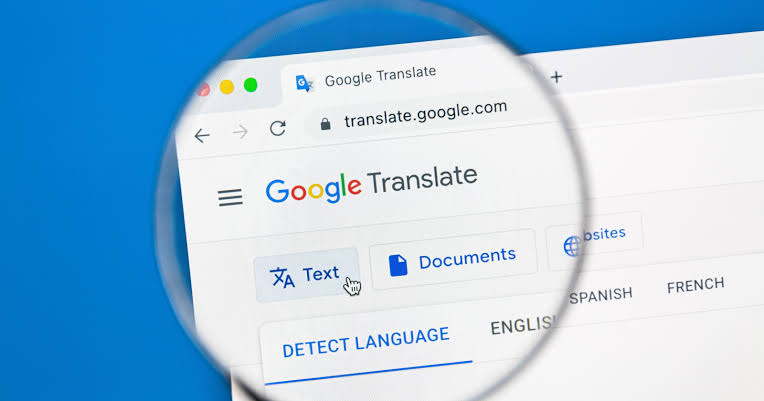
This isn't guaranteed to work, but Google Translate can occasionally help open websites that are blocked by simple URL filters.
Instead of visiting the website directly, you access it through the translated webpage.
💡 Quick Steps
- Go to translate.google.com.
- Choose Websites (if available in your region).
- Paste the Bellesa URL.
- Select another language.
- Open the translated webpage.
⭐ Key Note: This method only works for some network restrictions and may not function if the website is completely blocked.
Way 6. Clear Your Browser Cache
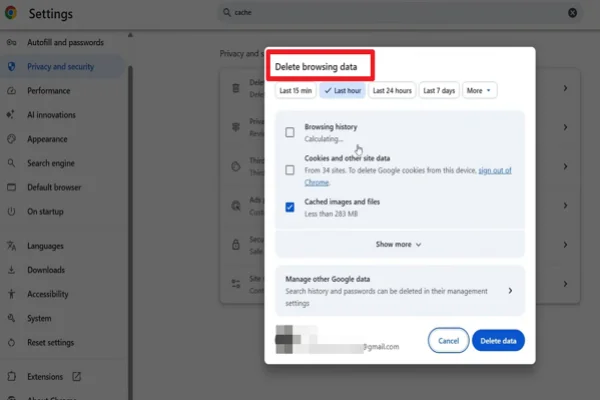
Your browser stores cached files and cookies to speed up loading. Sometimes these files become outdated or corrupted, causing websites to load incorrectly.
Clearing them often resolves unexpected loading problems.
💡 Quick Steps
- Open your browser settings.
- Find Privacy & Security.
- Select Clear browsing data.
- Choose Cached images and files (and cookies if needed).
- Restart your browser and try Bellesa again.
Way 7. Change Your DNS Server
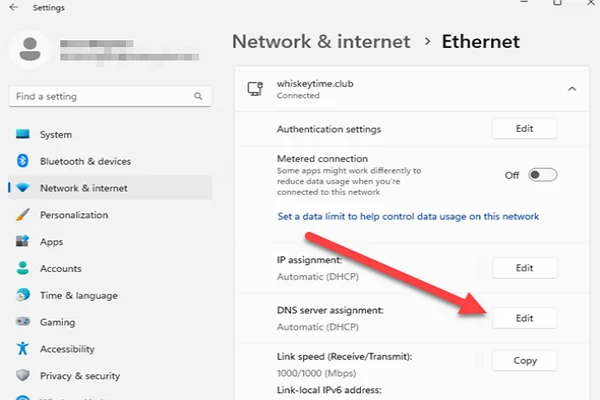
Some internet providers use DNS filtering to block access to certain websites. Switching to a public DNS service may help if DNS filtering is causing the problem.
Popular public DNS providers include:
- Google Public DNS
- Cloudflare DNS
- Quad9
- OpenDNS
💡 Quick Steps
- Open your device's network settings.
- Locate the DNS settings.
- Replace your current DNS with a public DNS provider.
- Save the changes.
- Restart your browser and test the website again.
Way 8. Switch to Another Network
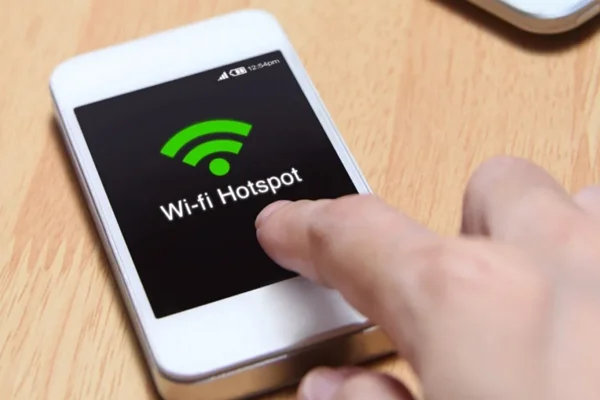
Sometimes the issue isn't your device—it's the network you're using. Schools, offices, hotels, and public Wi-Fi often block adult websites through their network filters. Testing another connection is one of the quickest ways to narrow down the cause.
Try These Options:
- Connect to your mobile data instead of Wi-Fi.
- Switch to another Wi-Fi network if available.
- Restart your router before reconnecting.
- Open Bellesa again to see if the issue is resolved.
If Bellesa works on one network but not another, the original network is likely blocking access.
Way 9. Restart Your Device
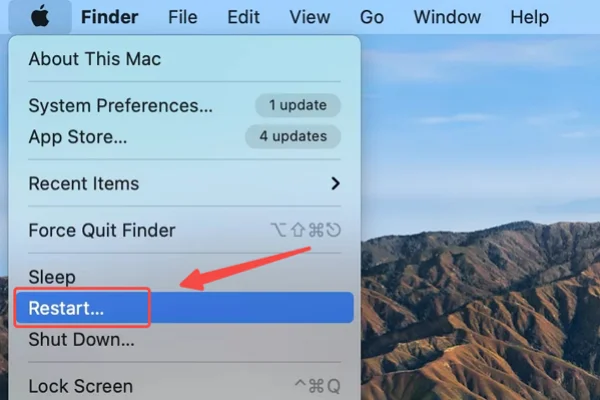
While it sounds simple, restarting your device can fix temporary network glitches, browser conflicts, or system errors that prevent websites from loading properly.
For A Quick Refresh:
- Close all browser windows.
- Restart your computer or phone.
- Reconnect to the internet.
- Open Bellesa again.
This only takes a few minutes and is worth trying before changing more advanced settings.
Way 10. Disable Browser Extensions Temporarily
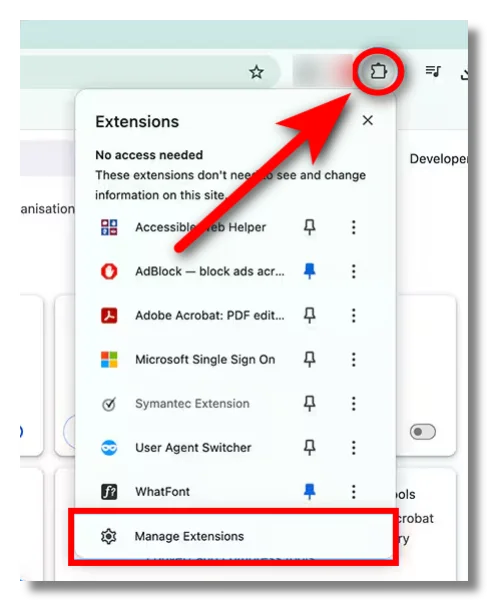
Some browser extensions—especially ad blockers, privacy tools, or security add-ons—can interfere with how certain websites load.
You don't have to remove them permanently. Simply turn them off for a moment to see whether one of them is causing the problem.
Check in This Order
- Pause your ad blocker.
- Disable privacy or script-blocking extensions.
- Refresh the page.
- Re-enable the extensions one by one to identify the conflicting one.
Way 11. Flush Your DNS Cache
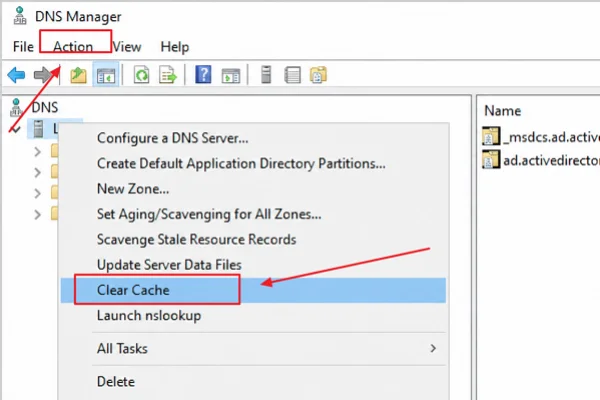
Your device stores DNS records to speed up website visits. If those records become outdated, your browser may keep trying to connect to an old or incorrect address.
Refreshing the DNS cache forces your device to request updated information.
- Open Command Prompt as Administrator.
- Type: ipconfig /flushdns
- Press Enter.
- Restart your browser.
- Open Terminal.
- Run the appropriate flush DNS command for your macOS version.
- Restart your browser and try accessing Bellesa again.
Way 12. Wait and Try Again Later
If you've already confirmed that Bellesa is experiencing a temporary outage, there may be nothing you need to fix. Server maintenance, technical issues, or unusually high traffic can all make the website temporarily unavailable.
Instead of repeatedly refreshing the page, give it some time and check again later.
While You Wait:
- Check the website's status every 15–30 minutes.
- Follow Bellesa's official social media channels for updates if available.
- Avoid using unknown mirror websites that claim to provide instant access.
Sometimes the easiest solution is simply waiting for the service to return online.

Final Say
Access problems don't always have the same cause, so there's rarely a one-size-fits-all solution. By understanding where the restriction comes from, you can choose a method that fits your situation instead of relying on trial and error.
Whether you're dealing with a network filter, a browser issue, or regional limitations, using trusted tools like UFO VPN and reliable websites can make your browsing experience smoother while helping you protect your privacy online.
FAQs
Why does Bellesa load on my phone but not on my computer?
This usually points to a browser or device issue rather than a problem with Bellesa itself. Try another browser, clear your cache, or temporarily disable browser extensions.
Is it legal to use a VPN to access Bellesa?
VPNs are legal in many countries, but laws vary by region. Before using one, you should understand the regulations that apply where you live or travel.
Why does Bellesa keep loading but never opens?
A slow internet connection, outdated browser data, DNS issues, or temporary server problems can all cause endless loading. Checking the website's status first can help narrow down the cause.
Are free proxy websites safe to use?
Some are, but many display aggressive ads, collect browsing data, or disappear without notice. If privacy is important, a reputable VPN generally provides a more secure connection than a free web proxy.
Do I need to create an account to browse Bellesa?
Some content may be available without signing in, while premium videos and certain features typically require an account or subscription. The available content may also vary depending on your location.