Before We Go: Understand the ITVX Cancellation Policy
Before you take action, taking a few minutes to understand the ITVX cancellation policy is highly necessary.
Typically, you must cancel your subscription before the next billing cycle begins (preferably at least 24 hours in advance) to avoid being charged for the next month or year. Even if you cancel now, you can continue to enjoy your Premium membership benefits until the current billing cycle ends.
It is important to note that ITVX allows users to subscribe across different platforms, meaning your membership might be tied to a PC, Android, or iOS device. Because major platforms have independent billing systems, cancellation methods vary based on your registration route.
One click to unblock Netflix, Hulu, Disney+ etc, and enjoy buffer-free streaming.
Step-by-Step Tutorial for Cancelling ITVX Subscription
Next, we will provide you with a very detailed and clear operational guide. No matter which device or platform you initially used, you can easily follow the corresponding steps below to complete the cancellation.
Cancel ITVX Premium on iOS (iPad/iPhone)
-
Open your iPhone or iPad and go to the "Settings" app.
-
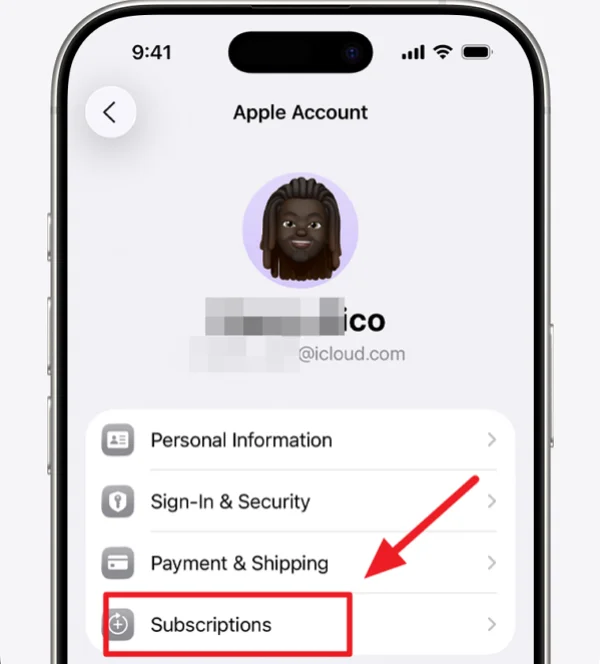
Tap your Apple ID profile at the very top of the screen.
-
Select "Subscriptions" and find "ITVX" in your active list.
-
Tap the red "Cancel Subscription" button and follow the prompts to confirm.
Cancel ITVX Premium on Android (Google Play)
-
Open the "Google Play Store" app on your Android phone or tablet.
-
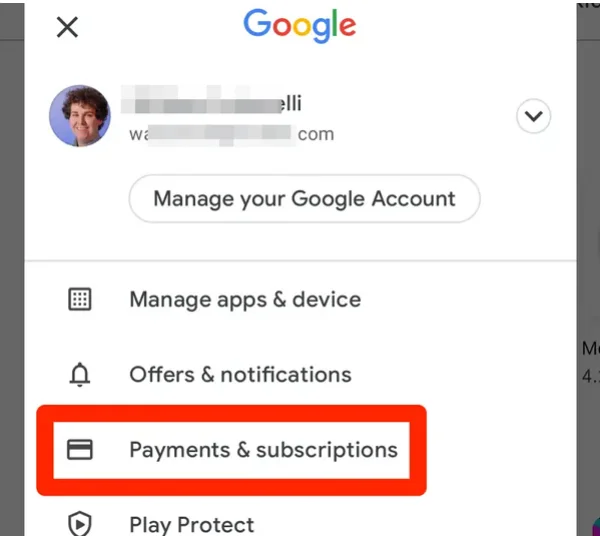
Tap your profile icon in the top right corner to open the menu.
-
Select "Payments & subscriptions," then tap "Subscriptions."
-
Find the ITVX subscription, tap "Cancel subscription," choose a reason, and confirm.
Cancel ITVX Premium on PCs
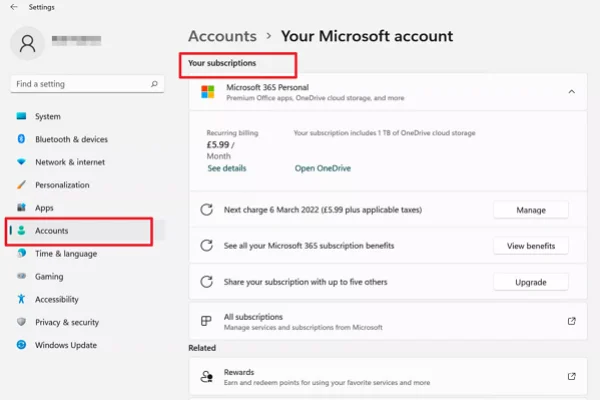
If you are using a Windows computer, follow the steps like:
-
Visit the official ITVX website on your computer browser and log into your account.
-
Click the profile icon in the top right corner and enter "Manage Account."
-
Locate the "Manage your subscription" tab.
-
Click "Cancel subscription" and follow the confirmation page to finalize the process.
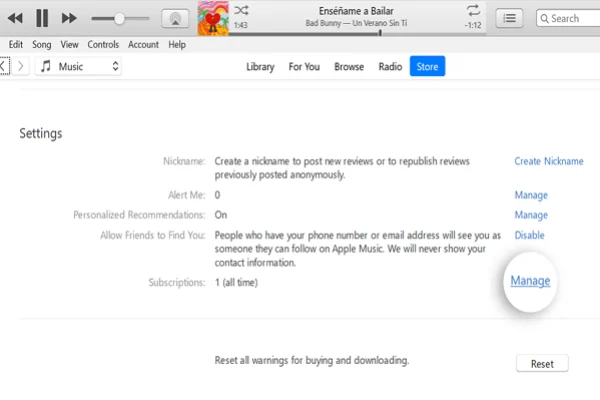
If you are using a Macbook, the steps may be a little bit different.
-
Open the App Store application on your Mac.
-
Click on your name or profile icon located at the bottom left corner of the sidebar (if you are not logged in, click "Sign In" first).
-
Click on "Account Settings" at the top of the window.
-
You may be prompted to enter your Apple ID password to proceed.
-
Scroll down the account information page until you find and click the "Manage" link.
-
Locate your ITVX subscription in the list, click "Edit," and then select "Cancel Subscription".
Cancel ITVX Premium on Smart TVs
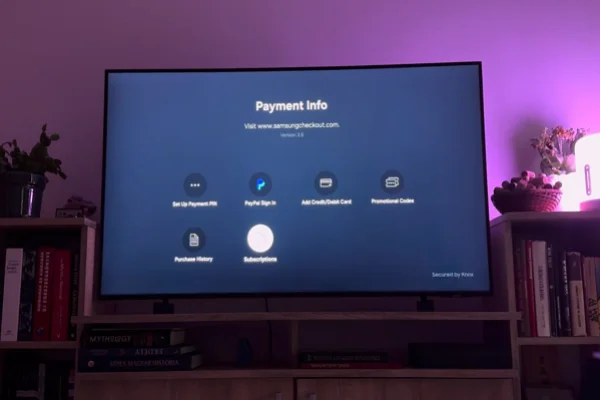
Since most smart TV apps don't handle billing directly, if you subscribed via the official ITVX system on your TV, you usually need to log into the ITVX website via a PC or mobile browser to cancel (refer to the PC steps).
If your TV uses a third-party app store (like Roku, Samsung, or Sky) for billing, visit that specific brand's account center to manage your subscription.
🎯 For Roku Users:
-
Open a web browser on your smartphone or computer, visit my.roku.com, and sign in to your Roku account.
-
Scroll down the page and click on "Manage your subscriptions."
-
Find ITVX in your list of active subscriptions, select "Turn off auto-renew" or "Cancel subscription," and confirm your choice to prevent future billing.
🎯 For Samsung Smart TV Users:
-
Open a web browser and visit samsungcheckout.com (or your Samsung Account portal). Log in using the same Samsung credentials linked to your smart TV.
-
Go to the "Subscriptions" or "Purchase History" tab from the main dashboard.
-
Find the ITVX Premium subscription in your active list, click "Unsubscribe," and follow the on-screen prompts to complete the cancellation process.
🎯 For Sky Users:
-
Access your Sky main menu via your remote or log into your Sky account on a browser.
-
Navigate to "My Account" or "Apps & Subscriptions."
-
Locate the ITVX Premium add-on.
-
Select remove or cancel, and follow the on-screen validation steps to complete the process.
Pro Tip
If you use other brands like LG or Vizio, the logic is identical—always log into the manufacturer's official web portal or the TV's native subscription management menu to cancel.
Cancel ITVX Premium on Amazon Prime
-
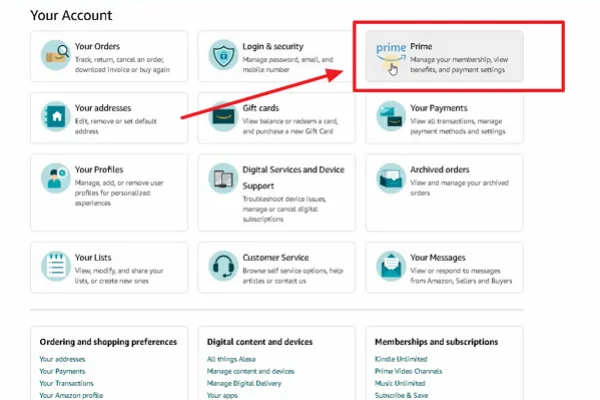
Log into your Amazon account and go to "Your Account."
-
Find and click "Manage Your Prime Video Channels."
-
Locate the ITVX Premium add-on in your channel list.
-
Select "Cancel Channel" and confirm; your access will remain until the current billing cycle ends.
Common Issues of Cancelling ITVX Subscription & Fix
During the cancellation process, you might occasionally run into minor troubles. Don't worry, here are some common issues and their quick fixes.
1. Clicking Cancel Yields No Response: The page freezes, keeps loading, or gives no feedback when clicking the cancel button on the website.
💡 Quick Fix: This is usually caused by browser cache or network latency. Try clearing your browser's cookies and cache, or use a fresh Incognito/Private window to log in and try again.
2. Cannot Cancel from iPhone: You can't find ITVX in your Apple ID subscriptions list or cannot complete the action.
💡 Quick Fix: This means you didn't pay through Apple's system originally. Check your email receipts to confirm if you subscribed via the website, Google Play, or Amazon, then switch to that specific platform to cancel.
3. Still Receiving Charge Notices After Cancelling: You clearly finished the cancellation, but still got billed by the bank or payment platform the following month.
💡 Quick Fix: Verify if you canceled within 24 hours of the renewal date (system processing can be delayed). If you did cancel early, prepare a screenshot of your cancellation confirmation email and contact ITVX support to dispute the charge and request a refund.
4. Forgot the Original Login Account or Password: You want to log into the website to cancel but completely forgot your password or linked email.
💡 Quick Fix: Click "Forgot Password" on the login page to reset it. If you are unsure which email you used, search all your inboxes for past receipts from ITVX or billing platforms to identify the correct account.
5. Subscription Tied to a Broken or Lost Device: You subscribed on an old phone that no longer works, and you worry you can't cancel.
💡 Quick Fix: You don't need the physical device. Simply log into the corresponding cloud account (Google, Apple ID, or Amazon) on any PC or new phone, access the web-based account management center, and cancel remotely.
Bonus: Make Sure Everything Goes Well with UFO VPN
When handling online subscriptions across Apple, Android, or PC devices, a stable network environment cannot be ignored. First, you must ensure your existing access, because if you are overseas, some regions might impose strict geo-restrictions on ITVX, preventing you from opening the site or logging in to cancel. In this case, securing a fast and safe internet connection is crucial.
In this case, UFO VPN is highly recommended. It is perfectly compatible with all these mainstream devices (iOS, Android, PC), helping you smoothly bypass regional blocks and safely complete your tasks. Here are the simple steps to download and activate it:


Pro Tip
UFO VPN is an all-in-one VPN that offers unlimited access to 4K streaming like Netlfix, Disney Plus, no-ping gaming as PUBG, Roblox, CODM and social networking for YouTube, X, Facebook and more.




Unlock Pro Features
If you have upgraded to premium plan , feel free to enjoy premium servers for 4K streaming and advanced features like Kill Switch, Split Tunneling, and gaming acceleration. Your Mac is now fully optimized and protected. Inaddition to basic functions, we recommend you turn on

Verify Your IP Now
Use UFO VPN's " What is My IP " feature to see your new IP and location. This confirms your connection is secure, anonymous, and ready for safe browsing online anywhere at any time.







Conclusion
Managing your digital entertainment expenses should be an effortless task. By identifying your original subscription platform and following the correct guidelines, you can terminate unwanted services at any time. Regardless of the device you use, maintaining a smooth network and executing the steps systematically will help you take control of your account and avoid unnecessary costs.
FAQs
Can I get a refund if I cancel my subscription early?
Generally, ITVX does not offer pro-rated refunds for the remaining time you've paid for. Once canceled, you can keep watching Premium content until the current billing cycle completely ends.
Will I lose my viewing history after cancelling?
No. Cancelling Premium simply downgrades your account to the free basic version. Your watch history, saved lists, and basic account details remain safely intact within the system.
Can I resubscribe to ITVX Premium later?
Absolutely. If you change your mind later, you can log into your free account at any time and reactivate the Premium subscription to enjoy ad-free and exclusive content again.
How do I know if my cancellation was successful?
After completion, you will typically receive a confirmation email from ITVX (or your payment platform like Apple/Google). You can also recheck your account's "Subscriptions" page to ensure it clearly states "Expires on [Date]."
Is it possible to pause my subscription instead of cancelling?
Currently, ITVX does not offer a direct "pause" feature. To stop billing, you must completely cancel the subscription and re-subscribe later when you are ready to watch again.