Things to Know Before Deleting the ITVX Account
Before you move forward, it’s important to understand a few key details. Deleting your account is permanent in most cases, and there are a few things you should check first to avoid problems later.
1. You May Need Access to Manage Your Account
ITVX is mainly available in the UK. If you're outside the UK, you might not be able to access account settings properly.
In this case, using a VPN like UFO VPN can help you log in and manage your account as if you were in the UK. This is especially useful if you’re stuck on login pages or settings that won’t load.
2. Cancel Any Active Subscription First
Deleting your ITVX account does not always cancel your subscription automatically.
If you have ITVX Premium, you should cancel it first. Otherwise, you may still be charged even after trying to delete the account.
3. Your Data May Be Removed Permanently
Once your account is deleted, your watch history, saved shows, and personal preferences are usually erased.
You won’t be able to recover this data later, even if you create a new account using the same email.
4. Deletion Is Not Always Instant
In some cases, ITVX may take time to fully process your request. Your account might remain active for a short period, especially if there are billing issues or pending requests.
5. Finish Your Favorite List before the Account is Gone
Once the account is gone, it’s gone. You will lose your "My List" saved shows, your viewing history, and any personalized recommendations. If there’s a show you’re halfway through, you might want to finish it before pulling the plug.
Step-by-Step Guide to Delete Your ITVX Account
Now let’s go through the full process. Follow these steps carefully to delete the ITVX account without missing anything.
Step 1: Go to the ITVX Website
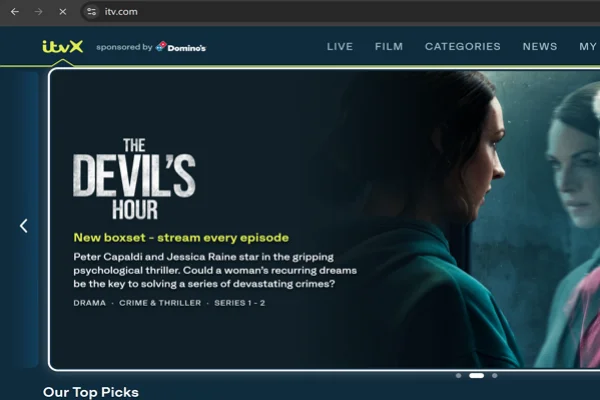
Open your browser and visit the official ITVX website.
Make sure you are using a stable internet connection. If the site doesn’t load properly, consider using a VPN set to the UK.
Step 2: Log in to Your Account
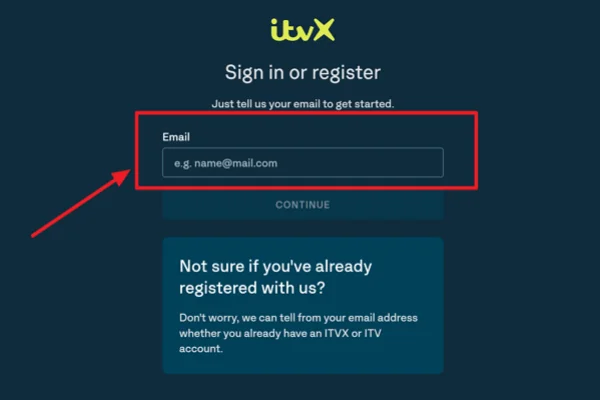
Click on the Sign In button at the top right corner.
Enter your email address and password. If you forgot your password, use the “Forgot Password” option to reset it.
Step 3: Access Your Account Settings
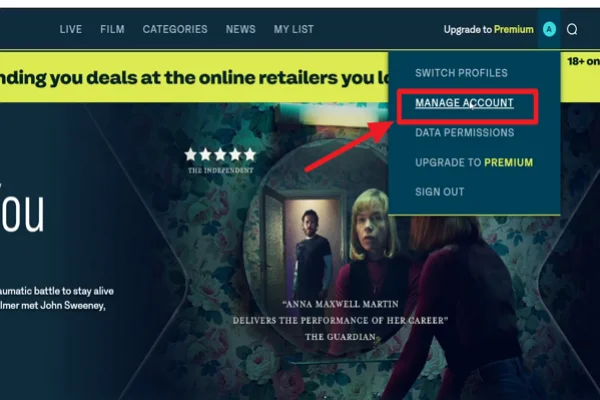
Once logged in, click on your profile icon.
From the dropdown menu, select Account Settings or a similar option.
Step 4: Locate Personal Information or Privacy Settings
Scroll through the settings page.
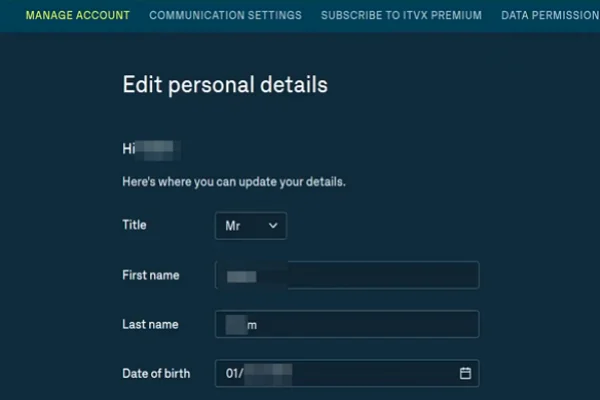
Look for sections like:
- Personal Details
- Privacy Settings
- Account Management
This is where account-related actions are usually stored.
Step 5: Find the Delete or Close Account Option
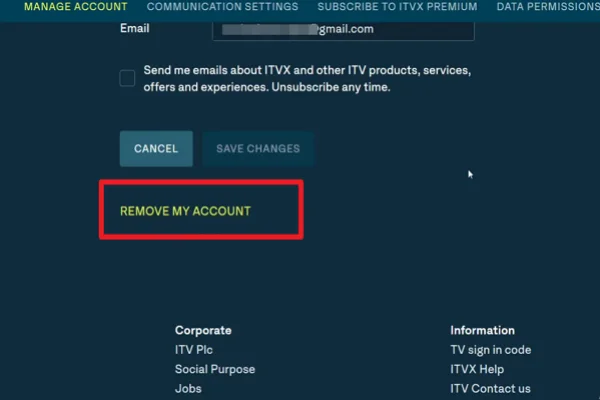
ITVX does not always show a direct delete button.
If you see an option like:
- “RemoveAccount”
- “Delete Account”
Click it and follow the instructions.
If you do not see this option, move to the next step.
Step 6: Submit a Request Through Help or Support
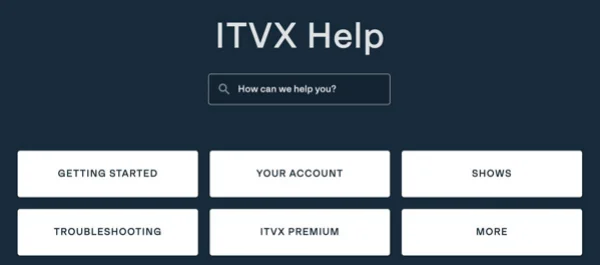
Go to the Help or Support section of the website.
Look for a contact form or support page. Then:
- Select account-related issues
- Request account deletion
- Provide your account email
Clearly state that you want to permanently delete your ITVX account.
Step 7: Confirm Your Request
After submitting your request, ITVX may send you a confirmation email.
Follow any instructions in that email to verify your identity and confirm deletion.
Step 8: Wait for Completion
Once confirmed, your account will be scheduled for deletion.
This may take a few days, depending on their system and support response time.
How to Cancel ITVX Subscription Before Deleting
Before deleting your account, you should cancel your subscription to avoid future charges.
Step 1. Log in to Your ITVX Account: Go to the ITVX website and sign in.
Step 2. Open Subscription Settings: Navigate to your account settings and find the Subscription or Billing section.
Step 3. Select Cancel Subscription: Click on Cancel Subscription. You may be asked to confirm your choice or provide a reason.
Step 4. Confirm Cancellation: Follow the prompts until you receive a confirmation message. Make sure you see a confirmation email as proof.
Step 5. Check Billing Status: After canceling, verify that:
- No future payments are scheduled
- Your plan shows as inactive or ending soon
Only after this step should you proceed to delete your account.
💡 For more detailed steps to cancel the ITVX premium subscription on various devices, refer to: How to Cancel ITVX Subscription? 2026 Step-by-Step Guide
What Happens After You Delete Your ITVX Account
Once you finalize the deletion, the following changes happen immediately or within a very short window:
-
No More Login: Your email and password combination will no longer work on the ITVX website or any app.
-
Immediate Logout: If you are signed in on a TV or tablet, the app will eventually prompt you to sign in again, at which point you will be locked out.
-
Privacy Rights: ITV will begin the process of removing your personal data from their active databases, though some information may be kept for legal or tax reasons (especially if you were a paying subscriber).
-
Loss of Premium Benefits: Even if you had 20 days left on a Premium month, those days are forfeited the moment the account is deleted.
Common Issues When Deleting ITVX Account (And Fixes)
Even if you follow the steps, you might run into some problems. Here are common issues and how to fix them.
Issue 1: Cannot Access Account Settings
💡 Quick Fix:
Try switching browsers or clearing cache.
If you’re outside the UK, use a VPN to access the site properly.
Issue 2: No Delete Option Available
💡 Quick Fix:
Use the ITVX support page to submit a deletion request manually.
This is often required since the delete option is not always visible.
Issue 3: Subscription Still Active
💡 Quick Fix:
Check if you subscribed through a third party like Apple or Google.
If so, cancel it through that platform instead of ITVX.
Issue 4: No Response from Support
💡 Quick Fix:
Wait at least 48–72 hours.
If there is still no reply, send another request with clear details and your account email.
Issue 5: Forgot Login Details
💡 Quick Fix:
Use the password recovery option.
If you no longer have access to your email, contact support and provide identity verification details.
Conclusion
Deleting an ITVX account is not always a one-click process, but it becomes manageable once you understand where to look and what steps to follow. Taking care of access issues, billing, and confirmation requests early can prevent delays and unnecessary charges. With the right approach, you can close your account smoothly and move on without complications.
FAQs
Can I reactivate my ITVX account after deleting it?
No. Once an account is deleted, it is gone forever. If you want to use the service again later, you will need to sign up as a new user with your email address.
How long does it take for ITV to delete my data?
While the account access is removed almost instantly, it can take up to 30 days for all your data to be scrubbed from their background systems.
Will deleting the app from my TV delete my account?
No, deleting the app only removes the software from your device. Your account, billing information, and profile will remain active on ITV’s servers until you follow the manual deletion steps on their website.
Do I get a refund if I delete my account mid-month?
Generally, ITV does not offer pro-rata refunds for the remaining days of a Premium subscription if you choose to delete the account early. It is better to cancel the subscription and wait for the month to end before deleting the account.
Is there a way to just pause my account instead of deleting it?
ITVX doesn't have a "pause" button for the free account. However, you can simply cancel your Premium subscription and keep the free account. This way, your watchlists stay saved, but you aren't charged any money.