How to Quickly Check DeviantArt's Server Status
Before you start changing settings on your computer, it's best to confirm if the website is actually offline. Here is how you can do that:
Method 1. Switch to a Different Network
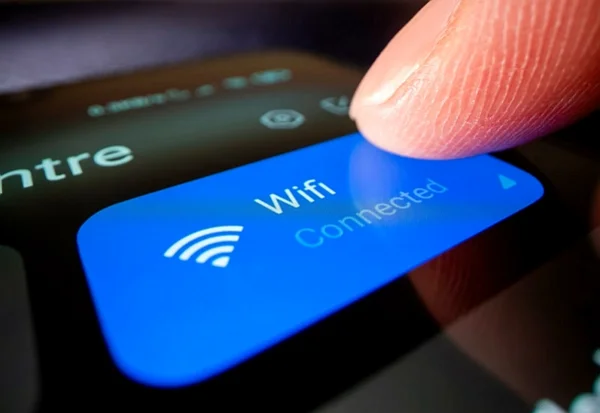
One of the easiest ways to check whether your Wi-Fi is the problem is to try a different connection. For example, turn off Wi-Fi on your phone and access DeviantArt using mobile data, and vice versa.
If the site loads perfectly on data but fails on Wi-Fi, the issue is likely with your home network or ISP, not DeviantArt itself. Similarly, if you're using VPN tools like a free proxy VPN in UFO VPN, you can verify this by switching to a different server location. If the site suddenly loads after you change your virtual location, it suggests a regional network block or a routing issue with your ISP.
Method 2. Check Server Status via Online Helpers
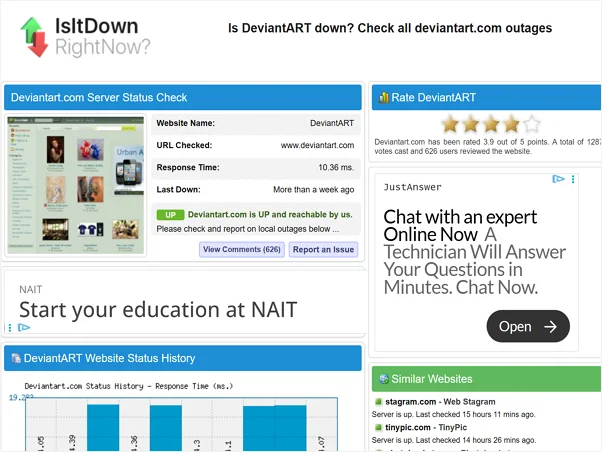
If switching networks didn't give you a clear answer, try these reliable methods:
1. Check "Down Detector" Sites: Websites like DownDetector, IsItDownRightNow, or StatusGator are excellent for real-time updates. They aggregate user reports, so if you see a huge spike in the graph, it confirms that DeviantArt is down for many people.
2. Visit the Official DeviantArt Status Twitter (X): The DeviantArt team often posts updates about scheduled maintenance or unexpected crashes on their official social media handles. If you see an announcement there, it usually means DeviantArt down for everyone, not just you. Once the issue is fixed, they also post follow-up updates. So just stay informed.
3. Look at the DeviantArt Help Center: Sometimes, the platform posts banners or notices on its support pages regarding known technical difficulties. Reviewing these updates can help you understand what's happening and whether there's anything you need to do on your side.
4. Check Community Forums (like Reddit): A quick search on the r/DeviantArt subreddit usually reveals if others are complaining about the same issue. If the "New" posts are all about the site not loading, you have your answer.
Common Signs DeviantArt Is Experiencing an Outage
Sometimes the site isn't fully "dead," but it's definitely not working right. How do you tell the difference between a slow connection and a server failure? Here are the most common signs that remind you the DeviantArt is completely down or on strike for now.
- The "503 Service Unavailable" Error: This is the classic sign of a server overload. It means the DeviantArt servers are too busy to handle your request. It’s like trying to walk into a store that is already packed to capacity - the door is locked until someone leaves.
- Infinite Loading Screens: You might see the site's logo or a spinning wheel that just never stops. If the page tries to load for 30 seconds or more without success, the server is likely hanging.
- Broken Images (Thumbnails Not Loading): DeviantArt is heavy on images. If the text loads fine but all the artworks are grey boxes or "broken image" icons, their media servers might be down, even if the main site is up.
- "Something's Gone Wrong" Message: This is DeviantArt's custom error page. It usually features a mascot looking confused. If this happens, it confirms the crash is internal and not your fault.
Why DeviantArt Might Be Down or Not Loading
There are numerous reasons for the breakdown of DeviantArt, and understanding why the platform is unreachable can help you choose the right fix. Here are the main culprits:
Server Maintenance or Unexpected Technical Issues
Like any massive platform, DeviantArt needs upkeep. Scheduled maintenance usually happens during off-peak hours, but unexpected bugs can crash the servers at any time. In these cases, no amount of troubleshooting on your end will help. In this situation, you can't do anything but wait.
Regional Restrictions or Government Blocks
In some parts of the world, ISPs or governments may restrict access to creative platforms or social media sites. If DeviantArt is down only for you but works for a friend in another country, you might be facing a geo-block.
ISP, Network, or DNS-Related Problems
Your ISP (Internet Service Provider) acts as the bridge between you and the website. Sometimes, this bridge gets "clogged." DNS (Domain Name System) errors are common; they happen when your computer can't translate "deviantart.com" into the correct IP address.
Account-Level or IP-Based Restrictions
Rarely, DeviantArt might block a specific IP address if it detects suspicious activity, like botting or scraping. If you can access the site from a friend's house but not your own, your IP might be temporarily flagged.
How to Fix DeviantArt Down on Your Device
If you've confirmed the server is up but you still can't get in, try these fixes in order.
Method 1: Check Your Internet Connection and DNS Settings
Start with the basics. Restart your router. If that fails, try changing your DNS settings. By default, you use your ISP's DNS, which can be slow or buggy. Switching to a public DNS like Google (8.8.8.8) or Cloudflare (1.1.1.1) often resolves loading issues instantly.
Method 2: Choose a Fast, Reliable Server Location
If your local connection is throttling DeviantArt or if there is a regional routing issue, changing your virtual location can bypass the bottleneck. By connecting to a VPN, you can change to a server in a different region to "hop over" the bad connection path. In order to get VPN to bypass geo-restrictions at a faster speed, here are some practical tips for you to try:


UFO VPN is an all-in-one VPN that offers unlimited access to 4K streaming like Netlfix, Disney Plus, no-ping gaming as PUBG, Roblox, CODM and social networking for YouTube, X, Facebook and more.




Unlock Pro Features
If you have upgraded to premium plan , feel free to enjoy premium servers for 4K streaming and advanced features like Kill Switch, Split Tunneling, and gaming acceleration. Your Mac is now fully optimized and protected. Inaddition to basic functions, we recommend you turn on

Verify Your IP Now
Use UFO VPN's " What is My IP " feature to see your new IP and location. This confirms your connection is secure, anonymous, and ready for safe browsing online anywhere at any time.







Method 3: Refresh, Clear Cache, and Restart
Web browsers store data to help websites load faster, but over time, this data can become corrupted or piled up, leading to a sluggish or broken DeviantArt experience. When cached data causes pages to load incorrectly or not at all, you can try these three quick fixes:
- Hard Refresh: Press Ctrl + F5 on Windows or Cmd + Shift + R on Mac to force the browser to reload the page.
- Clear Cache: Open your browser settings and clear "Cached images and files" to remove outdated data.
- Restart the Browser: Fully close your browser and reopen it to reset the session and apply changes.
Method 4: Try a Different Browser
If DeviantArt isn't loading properly in your current browser, testing it in another one may narrow down the cause. For example, if Chrome shows a blank page or images fail to load, try opening the site in Firefox, Edge, or Safari.
When DeviantArt works in one browser but not another, the issue is usually tied to browser-specific settings, outdated versions, or installed extensions, rather than the DeviantArt platform itself. In this case, updating your browser, resetting its settings, or reviewing installed add-ons often resolves the problem.
Method 5: Disable Extensions or Firewalls That May Block DeviantArt
When DeviantArt works in one browser but not another, the issue is usually tied to browser-specific settings, outdated versions, or installed extensions, rather than the DeviantArt platform itself. In this case, updating your browser, resetting its settings, or reviewing installed add-ons often resolves the problem.
To troubleshoot the issue, try the following steps:
- Temporarily disable your ad blocker or privacy extensions, then reload the DeviantArt page.
- Check your antivirus or firewall settings to confirm that DeviantArt has not been added to a blocked or restricted list.
- Reload the page and see whether images, thumbnails, and galleries appear correctly.
Conclusion
Facing a DeviantArt down situation can be annoying, especially when you are in the middle of a creative workflow. However, by checking the server status first and then systematically troubleshooting your connection, cache, and browser, you can usually solve the problem in minutes. Whether it's a global outage or just a hiccup in your local network, you now have the tools to get back to browsing and creating.
FAQs
1. Is DeviantArt blocked in some countries?
Yes, certain countries with strict internet censorship may block access to art and social platforms. For users in these blocked regions, using a reliable tool like UFO VPN to change your virtual location is often necessary to regain access.
2. Why does DeviantArt work for others but not for me?
This usually indicates a local issue. It could be your browser cache, a DNS error, or a firewall on your computer blocking the connection. It is rarely a server-side issue if others can access it.
3. How to quickly check DeviantArt's server status?
You can verify the status by visiting third-party sites like DownDetector or StatusGator. Alternatively, check DeviantArt's official social media channels for maintenance announcements.
4. Why does DeviantArt load slowly or fail to open?
Slow loading is often caused by high-resolution images clogging a slow internet connection or browser extensions interfering with the page script. Clearing your cache or disabling extensions typically speeds up the process.