Is MangaGo Down Just for Me?
Most of the time, it’s not just you—but it’s also not fully down for everyone either.
Based on recent status checks and outage reports:
- MangaGo is generally reported as UP and reachable on major status monitors
- However, users still frequently report intermittent issues (loading errors, access denied, missing chapters)
You can use these downdetecter tools to verify if MangaGo is down for you at any time:
- Is It Down Right Now - Simple URL checker showing uptime status and response time.
- Down for Everyone or Just Me - Quick check to see if a site is globally down or just you.
- Outage.Report - Crowdsourced outage reports for websites and apps.
- Is The Service Down - Tracks user reports + outage maps for popular services.
- DownDetector (original) - Crowdsourced real-time outage reports and graphs.
- UptimeRobot - Monitoring tool for websites with alerts when they go down.
- StatusGator - Aggregates official status pages of SaaS tools and cloud services.
- Uptime Kuma - Self-hosted open-source monitoring dashboard.
- Pingdom - Professional uptime monitoring and performance tracking.
- StatusCake - Website monitoring with global test locations and alerts.
📍Steps:
1. Open a downdetecter website (↓Copyable):
- www.isitdownrightnow.com
2. Enter the official MangaGo URL:
- https://www.mangago.me/
3. Check the real-time MangaGo status. The following information shows that the MangaGo site is on and available worldwide.
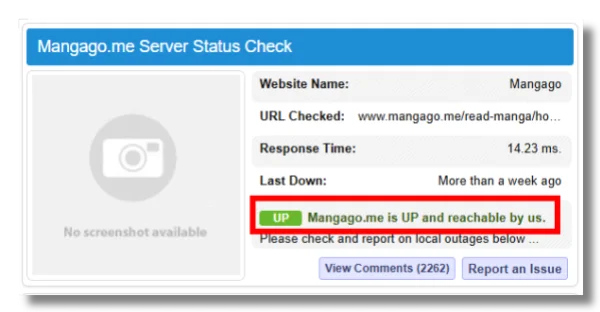
👉 If you can’t access it after checking, it’s usually a local issue, not a full outage.
Where Is MangaGo Blocked in 2026?
If MangaGo does not go through a global downtime right now, you should know if MangaGo is geo-blocked in your region. Here's a MangaGo not working report from a Reddit user:
if you're form the philippines and your mangago doesn't work. it MIGHT be because you're using globe wifi and they MAY have banned it. use a VPN.

The MangaGo access will be denied without a free proxy VPN if there are geographic restrictions.
🔴Countries where MangaGo is highly blocked:
- 🇨🇳 China (very likely blocked via national firewall)
- 🇦🇪 UAE (strict copyright + site filtering)
- 🇸🇦 Saudi Arabia
- 🇮🇷 Iran
- 🇹🇷 Turkey (periodic ISP-level blocking or DNS filtering)
- 🇮🇩 Indonesia (intermittent ISP blocks)
- 🇮🇳 India (some ISPs block or throttle)
🟠Countries where MangaGo is likely blocked by ISPs:
- 🇰🇷 South Korea (some users report South Korea VPN required)
- 🇷🇺 Russia (domain blocking can occur depending on ISP)
- 🇵🇭 Philippines (occasional DNS filtering & ISP blocks)
- 🇺🇸 United States (usually accessible, but school/work networks often block it)
- 🇬🇧 UK (rare blocks, more often ISP/ad-block interference)
🟢Countries where MangaGo is often available:
- 🇺🇸 United States
- 🇨🇦 Canada
- 🇬🇧 United Kingdom
- 🇫🇷 France
- 🇩🇪 Germany
- 🇪🇸 Spain
- 🇵🇹 Portugal
- 🇮🇹 Italy
- 🇯🇵 Japan
- 🇸🇬 Singapore
- 🇦🇺 Australia
- 🇳🇿 New Zealand
- 🇧🇷 Brazil
- 🇨🇴 Colombia
- ...
The most effective way to bypass MangaGo geo-restrictions is to use a reliable browsing VPN like UFO VPN.
It provides fast VPN servers working for accessing MangaGo.me, such as the USA VPN free, the UK VPN free, Japan VPN free, Canada VPN free, France VPN free, etc.
12 Easy Ways to Fix MangaGo Not Working
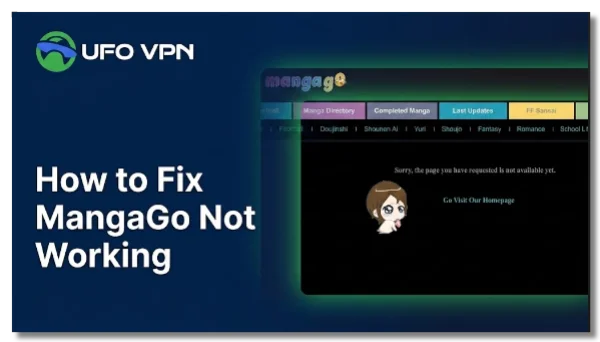
The MangaGo site not working issue can behave differently depending on your device, network, or region. The practical ways below are aimed at dealing with these common MangaGo symptoms:
- The website won’t load or shows a blank page
- “Access denied” or “Have no permission” error appears
- Pages load indefinitely with no manga content showing
- Manga images are missing or not loading properly
- Login button or navigation features disappear
- Chapters open but stay stuck in loading state
- Comments or community features fail to post or refresh
- The site works on one device but not another (e.g., iPhone vs iPad)
- VPN changes behavior (works only on certain servers or stops working entirely)
- Specific manga chapters suddenly become unavailable or removed
If your MangaGo site is not working properly in any of the above scenarios, try these solutions:
Way 1. Wait a While and Try Later
If you've verified that MangaGo is down for everyone during peak hours or maintenance. The only way is to wait for recovery and try refreshing the site later. At the same time, you can look through some forums or communities like Reddit or Twitter. Search for keywords like "MangaGo not working Reddit" for live status information.
Way 2. Use a VPN to Bypass MangaGo Restrictions
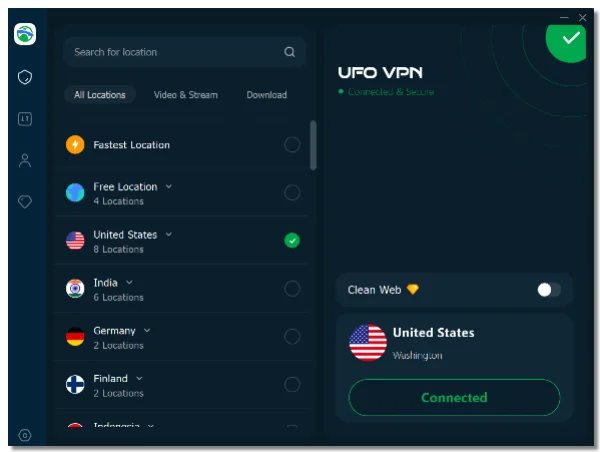
If you can't access MangaGo because your country blocks MangaGo, a VPN for MangaGo is the fastest way to unblock it. A reliable VPN like UFO VPN helps hide your real IP address with a new virtual one, so your local ISPs can not see that you're browsing MangaGo.me.
Choose a VPN country that works for MangaGo and always keep it on when you're reading your favorite manga.
Way 3. Switch Between WiFi and Mobile Data
Sometimes MangaGo may work on one network but fail on another. This usually happens when your ISP blocks certain manga domains, slows image-heavy pages, or has temporary DNS routing issues.
Steps:
- Turn off WiFi and switch to mobile data
- Or switch from mobile data to WiFi
- Reload MangaGo
- Check if images and chapters load correctly
This helps identify if your ISP is causing the problem.
Way 4. Clear Browser Cache & Cookies
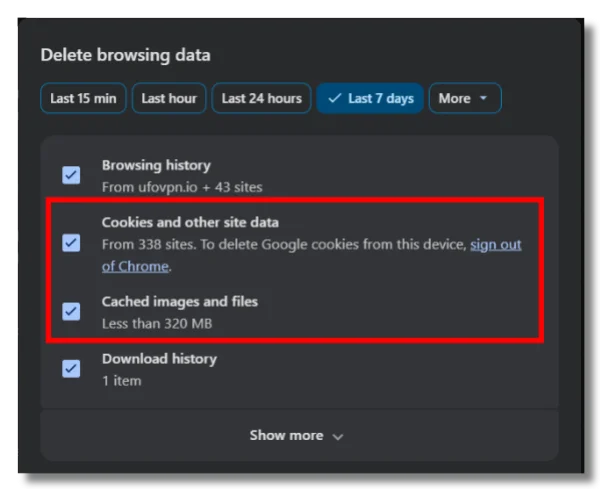
Over time, cached files and old cookies can conflict with MangaGo’s updated scripts or page structure. This can lead to problems such as chapters loading forever, broken images, missing login buttons, or random site glitches.
Steps:
- Go to browser settings
- Find “Privacy” or “History”
- Select “Delete browsing data”
- Check “Cache” and “Cookies”
- Restart browser and reopen MangaGo
This often fixes MangaGo loading problems without needing additional tools.
Way 5. Open MangaGo.me in Incognito Mode
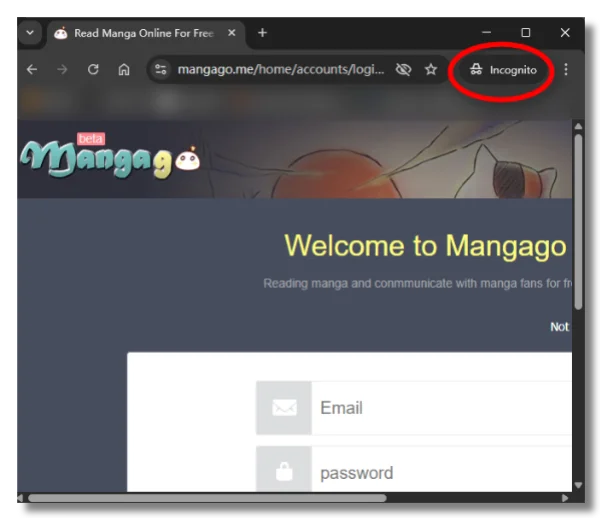
If you don't want to clear out your browser cache and cookies, directly access MangaGo in Incognito Mode. Incognito mode temporarily disables stored browsing data and makes you feel like browsing in a private environment, without extra interference.
Steps:
- Open your browser, Chrome, Safari, or Firefox
- Find the "⋮" three dots icon in the upper-right corner
- Select “New Incognito Window” / “Private Mode”
- Visit MangaGo again
- Try loading the same chapter
Way 6. Disable Ad Blockers or Browser Extensions
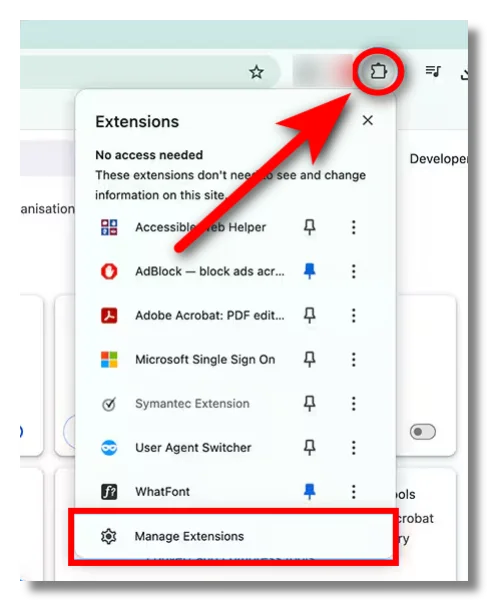
Some browser extensions—especially aggressive ad blockers, script blockers, or privacy tools—can accidentally block MangaGo’s page scripts or image requests. As a result, manga pages may fail to load properly or certain features may disappear.
Steps:
- Temporarily disable ad blockers
- Turn off script-blocking extensions
- Reload MangaGo page
- Test again in a clean browser session
If MangaGo starts working again, one of your extensions is likely interfering with the site.
Way 7. Try Another Browser (Firefox, Opera, DuckDuckGo)
Different browsers handle website scripts, cookies, and image rendering differently. If MangaGo is not working on Safari or Chrome, another browser may load the site more smoothly.
Steps:
- Install an alternative browser (Firefox / Opera / DuckDuckGo Browser)
- Open MangaGo in the new browser
- Compare performance with your current one
- Switch permanently if it works better
Way 8. Restart or Update Your Device
Sometimes, the issue is not the website itself. MangaGo may work on iPhone, but not on iPad with temporary system glitches.
Steps:
- Restart your phone, tablet, or computer
- Check for system updates
- Install updates if available
- Reopen browser and try MangaGo again
Way 9. Change DNS Settings
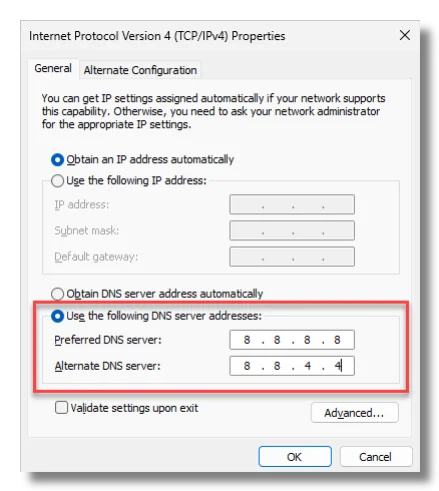
DNS servers help your device locate websites online. If your current DNS provider is slow, unstable, or filtering manga-related domains, MangaGo may fail to load correctly or appear completely inaccessible.
On Windows
- Open Settings → Network & Internet
- Select your current WiFi or Ethernet connection
- Click Edit DNS settings
- Change from Automatic to Manual
- Enable IPv4
- Enter one of these DNS addresses:
- Google DNS:
8.8.8.8and8.8.4.4 - Cloudflare DNS:
1.1.1.1and1.0.0.1
- Google DNS:
- Save changes and reconnect to the network
- Reload MangaGo
On iPhone / iPad
- Open Settings → Wi-Fi
- Tap the ⓘ icon next to your connected network
- Scroll down to Configure DNS
- Select Manual
- Remove old DNS entries
- Add:
1.1.1.18.8.8.8
- Save settings
- Reopen Safari or Chrome and visit MangaGo again
On Android
- Open Settings → Network & Internet
- Go to Private DNS
- Select Private DNS provider hostname
- Enter:
dns.googlefor Google DNS1dot1dot1dot1.cloudflare-dns.comfor Cloudflare
- Save settings
- Restart your browser and reload MangaGo
Way 10. Log Out and Log Back In
MangaGo account sessions occasionally become corrupted, especially after site updates or browser changes.
Steps:
- Log out of MangaGo account
- Close browser tab
- Reopen site
- Log in again and test access
Way 11. Check If the Domain Changed
Because manga sites often face copyright complaints or regional restrictions, their domains may occasionally change or redirect. This can cause saved bookmarks to stop working or display errors like “requested file not found.” Always check the MangaGo official site and avoid mirror or fake sites.
Way 12. Your Chromebook May No Longer Support Chrome Properly
Older Chromebooks may struggle with modern website scripts. If your device is no longer supported or frequently freezes while loading MangaGo, upgrading to a newer Chromebook may improve performance.
How to Access MangaGo Site Safely and Privately?
If you’re unable to access MangaGo or worried about privacy risks while browsing, the most effective solution is using a reliable VPN like UFO VPN. It helps you unlock restricted access while keeping your online activity encrypted and anonymous.
🚀 Why Use UFO VPN for MangaGo?
- Unlock MangaGo in restricted regions
- Hide your real IP address for privacy protection
- Encrypt your browsing data to prevent tracking
- Improve connection stability for smoother page loading
- Reduce exposure to ISP filtering or network blocks
Download UFO VPN for MangaGo with the setup steps:


UFO VPN is an all-in-one VPN that offers unlimited access to 4K streaming like Netlfix, Disney Plus, no-ping gaming as PUBG, Roblox, CODM and social networking for YouTube, X, Facebook and more.




Unlock Pro Features
If you have upgraded to premium plan , feel free to enjoy premium servers for 4K streaming and advanced features like Kill Switch, Split Tunneling, and gaming acceleration. Your Mac is now fully optimized and protected. Inaddition to basic functions, we recommend you turn on

Verify Your IP Now
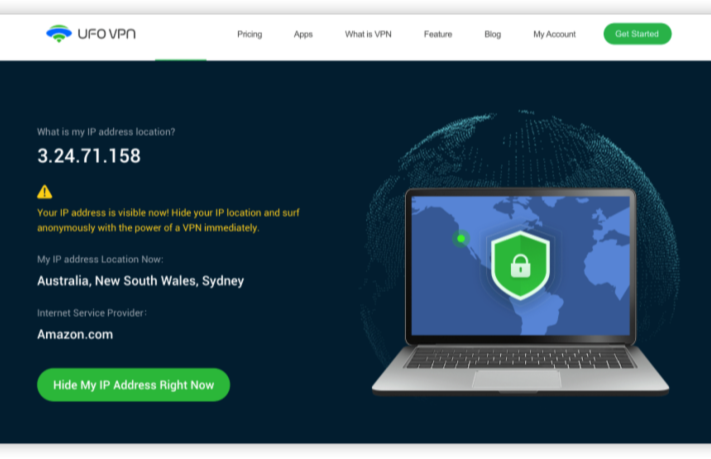
Use UFO VPN's " What is My IP " feature to see your new IP and location. This confirms your connection is secure, anonymous, and ready for safe browsing online anywhere at any time.







More tips when accessing MangaGo with UFO VPN:
Connect to UFO VPN before opening MangaGo to hide your IP and bypass access restrictions
Choose a stable server location for smoother page loading
Use incognito/private mode to reduce tracking and cookie conflicts
clear cache if pages don’t load properly or show errors
Enable an ad blocker to reduce pop-ups and intrusive redirects
Keep UFO VPN active during your entire browsing session for continuous protection
Don’t click fake “download” or “mirror” buttons that may appear in ads
Don’t enter personal, login, or payment information on unofficial pages
Don’t install unknown extensions or plugins prompted by pop-ups
Explore Best MangaGo Alternatives in 2026
If MangaGo is still not working for you after trying the above fixes, there are several alternatives to it.
1. MangaDex
MangaDex is one of the most widely used community-based manga platforms, known for its clean interface and large multilingual library.
Pros
- Large collection of manga, manhwa, and manhua
- No aggressive pop-up ads
- Strong filtering (genre, language, status)
- Active community uploads and translations
- Good for niche and rare titles
Cons
- Some chapters may be missing or incomplete
- Upload speed depends on the community
- Occasional downtime or slow loading during peak traffic
- Interface may feel basic compared to modern apps
2. Webtoon
Webtoon is a leading platform for digital comics, especially Korean manhwa, with a strong mobile-first design.
Pros
- Smooth vertical-scroll reading experience
- Fully mobile-optimized
- High-quality official content
- Regular updates from creators
- Large romance, fantasy, and drama selection
Cons
- Limited traditional Japanese manga
- Many episodes are locked behind paywall or wait system
- Requires account for full features
- Less “free browsing” flexibility
3. Tapas
Tapas focuses on indie comics, novels, and romance-heavy storytelling, with a mix of free and premium content.
Pros
- Strong indie creator ecosystem
- Good for romance and slice-of-life genres
- Free episodes available daily
- Clean and modern UI
- Supports web novels and comics
Cons
- Limited mainstream manga titles
- Many chapters require coins or payment
- Smaller library compared to bigger platforms
- Less suitable for action-heavy manga readers
4. Manga Plus
Manga Plus is an official platform by Shueisha offering legal manga releases globally.
Pros
- 100% legal and safe
- Simultaneous global chapter releases
- High-quality official translations
- Free access to many latest chapters
- Fast and stable performance
Cons
- Limited back catalog (older chapters often unavailable)
- Focus mainly on Shonen Jump titles
- No community uploads or niche series
- Some regions may have restrictions on full library
5. VIZ Manga
VIZ Manga is a premium official platform offering licensed English manga content.
Pros
- Large catalog of popular mainstream manga
- Professional English translations
- Stable and high-quality reading experience
- Regular updates for ongoing series
- Supports official publishers
Cons
- Subscription required for full access
- Limited free content
- Focus mainly on mainstream titles
- Less variety in niche genres
Final Words
MangaGo not working issues in 2026 are usually caused by regional restrictions, browser errors, or temporary server instability rather than a permanent shutdown. By checking your network, clearing browser data, or switching devices, most problems can be fixed quickly. If access remains unstable, exploring alternatives like MangaDex or Webtoon ensures uninterrupted reading.
FAQs
Why is my MangaGo comment not posting?
This usually happens due to a temporary site glitch, expired login session, or browser cache/extension blocking the comment system. Try refreshing, logging in again, or switching browsers.
What should I do if the manga has been taken down?
If a manga is removed, it’s often due to copyright or content removal. You can try searching the title on other platforms like MangaDex or WEBTOON, or check if only certain chapters are missing.
Why does MangaGo show “Have no permission” error?
This error usually means the page is blocked or restricted by region, network, or ISP filtering rather than your account being banned. Switching networks or browsers often helps.