Preview: FitGirl Repack
FitGirl Repack is a website that distributes compressed versions of PC games without compromising gameplay quality. By reducing file size, it helps users with slower connections download AAA titles faster.
-
Domain Type: Torrent-based distribution
-
Primary Access: BitTorrent protocol
-
Target Audience: Gamers worldwide seeking smaller, install-ready game files
-
Supported Platforms: Windows PCs
Note: FitGirl doesn't crack games itself but repacks existing cracked versions.
Where Is FitGirl Repack Available
FitGirl Repack is a globally popular site, but its accessibility varies by region due to internet censorship and copyright enforcement.
In these regions, users can typically access the official FitGirl site or its mirrors without major issues:
-
Russia
-
Ukraine
-
Brazil
-
Philippines
-
Mexico
-
Vietnam
-
South Africa
-
Indonesia
-
Thailand
-
Pakistan
-
Bangladesh
In other countries, FitGirl Repack is often blocked by ISPs or flagged as a piracy-related site, making direct access difficult or impossible without a free proxy VPN or proxy.
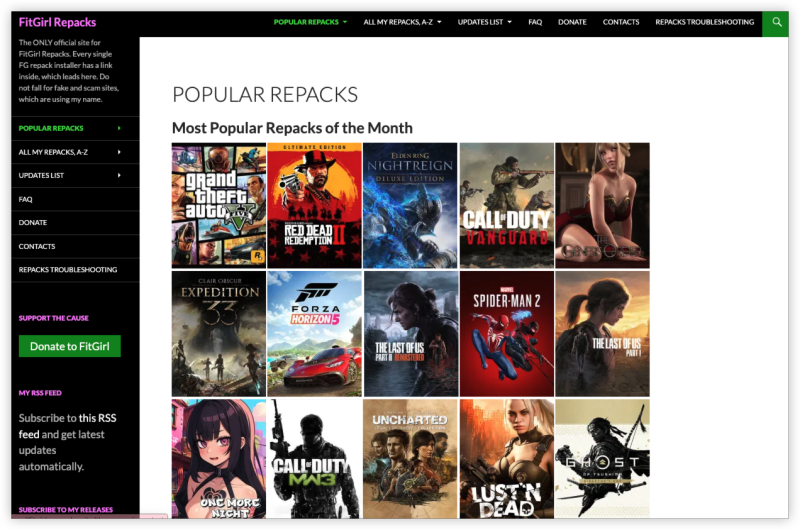
5 Steps to Use FitGirl Repack
Here’s how to download and install games from FitGirl Repack safely and effectively.
Step 1: Use a VPN Before Downloading
A free proxy VPN helps you access blocked sites (FitGirl mirrors, torrent trackers) and hides your IP address from ISPs and copyright enforcers.
Recommended UFO VPN Server Locations for FitGirl Access:
How to use UFO VPN:


UFO VPN is an all-in-one VPN that offers unlimited access to 4K streaming like Netlfix, Disney Plus, no-ping gaming as PUBG, Roblox, CODM and social networking for YouTube, X, Facebook and more.




Unlock Pro Features
If you have upgraded to premium plan , feel free to enjoy premium servers for 4K streaming and advanced features like Kill Switch, Split Tunneling, and gaming acceleration. Your Mac is now fully optimized and protected. Inaddition to basic functions, we recommend you turn on

Verify Your IP Now
Use UFO VPN's " What is My IP " feature to see your new IP and location. This confirms your connection is secure, anonymous, and ready for safe browsing online anywhere at any time.







Step 2: Install a Torrent Client
Then you need a torrent client first to download FitGirl files. Recommended clients:
| Torrent Client | Features | Support OS |
|---|---|---|
| Open-source, no ads | Windows, Mac, Linux | |
| Tixati | Lightweight, easy UI | Windows, Linux |
| Deluge | Customizable via plugins | Windows, Mac, Linux |
| BitTorrent | Mainstream, ad-supported | Windows, Mac |
Step 3: Visit the Official FitGirl Site
Always get the real link from: https://fitgirl-repacks.site (official domain)
Or use trusted mirror links and proxies verified by the community (Reddit, forums).
⚠️ Avoid fake clone sites with malicious ads or cryptocurrency miners.
Step 4: Download the Torrent File or Magnet Link
-
Use the magnet link or .torrent file listed next to your desired game
-
Open it with your torrent client (like qBittorrent)
-
Start the download
Step 5: Install the Game Properly
After download:
-
Run the installer (setup.exe)
-
Follow the guided installation process
-
Turn off antivirus temporarily to avoid false positives (re-enable afterward)
-
Launch the game via desktop shortcut or .exe file
The installation can be long due to compression. Be patient!
Additional Tips for FitGirl Repack Usage
-
Always check the MD5 hash of downloaded files (provided on the site)
-
Use 7-Zip for extraction if needed
-
Temporarily disable antivirus or Windows Defender during install
-
Run as administrator for installation
-
Avoid installing on system drives (like C:)
Conclusion
Even if you're in a country where FitGirl Repack is not officially blocked, your torrent activity may still be monitored, throttled, or logged by your ISP. That's why using a secure VPN and torrent client is crucial.
FAQs
Is FitGirl Repack safe from viruses?
Yes, as long as you download from the official FitGirl site. Community feedback confirms it's among the cleanest repack sources.
Can I play online multiplayer with FitGirl games?
Mostly no. Repacked games typically strip out multiplayer functionality. Some may include cracked servers, but they're risky and not reliable.
What if FitGirl is blocked in my country?
Use a VPN like UFO VPN or proxy mirror to bypass geo-blocking and access FitGirl from anywhere.
Do I need to seed FitGirl torrents?
Seeding is optional but encouraged to help others download faster. If you choose to seed, ensure your VPN is active to protect your identity.
Why is the installation in FitGirl Repack so long?
FitGirl games are highly compressed, which means your system must decompress large files during install. The process can take up to 1–2 hours.