What is Pegasus Spyware?

Pegasus spyware is a highly sophisticated tool developed by the Israeli surveillance company NSO Group. Initially designed for law enforcement and government use, it allows hackers to remotely access and monitor an infected device. Pegasus can:
-
Steal data: This includes text messages, emails, contacts, photos, and even social media messages.
-
Record audio and video: The spyware can activate a phone's camera and microphone without the user’s knowledge.
-
Track location: Pegasus can follow a user’s every move, tracking them via GPS.
While Pegasus was originally intended for espionage and criminal investigations, it has been misused for illegal surveillance, including hacking high-profile targets, journalists, and activists. This powerful spyware is now being weaponized through Pegasus scam emails, attempting to trick users into unknowingly installing the malware on their devices.
How Does the Pegasus Email Scam Work?
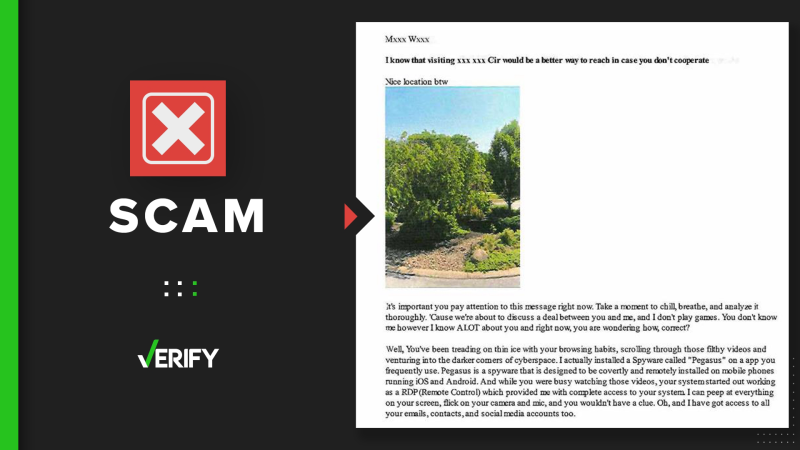
The Pegasus scam email operates much like other phishing scams but with a much more sophisticated twist. Here’s how it usually plays out:
-
The Email Appears Legitimate:
The email may appear to come from a trusted company or government entity, such as a bank, social media platform, or even law enforcement. -
A Sense of Urgency:
Scammers create a sense of urgency, claiming that your account has been compromised, your personal information is at risk, or you need to verify something immediately. This compels you to take action quickly, often without carefully thinking through the request. -
The Link or Attachment:
The email will prompt you to click on a link or download an attachment. This is the moment when the Pegasus spyware scam email does its damage. Clicking the link or opening the attachment installs the malware onto your phone or computer. -
Spyware Installation:
Once installed, Pegasus spyware silently takes control of your device. It can access everything on your phone, including messages, emails, and even encrypted communications.
The biggest danger with Pegasus spyware is that it can operate invisibly, making it hard for users to detect. The spyware uses zero-click exploits, meaning it doesn't require any action from the user to be installed. All it takes is receiving a malicious message or email.
Signs That You May Have Fallen for a Pegasus Email Scam
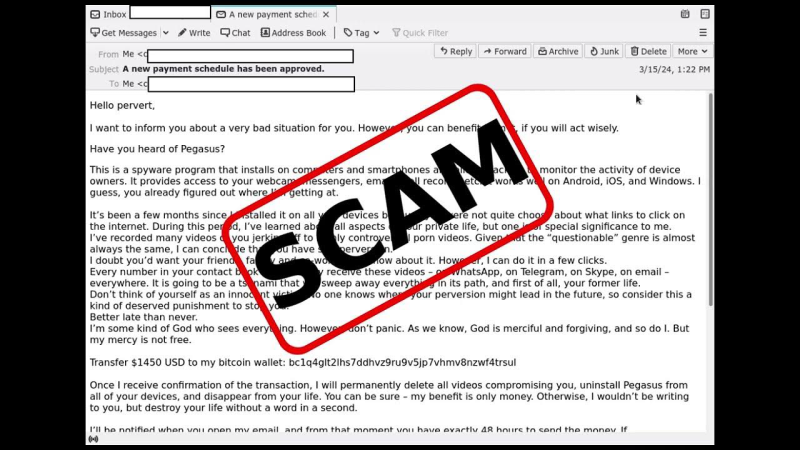
To avoid being tricked, here are common signs that may indicate you’ve received a Pegasus scam email:
-
Suspicious Sender:
Check the sender's email address. Phishing emails often come from fake domains that look similar to legitimate ones but have subtle spelling errors (e.g.,support@paypl.cominstead ofsupport@paypal.com). -
Unexpected Attachments or Links:
Be wary of unsolicited emails that prompt you to download an attachment or click on a link, especially if you're not expecting communication from the supposed sender. -
Grammatical Errors or Unusual Tone:
Scam emails often contain awkward language, spelling errors, or odd phrasing. A legitimate company or government organization will usually send emails that are carefully crafted. -
Urgent Requests or Threats:
Many scams create a sense of urgency, such as threats of account suspension or unauthorized access, urging you to act quickly. -
Suspicious Requests for Personal Information:
Legitimate companies will never ask you for sensitive information via email, such as your login credentials, social security number, or credit card details.
How to Protect Yourself from the Pegasus Email Scam
1. Don’t Click on Unknown Links or Attachments
The first rule in avoiding phishing scams, including the Pegasus spyware scam email, is to never click on any links or download attachments from unfamiliar sources. Even if the email seems to come from someone you know, always double-check the details before interacting with the content.
2. Enable Multi-Factor Authentication (MFA)
Multi-factor authentication adds an extra layer of security to your accounts. Even if a hacker gains access to your login credentials, they will still need additional verification to break into your accounts. Enable MFA wherever possible.
3. Regularly Update Your Software
Make sure your device's operating system and apps are always up to date. Security patches are often released to address vulnerabilities that could be exploited by malware like Pegasus.
4. Use UFO VPN for Extra Protection
When browsing the web or opening emails, use a reliable VPN like UFO VPN. VPNs encrypt your internet connection, making it harder for cybercriminals to access your data or intercept your communications. UFO VPN ensures your privacy by masking your IP address and securing your online activity.
5. Install Anti-Spyware and Anti-Malware Software
Having up-to-date anti-malware software installed on your device can help detect and prevent spyware like Pegasus. Many security tools can scan incoming emails and attachments for malicious content.
6. Educate Yourself and Stay Vigilant
Awareness is your first line of defense. Familiarize yourself with common phishing tactics and scams. The more you know, the less likely you are to fall for them.
How Best free VPN Helps Secure Your Data

While protecting yourself from Pegasus spyware scam emails is crucial, securing your entire online experience is essential. Here’s how UFO VPN plays a vital role:
-
Encrypted Browsing: UFO VPN encrypts all internet traffic, protecting your communications from interception, even in public Wi-Fi environments.
-
Hide Your IP Address: By masking your IP address, UFO VPN makes it more difficult for hackers or malicious actors to track your activities.
-
Access Secure Websites: UFO VPN helps you connect to trusted sites by bypassing potential geo-restrictions and firewalls set by hackers or other cyber threats.
-
Anonymous email: Prevent websites and email senders from tracking you, ensuring that your browsing activity remains private.
Using UFO VPN in conjunction with best practices for email security will ensure that your device remains safe from spyware like Pegasus and other malware.
Safely Download UFO VPN


UFO VPN is an all-in-one VPN that offers unlimited access to 4D streaming like Netlfix, Disney Plus, no-ping gaming as PUBG, Roblox, CODM and social networking for YouTube, X, Facebook and more.




Unlock Pro Features
If you have upgraded to premium plan , feel free to enjoy premium servers for 4K streaming and advanced features like Kill Switch, Split Tunneling, and gaming acceleration. Your Mac is now fully optimized and protected. Inaddition to basic functions, we recommend you turn on

Verify Your IP Now
Use UFO VPN's " What is My IP " feature to see your new IP and location. This confirms your connection is secure, anonymous, and ready for safe browsing online anywhere at any time.







Frequently Asked Questions (FAQ)
Q1: What is Pegasus spyware?
Pegasus is a sophisticated spyware tool developed by NSO Group that can remotely access and monitor a person’s device. It can steal data, record audio/video, and track locations.
Q2: How do I know if I’ve received a Pegasus scam email?
Look for signs such as suspicious links or attachments, unexpected requests for personal information, and grammatical errors in the email content.
Q3: Can Pegasus spyware be installed without me clicking on anything?
Yes, Pegasus can be installed via zero-click vulnerabilities, meaning it can infect your device just by receiving a malicious message or email.
Q4: What should I do if I suspect I’ve been infected with Pegasus?
If you suspect spyware on your device, immediately disconnect from the internet, run an anti-malware scan, and seek help from a cybersecurity professional.
Q5: How does UFO VPN protect me from spyware?
UFO VPN encrypts your internet connection and hides your IP address, preventing hackers and spyware from tracking your online activities and gaining access to your personal data.
Conclusion
The Pegasus email scam is a dangerous threat to online security, but with awareness and the right precautions, you can protect yourself. By recognizing the signs of a Pegasus spyware scam email and implementing safety measures such as using a VPN and keeping your software up to date, you’ll be well-prepared to avoid falling victim to these attacks. With UFO VPN, you add an extra layer of encryption and privacy to safeguard your online presence against any digital threat. Stay vigilant, stay secure, and stay protected!