Why Is Drive U7 Home So Popular?
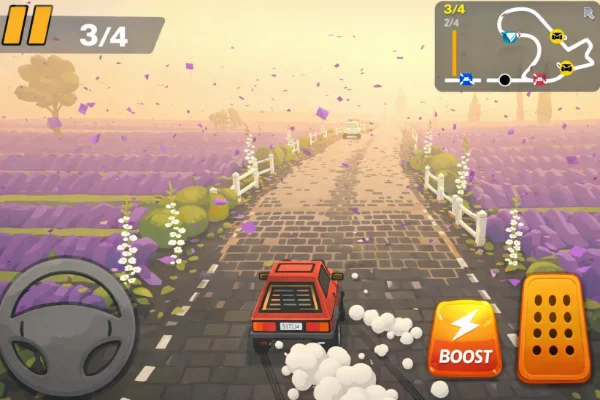
Drive U7 Home is a driving simulation game that emphasizes fun over realism. Players control small, fast cars across a variety of tracks, including city streets, parking lots, and countryside roads. The game uses straightforward controls: accelerate, brake, and steer. Some versions also include drifting mechanics to help complete tight turns efficiently. Players often unlock new vehicles and tracks as they progress, adding to the replay value.
The game appeals to a wide audience. Young players enjoy the colorful graphics and simple gameplay, while older players appreciate the challenge of mastering tracks and beating high scores. Streamers and content creators have also contributed to the game’s popularity by sharing exciting gameplay clips, making Drive U7 Home a social experience as well.
Its popularity is also due to accessibility. Unlike many modern games that require expensive hardware or large downloads, Drive U7 Home can run smoothly on most browsers and devices. This low barrier to entry ensures that nearly anyone with an internet connection can join in the fun, making it a top choice for casual gaming sessions.
Why & Where Is Drive U7 Home Often Blocked?
You might wonder why a harmless driving game gets banned in the first place. The answer usually comes down to productivity and bandwidth. Schools and workplaces use network filters to stop people from accessing entertainment sites during working hours. Network administrators often block entire categories of websites, including "Games" or "Entertainment," to ensure students stay focused on their studies and employees stay on task.
These blocks are most common in:
-
High Schools and Colleges: To prevent distraction in computer labs.
-
Corporate Offices: To keep employees focused on work.
-
Public Libraries: To prioritize bandwidth for research and reading.
-
Public WiFi: To limit data usage on shared networks. Because Drive U7 Home is hosted on gaming websites, it often gets caught in these wide-reaching filters, even though it is a safe and simple browser game.
How to Get Drive U7 Home Unblocked at School or Any Public Areas?
Accessing Drive U7 Home in restricted networks requires safe and reliable solutions. There are several technical and device-based approaches to bypass blocks without compromising security.
🧰 Technical Solutions
1. Use a Reliable VPN: A VPN, or Virtual Private Network, masks your IP address and encrypts your internet traffic. This allows you to access websites that might be blocked on your current network. UFO VPN is a popular choice for gamers because it is lightweight, fast, and secure. Using a free proxy VPN in UFO VPN, players can connect to different servers to access Drive U7 Home without restrictions. The VPN ensures your connection is private while maintaining good speed for smooth gameplay.


UFO VPN is an all-in-one VPN that offers unlimited access to 4K streaming like Netlfix, Disney Plus, no-ping gaming as PUBG, Roblox, CODM and social networking for YouTube, X, Facebook and more.




Unlock Pro Features
If you have upgraded to premium plan , feel free to enjoy premium servers for 4K streaming and advanced features like Kill Switch, Split Tunneling, and gaming acceleration. Your Mac is now fully optimized and protected. Inaddition to basic functions, we recommend you turn on

Verify Your IP Now
Use UFO VPN's " What is My IP " feature to see your new IP and location. This confirms your connection is secure, anonymous, and ready for safe browsing online anywhere at any time.







2. Use a Web Proxy: A web proxy is another method to bypass blocks. It acts as an intermediary between your device and the game server, allowing you to access Drive U7 Home through a different IP. Many free proxies are available online, but it is important to choose ones with SSL support to keep your data safe.
3. Browser Extensions: Some browser extensions can help unblock websites by routing traffic through external servers. Extensions like those for Chrome or Firefox can provide quick access to Drive U7 Home without installing a full VPN client. However, always check user reviews and ratings to avoid malicious software.
4. Change DNS Settings: Modifying your DNS server settings can sometimes bypass restrictions. Using public DNS servers like Google DNS (8.8.8.8 / 8.8.4.4) or Cloudflare DNS (1.1.1.1) may allow access to blocked games. This solution is simple and does not require extra software, but it may not work on all networks.
🧰 Offline Options
Some versions of Drive U7 Home are available for download or can be played using offline browser emulators. Offline gameplay ensures you can enjoy the game without relying on network access. Check the official site or reputable gaming platforms for downloadable versions to avoid unsafe files.
🧰 Device Options
Drive U7 Home works on multiple devices, including:
-
Chromebooks: It runs perfectly on school-issued devices because they are lightweight.
-
Smartphones & Tablets: The game controls are touch-friendly, so you can play on your iPhone or Android during lunch.
-
Laptops: Runs smoothly on any Windows or Mac machine with a basic browser like Chrome or Firefox.
Alternative Options: Similar Driving Game Like Drive U7 Home
If you have mastered every level or just want a change of pace, there are plenty of other driving games that offer similar thrills. Here are some great alternatives you can check out.
-
Moto X3M: This is a fast-paced bike racing game. Instead of parking, you are racing against the clock over crazy obstacles like spikes and loops. It is much faster than Drive U7 Home but requires the same quick reflexes.
-
Drift Boss: This is a one-button game where timing is everything. You have to drive your car through a winding track without falling off the edge. It is simple, addictive, and perfect for quick sessions.
-
Slope Unblocked: While not a car game, it shares the "avoid the obstacle" spirit. You control a ball rolling down a 3D slope at high speeds. It tests your reaction time to the limit.
-
Car Racing Unblocked Collection: This is usually a hub or a pack of various simple racing games. If you want variety—from drag racing to circuit laps—this collection is a good place to look.
-
Madalin Stunt Cars 2: If you want freedom, this is the game. It is an open-world driving game with amazing graphics for a browser title. You can drive fast sports cars, do loops, and crash without consequences.
-
Parking Fury: This is the closest cousin to Drive U7 Home. It focuses entirely on parking mechanics. You have to drive various vehicles, including trucks and trailers, into tight spots without scratching the paint.
Bonus Gameplay Tips and Tricks
Getting three stars on every level of Drive U7 Home isn't easy. Here is how to improve your driving.
-
Master the Controls: For beginners, the hardest part is sensitivity. Don't hold the "forward" key down constantly. Tap the arrow keys gently to inch forward. This "feathering" technique helps you make tight turns without crashing.
-
Use the Brake: In this game, the brake is your best friend. Always come to a full stop before changing gears from forward to reverse. Shifting too fast can cause your car to jerk and hit an obstacle.
-
Look Ahead: Don't just look at your car's bumper. Look at the path ahead. If you see a tight corner coming up, swing wide early so you can turn into it smoothly.
-
Hidden Shortcuts: On some levels, the obvious path is the hardest one. Look for gaps in the barriers or grass patches you can drive over. sometimes driving "off-road" carefully is safer than navigating a narrow concrete maze.
- High Score Strategy: Speed matters, but accuracy matters more. You get more points for a clean run than a fast, messy one. Finish the level without hitting anything first; once you know the route, try to do it faster for a better spot on the leaderboard.
Drive 7U Home Fun Modes and Features to Boost Excitement
The game keeps things fresh with different ways to play.
-
Time Attack Mode: Once you beat the normal levels, try Time Attack. The clock counts down, adding pressure. You have to balance your need for speed with the risk of crashing. It is a heart-pounding way to play.
-
Car Customization: As you clear levels, you often earn in-game currency or points. Use these to unlock new cars. Smaller cars are easier to park in tight spots, while sports cars are faster but harder to handle. Finding the right car for the level is key.
-
Night Mode: Some versions of the game feature night driving. This changes the challenge completely because you can only see what is in your headlights. It requires you to memorize the track layout.
-
Reward System: The game rewards consistency. Playing daily or completing levels without a single crash grants you bonus coins or special skins for your vehicle.
Safety and Legal Considerations
When playing games on school or work networks, it is important to be smart and safe.
-
Respect the Rules: While unblocking games is fun, always respect your school's major policies. Don't play during important exams or lectures. Use these tools for your free time.
-
VPN Safety: Not all VPNs are safe. Some free, unknown VPNs might track your data or sell it. That is why it is better to stick to reputable services. When you use tools like UFO VPN, your connection is encrypted, meaning no one can snoop on your passwords or personal info while you play.
-
Official vs. Unofficial Sites: Always try to play on well-known unblocked game sites (like the ones hosting the official versions). Avoid clicking on suspicious pop-up ads that claim you won a prize. Unofficial mirror sites might host malware. If a site asks you to download an .exe file to play a browser game, leave immediately. Real browser games do not need installs.
Final Thoughts
Drive U7 Home is more than just a casual driving game - it's a fun, accessible experience for players of all ages. Despite network restrictions in schools or public areas, safe technical solutions like VPNs and proxies can help you enjoy uninterrupted gameplay.
Combined with alternative driving games, gameplay tips, and device flexibility, you can get the most out of your gaming sessions. Remember to stay safe online and follow guidelines to enjoy Drive U7 Home responsibly.
FAQs
Is Drive U7 Home free to play?
Yes, the game is free in most browser-based versions. Some versions offer optional in-game purchases or unlockable content.
Can I play Drive U7 Home offline?
Certain versions or downloadable files allow offline play. However, browser versions typically require an internet connection.
What devices can run Drive U7 Home?
The game runs on Windows, macOS, Android, iOS, and Chromebooks, making it highly versatile.
Is it safe to use a VPN for this game?
Yes, if you use a reputable VPN like UFO VPN. Avoid unverified free VPNs or proxies to ensure your data is protected.
Are there alternatives if Drive U7 Home is blocked?
Yes, games like Slope Unblocked, Drift Boss, Moto X3M, and Car Racing Unblocked Collection provide similar driving experiences.