Understanding Tinder's Blocking & Unblocking Terms

Before learning the actual steps, it helps to understand how Tinder handles blocking, unmatched users, and contact-based restrictions.
On Tinder, "blocking" usually refers to blocking someone through your phone contacts or preventing specific people from discovering your profile. Meanwhile, "unmatching" means removing an existing match from your conversations.
So, can you unblock someone on Tinder?
The short answer is YES — but the result depends on the type of restriction you used before. If you blocked someone through Tinder’s blocking feature or contact settings, you can usually remove the block later. However, if you unmatch someone, Tinder normally treats it as permanent, meaning the old conversation and match cannot be restored automatically.
Step-by-Step Guide to Unblock Someone on Tinder
Now that you understand Tinder’s basic blocking terms, the next question is naturally: How do you unblock someone on Tinder?
Below, we’ll walk through the full process step by step so you can remove someone from your blocked list safely and correctly.
Step 1. Access Tinder
The first step is to open the Tinder app or visit the Tinder website. However, in some countries, schools, workplaces, or public networks, Tinder may be restricted or unavailable. In these situations, a VPN can help you regain proper access.
In this area, a free proxy VPN in UFO VPN can be especially helpful. It can help you:
- Access Tinder while traveling abroad
- Improve privacy on public Wi-Fi
- Reduce network restrictions in certain regions
- Keep browsing activity more secure
Here's how to set it up in simple steps:


UFO VPN is an all-in-one VPN that offers unlimited access to 4K streaming like Netlfix, Disney Plus, no-ping gaming as PUBG, Roblox, CODM and social networking for YouTube, X, Facebook and more.




Unlock Pro Features
If you have upgraded to premium plan , feel free to enjoy premium servers for 4K streaming and advanced features like Kill Switch, Split Tunneling, and gaming acceleration. Your Mac is now fully optimized and protected. Inaddition to basic functions, we recommend you turn on

Verify Your IP Now
Use UFO VPN's " What is My IP " feature to see your new IP and location. This confirms your connection is secure, anonymous, and ready for safe browsing online anywhere at any time.







Step 2. Log in to Tinder
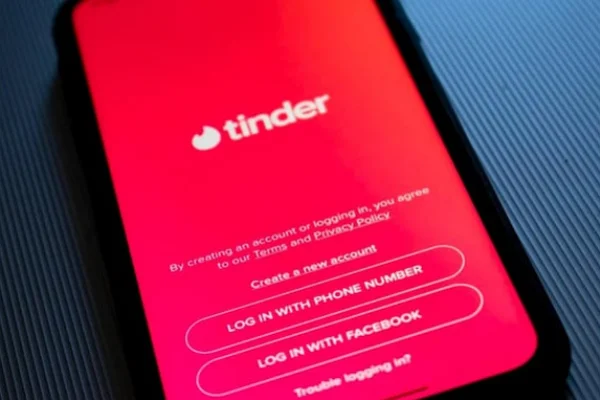
Enter your Tinder account information and log in normally.
Make sure you are using the same account where the person was originally blocked. Otherwise, the blocked list may appear empty.
🎯 Quick steps:
- After opening the Tinder app or website, tap Log In
- Choose your login method (Google, Apple ID, Facebook, or phone number)
- Enter your account details and continue
- If you forgot your password, tap Forgot Password? to reset your account credentials via email address or phone number.
Step 3. Open Your Tinder Profile
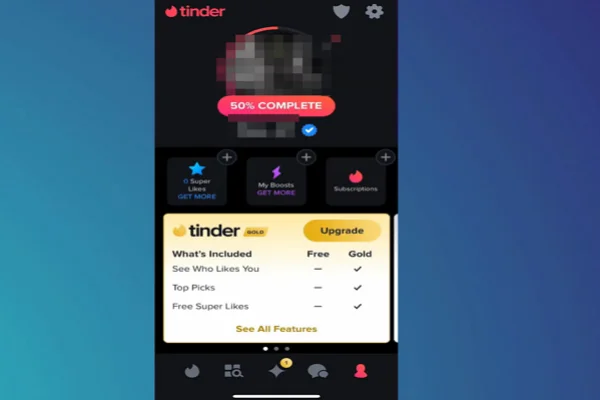
After entering the app:
- Tap your profile icon
- Go to Settings
- Scroll down until you find privacy-related options
This section contains Tinder’s blocking and contact management tools.
Step 4. Access the Blocked Contacts Section
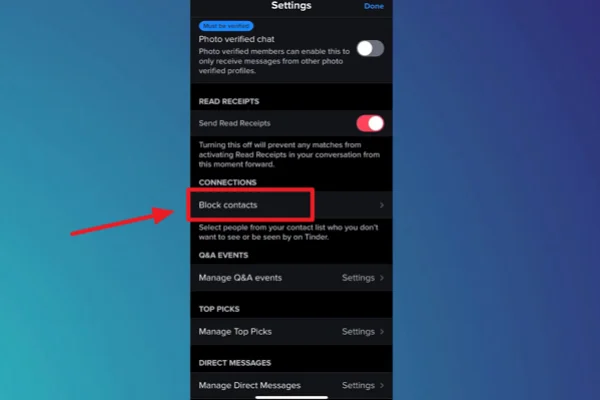
Inside Settings:
- Scroll down to find Blocked Contacts
- Tap to open the full blocked list
Here, Tinder will display the people you previously blocked using your phone contacts or Tinder's blocking tools.
Step 5. Find the Person You Want to Unblock
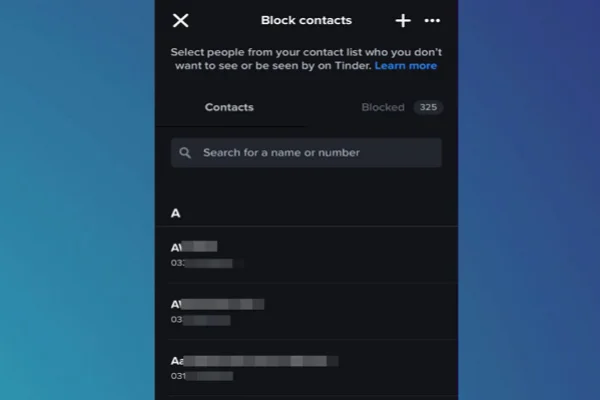
Browse through the blocked list carefully.
If the list is long, Tinder may organize blocked users based on synced contacts from your device.
Locate the person you want to remove from the block list.
Step 6. Tap "Unblock"
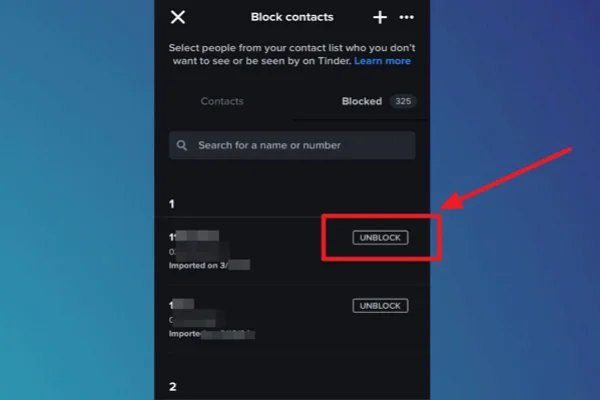
Once you find the person:
- Tap their profile or contact entry
- Select Unblock or Remove Block
After confirmation, Tinder will remove the restriction immediately.
Step 7. Return to Tinder Normally
Once unblocked:
- The person may be able to see your profile again
- You may appear in each other’s recommendations later
- Previous chats usually do not return automatically
- Old unmatched conversations generally remain deleted
If both users swipe right again in the future, a new match can still happen.


Is It Possible to Unblock Someone on Tinder without Number?
When unblocking someone on Tinder, it's also natural to ask: how do I unblock someone on Tinder without their numbers?
In most cases, you still may be able to unblock them if the blocked profile already exists inside Tinder’s blocked contacts system. Tinder stores blocked entries within your account settings, so you do not always need the original phone number again.
However, if the block was created directly through synced phone contacts and those contacts were deleted permanently, identifying the exact person later may become more difficult.
What Happens After You've Unblocked Someone on Tinder

After unblocking someone on Tinder, several things may change depending on your previous interaction history.
👉 Typical results include:
- They can potentially discover your profile again
- You may reappear in each other’s swipe recommendations
- You can interact again if both sides match later
- Blocking restrictions are removed immediately
⚠️ However, some things normally do not come back:
- Previous chats
- Old matches
- Past conversation history
- Earlier media or shared messages
If you‘ve unmatched the person before, Tinder generally does not restore the old connection automatically.
Beyond Blocking Someone: What Else to Do on Tinder?
Sometimes, blocking is not the only solution when someone makes you feel uncomfortable on Tinder. Here are several additional options you can consider.
1. Report Suspicious Behavior
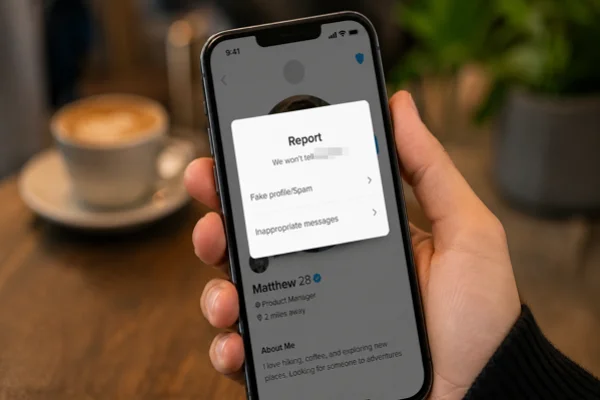
If someone is abusive, fake, or inappropriate, reporting the account helps Tinder review potential violations and protect other users.
💡 Quick steps:
- Open the person’s Tinder profile or chat
- Tap the menu icon
- Select Report
- Choose the reason and submit
2. Adjust Privacy Settings
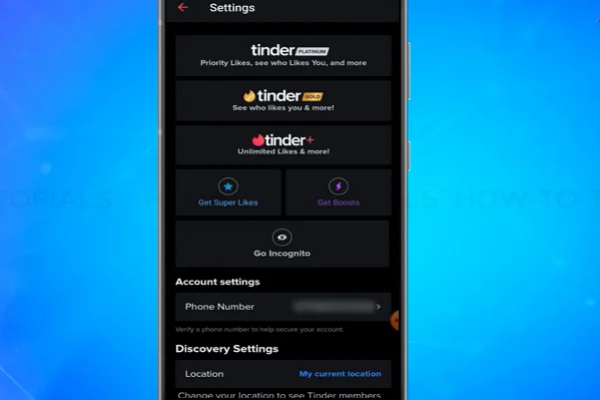
You can limit visibility, manage discovery preferences, and control who sees your profile more carefully.
💡 Quick steps:
- Open Tinder Settings
- Go to Privacy or Discovery Settings
- Adjust profile visibility and matching preferences
- Save the changes
3. Unmatch Instead of Blocking
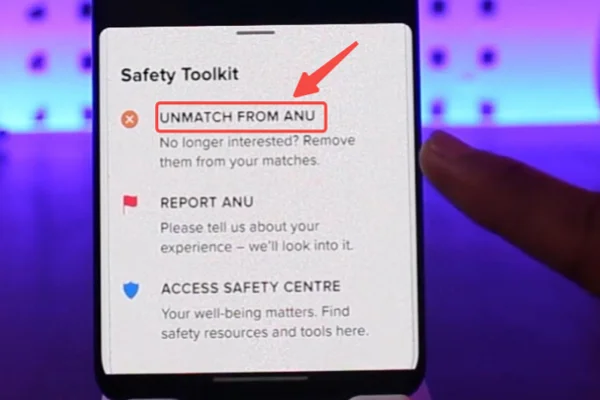
If you simply want to end communication quietly, unmatching may be enough without fully blocking the person.
💡 Quick steps:
- Open the chat with the person
- Tap the shield or menu icon
- Select Unmatch
- Confirm the action
4. Pause Your Profile Temporarily
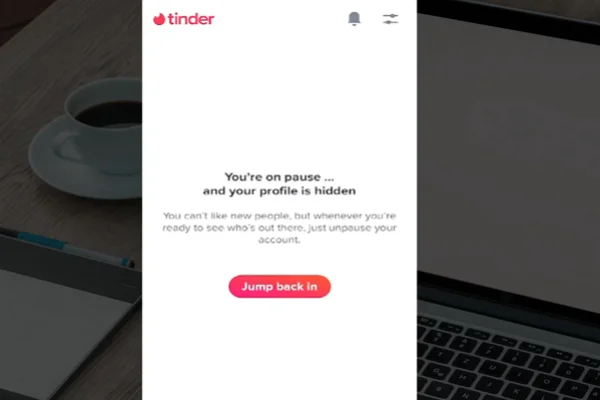
Tinder allows users to hide or pause profile visibility if they need a short break from dating apps.
💡 Quick steps:
- Go to Tinder Settings
- Find Show Me on Tinder
- Turn the option off
- Your profile will become hidden temporarily
5. Avoid Sharing Sensitive Information
For safety reasons, avoid sharing personal addresses, financial details, or private passwords with new matches.
💡 Safety tips:
- Keep early conversations inside Tinder
- Avoid sending banking or identity details
- Be cautious with suspicious links
- Meet in public places when meeting offline for the first time
Bonus Tips to Enhance the Overall Experience on Tinder
Besides managing blocks and matches, a few small habits can make Tinder more enjoyable, smoother, and safer overall. Here are several useful Tinder dos and don’ts worth remembering.
Use clear and authentic profile photos
Write a short but interesting bio
Respect other users during conversations
Keep your Tinder app updated regularly
Use secure internet connections or a VPN on public Wi-Fi
Swipe naturally instead of excessively liking everyone
Do not use fake or heavily edited pictures
Do not share sensitive personal information too early
Do not spam matches with repetitive messages
Do not behave aggressively or disrespectfully
Do not click suspicious links from strangers
Do not use unofficial or modified Tinder apps
Conclusion
Managing your Tinder connections is not always permanent, and sometimes people change their minds after blocking someone. Whether the block happened accidentally or during a temporary disagreement, understanding Tinder’s settings can help you unblock someone on Tinder more easily and avoid unnecessary confusion later. With the right steps, proper privacy habits, and a safer browsing setup, you can use Tinder more confidently and comfortably in different situations.
FAQs
How to find someone on Tinder?
You can sometimes find someone by adjusting discovery settings, age range, distance preferences, or reconnecting through mutual swipes. Tinder does not offer a direct username search feature for most users.
How to ban someone on Tinder?
You can report and block a user through their profile or chat menu if they violate Tinder’s policies or make you feel unsafe.
Can I unblock Someone on Tinder after deleting their contact?
Yes, in many cases, you still can, especially if the blocked entry remains saved inside Tinder’s blocked contacts section.
How to find blocked people on Tinder?
Open Tinder Settings and navigate to the Blocked Contacts section to review profiles or contacts you previously blocked.
How do I unblock someone on Tinder after unmatching them?
You can remove a block if it exists, but unmatched conversations and old matches are usually not recoverable on Tinder.