logo

UFO VPN : Best Free VPN You Can Actually Trust

Strong encryption & free access to global apps & websites.

  • No credit card
  • 100% free plan
  • 2000+ servers
blog banner bg

2 Player Games Unblocked: How to Play, Fix Errors & Enjoy Anywhere

Online games are one of the most fun ways to relax, especially when you get to compete or team up with a friend. But what happens if you’re at school, work, or a restricted network where most gaming sites are blocked? That’s where 2 player games unblocked come in. These versions allow you to enjoy multiplayer fun without worrying about firewalls or restrictions. In this guide, we’ll cover everything you need to know about playing 2 player games unblocked, troubleshooting when they don’t load, and even how to access them safely.
Published on 09/25/2025
5 minutes

Table of Contents

How to Play 2 Player Games Unblocked 
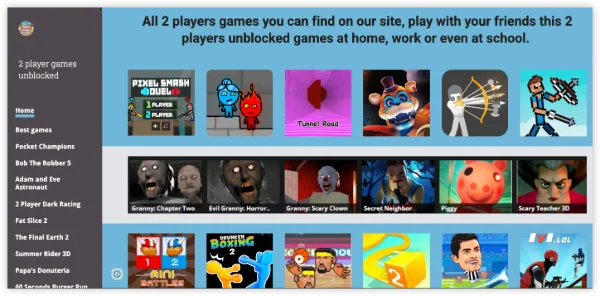
2 Player Games Unblocked 

Here’s a step-by-step template to make it smooth:

Method 1: Directly on Browser

  1. Open Chrome, Firefox, or Edge.

  2. Visit a portal like Unblocked Games 76.

  3. Search for your favorite 2 player game.

  4. Click and play instantly – no sign-ups needed.

Method 2: Using a VPN for Blocked Networks

Step 1
Grab the free Windows VPN installer right below. UFO VPN is lightweight and secure on all Windows systems. Double-click the downloaded file and complete the installation. Once installed, launch UFO VPN.
windows1
Step 2
Select a VPN Server
Inside the app, you can click the "Connect" button for quick connection, or browse the list of servers by Location or categroy: Video& Stream, Game, etc. Choosing the right server ensures fast speeds and smooth access.
windows2
Pro Tip

UFO VPN is an all-in-one VPN that offers unlimited access to 4D streaming like Netlfix, Disney Plus, no-ping gaming as PUBG, Roblox, CODM and social networking for YouTube, X, Facebook and more.


Step 3
Enable Advanced Features
In addition to basic functions, we recommend you turn on extra protections via Ad Blocker and features like Kill Switch, Split Tunneling and Smart Hop. Users can optimize online gaming/streaming/chatting as much as possible.
windows3
Step 4
Check Your New IP
Use UFO VPN's built-in " What is My IP" feature to see your new IP address and location. This confirms your VPN is working, hides your real IP, and ensures privacy while browsing.
windows4
Step 1 Download and install UFO VPN for macOS
Click the button below to download offcial Mac VPN free. Open the .dmg file, drag UFO VPN to your Applications folder, and launch it. You're just a few clicks away from secure browsing.
macos1
Step 2 Pick Your IP Server
Tap "Connect" button for the fastest server automatically. Or you can select a server from the global server list in 100+ countries. UFO VPN is an UFO VPN is an all-in-one VPN or gaming, video streaming, social platforms, and AI tools.
macos2
Step 3

Unlock Pro Features

If you have upgraded to premium plan , feel free to enjoy premium servers for 4K streaming and advanced features like Kill Switch, Split Tunneling, and gaming acceleration. Your Mac is now fully optimized and protected. Inaddition to basic functions, we recommend you turn on

macos3
Step 4

Verify Your IP Now

Use UFO VPN's " What is My IP " feature to see your new IP and location. This confirms your connection is secure, anonymous, and ready for safe browsing online anywhere at any time.


macos4
Step 1 Download and install UFO VPN for iPhone/iPad
Download this free iOS VPN via official link or App Store. Once installed, launch the app to get started. UFO VPN is now trusted by over 2 million users worldwide with optimzed service.
ios1
Step 2 Select a Perfect Server
Hit "Connect" button for the fastest server near you instantly. Or you can choose a favorite location/platform from the server list manually for full control. UFO VPN is an all-in-one VPN companion for gaming, streaming, social media, and AI tools.
ios2
Step 3 Lookup IP and Enable Pro Features
Now you can check your current IP via built-in IP lookup tool. Pro features in premium plan offer you premium servers, blazing speeds, Kill Switch, Split Tunneling, and Multi-device login, so you can protect your iPhone, iPad, and other Apple devices all at once.
ios3
Step 1 install UFO VPN for Android
Get free Android VPN from offcial website or Google Play Store. Follow the instructions for easy download. Then open the app and get ready to surf safely.
android1
Step 2 Choose Your Ideal Server
UFO VPN is an all-in-one powerhouse for gaming, video streaming, social apps, and AI tools. The"Connect" button links you to the fastest server instantly, or you can choose among the server list manually via Location/ Video&Stream/Games for easy access.
android2
Step 3 Power Up Pro Features
Pro users can look up current IP via built-in "What Is My IP" feature, and unlock premium features like 4K servers, turbo speeds, Kill Switch, Split Tunneling, and Multi-device login, keeping all your Android phones, tablets, and other devices safe at once.
android3

Refresh your browser and access the site again. Start the game and share controls with your friend!

Method 3: Offline or LAN Play

  1. Some games (like Chess or Tic Tac Toe) have offline versions.

  2. Download them from legitimate app stores.

  3. Play with your friend on the same device or via LAN.
Related Posts
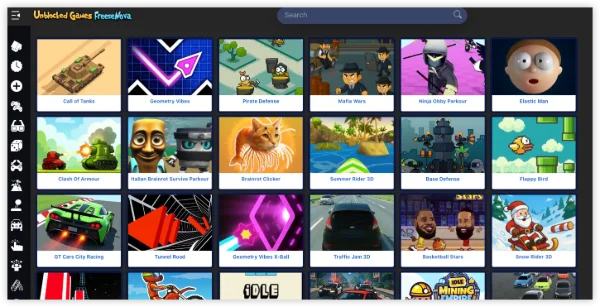
Freezenova Unblocked Games
Gaming
date icon 2025-09-25 16:15:52
Unblocked Game Freezenova: How to Access & Get Legal Cheats
slope unblocked
Gaming
date icon 2025-09-25 13:48:03
Slope Unblocked — Where to Play & How to Beat with Legal Cheats

2 Player Games Not Working: Easy Solutions
2 Player Games Not Working

Sometimes, even when you find the right site, games may fail to load. Here are the most common issues and fixes:

Problem Cause Fix
Game doesn’t load Network restrictions Use UFO VPN or mirror site
Black screen on startup Browser cache or outdated browser Clear cache & update browser
Controls not responding Compatibility issue Try a different browser (Chrome/Firefox)
Game blocked midway School firewall detected traffic Switch to VPN with stealth mode
Lagging multiplayer Weak internet Use wired/Wi-Fi with strong signal

What Are 2 Player Games Unblocked?

2 player unblocked games are browser-based multiplayer titles designed to run on restricted networks, such as:

  • Schools or colleges (where entertainment sites are blocked).

  • Workplaces (where IT policies prevent casual gaming).

  • Public Wi-Fi networks (airports, cafes, libraries).

They are lightweight, run on HTML5 or Flash alternatives, and don’t require downloads. Some popular 2-player games online include:

  • Fireboy and Watergirl

  • Stickman Fighter

  • Basketball Legends

  • Among Us (browser fan versions)

  • Tic Tac Toe, Chess, and Connect 4

Is It Safe to Play 2 Player Games Unblocked?

Generally, yes. However, unblocked game portals sometimes carry ads or redirects. To stay safe:

  • Use ad blockers.

  • Stick to well-known sites (Unblocked 76, CrazyGames, Y8).

  • Avoid clicking suspicious pop-ups.

  • Always pair access with a VPN for privacy.

Conclusion

Two-player games unblocked are the perfect way to enjoy quick, casual fun with friends even in restricted environments like schools or offices. With the right portals, troubleshooting steps, and a secure VPN setup, you can access your favorite titles anywhere, anytime. Just remember to play safely, avoid shady sites, and respect your network rules.

FAQs

Are 2 player unblocked games free?

Yes, they are completely free and run in your browser without downloads.

Why is my 2 player game lagging?

Lag usually comes from weak internet. Switch to a stable Wi-Fi or connect via VPN to improve speeds.

Can I play 2-player unblocked games without VPN?

Yes, if the site isn’t blocked. But if your school/work blocks it, you’ll need a VPN like UFO VPN.


Bypass blocks. Stay private.

Use UFO VPN — the best free VPN that works anywhere

Ethan Carter
Ethan Carter

About This Author

I’m Ethan Carter, a New York-based writer with a background in cybersecurity and digital trends. I love breaking down complex tech topics into digestible insights, helping people navigate the online world safely and smartly.