Key Takeaways
- Both proxies and VPNs can hide your real IP address, but they handle your internet traffic differently.
- A VPN provides stronger privacy and security by encrypting your connection, while a typical proxy mainly reroutes traffic without a VPN-style encrypted tunnel.
- Proxies are better for specific, targeted tasks, such as routing one browser, web testing, scraping, or IP rotation.
- VPNs are better for everyday use, especially for public Wi-Fi, travel, streaming, remote work, and protecting traffic across multiple apps.
Proxy vs VPN: What’s the Difference?
The difference between the two is that a VPN encrypts your traffic end to end whereas a proxy does not.

Here's the difference between proxy and VPN at a glance:
| Feature | Proxy | VPN |
|---|---|---|
| Hides your IP | ✅ Yes | ✅ Yes |
| Changes visible location | ✅ Yes | ✅ Yes |
| Encrypts connection | ⚠️ Usually no VPN-style tunnel | ✅ Yes |
| Traffic coverage | Usually specific apps/browsers | Usually device-wide |
| Public Wi-Fi protection | ❌ Limited | ✅ Yes |
| Privacy protection | Basic | Stronger |
| Speed | Depends on proxy/server | Depends on VPN/server |
| Setup | Often browser/app level | Usually VPN app/device level |
| Best for | IP routing, scraping, simple location changes | Privacy, security, everyday browsing |
| Streaming | Sometimes | Usually better suited |
The easiest way to decide: If you simply need a different IP for one task, a proxy may be enough. If you care about protecting the connection itself—not just changing your IP—a VPN is usually the better fit.
How Does a Proxy Work?
A proxy server sits between a configured app and the internet, forwarding requests on your behalf. Instead of your browser connecting directly to a website, it first connects to the proxy. The proxy then requests the page for you.
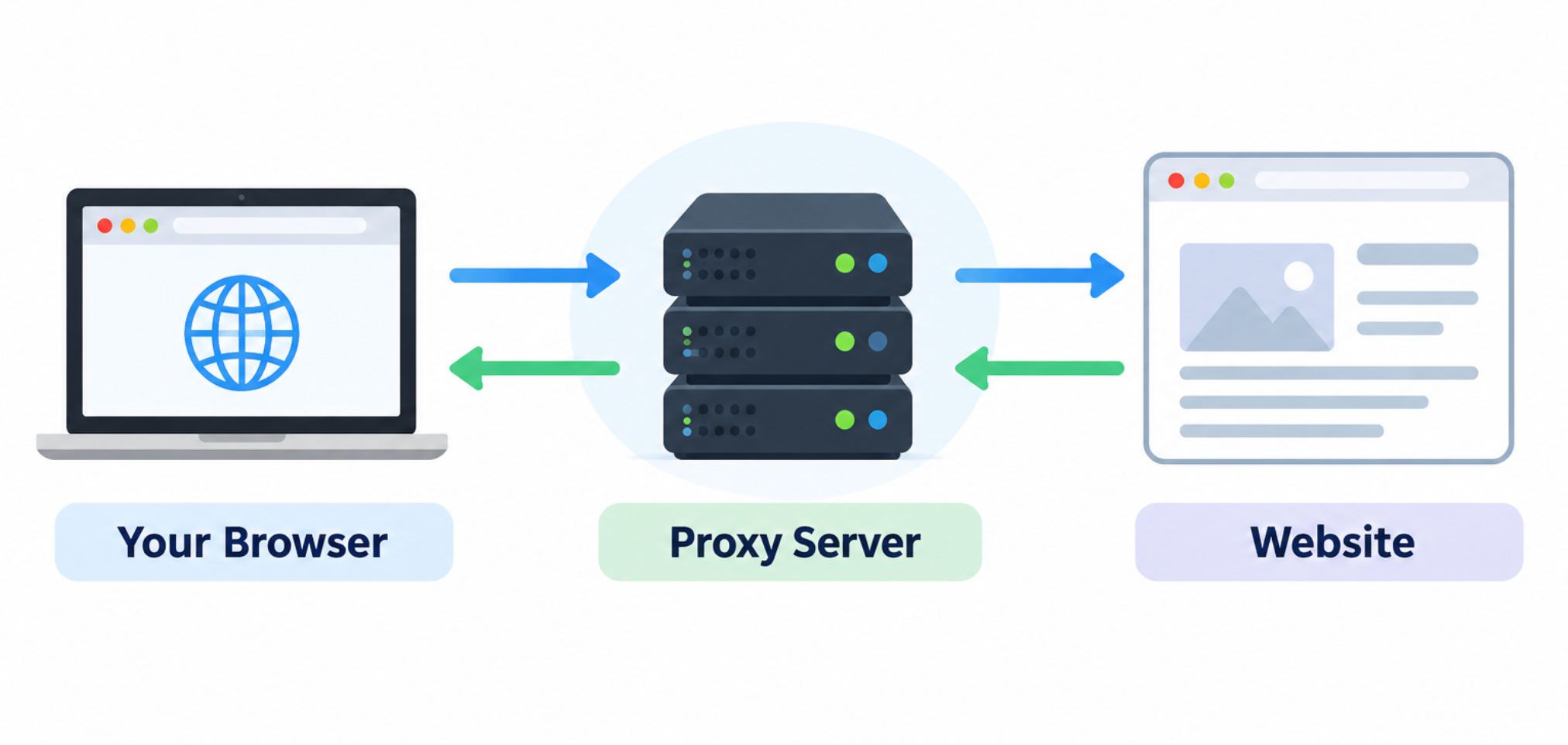
Suppose your real IP is in the US, but you're connected to a proxy server in Germany. When you visit a website through that proxy, the website sees the German proxy's IP rather than your original US IP.
That's useful when your goal is simply to hide or change the IP address used for a particular activity. However, other apps that aren't configured to use the proxy can continue connecting normally.
For example, if you set up a proxy only in Chrome:
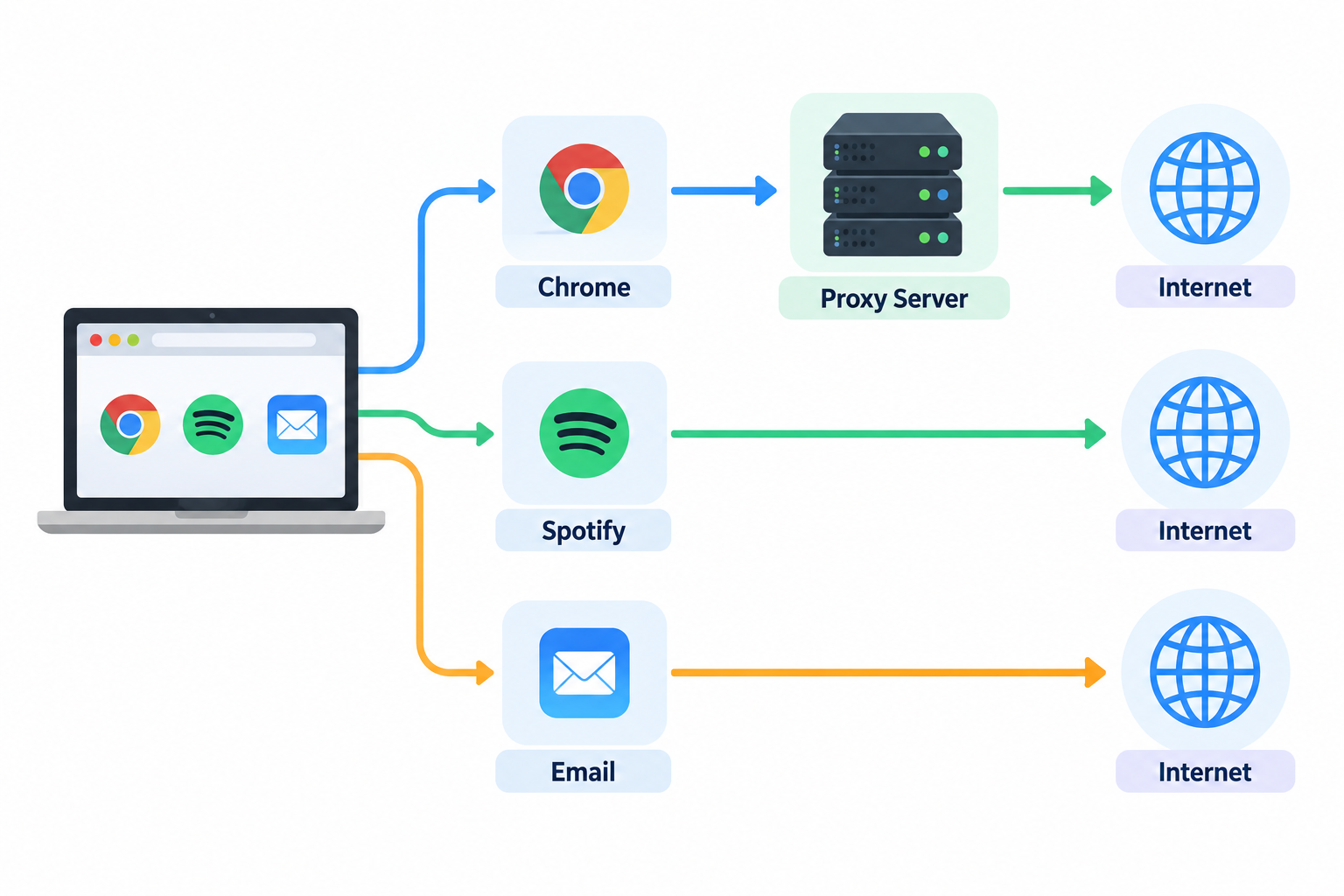
So changing your browser's proxy settings doesn't automatically mean your whole laptop is protected.
Common Types of Proxy Servers
Not all proxies work exactly the same way, which is why saying “a proxy does X” can sometimes be misleading.
- HTTP proxies are designed primarily for web traffic. They're useful for simple browser-based tasks, but aren't intended to protect every type of traffic on your device.
- HTTPS proxies can handle HTTPS connections. Remember, though, that HTTPS encryption between you and a website is not the same thing as a VPN encrypting your network connection to its VPN server.
- SOCKS5 proxies are more flexible because they can handle different kinds of traffic instead of being limited to ordinary web requests. This makes them useful for applications that need specific traffic routing.
- Residential proxies route requests through IP addresses associated with residential internet connections. They're commonly used for specialized business tasks such as market research, localization testing, ad verification, or large-scale web data collection.
The important thing for an everyday user isn't memorizing every proxy type. It's understanding that proxies are primarily built to route traffic; they aren't automatically a replacement for device-wide privacy and security.
How Does a VPN Work?
A VPN creates an encrypted tunnel between your device and a remote VPN server. Your traffic travels through this tunnel before reaching the wider internet.
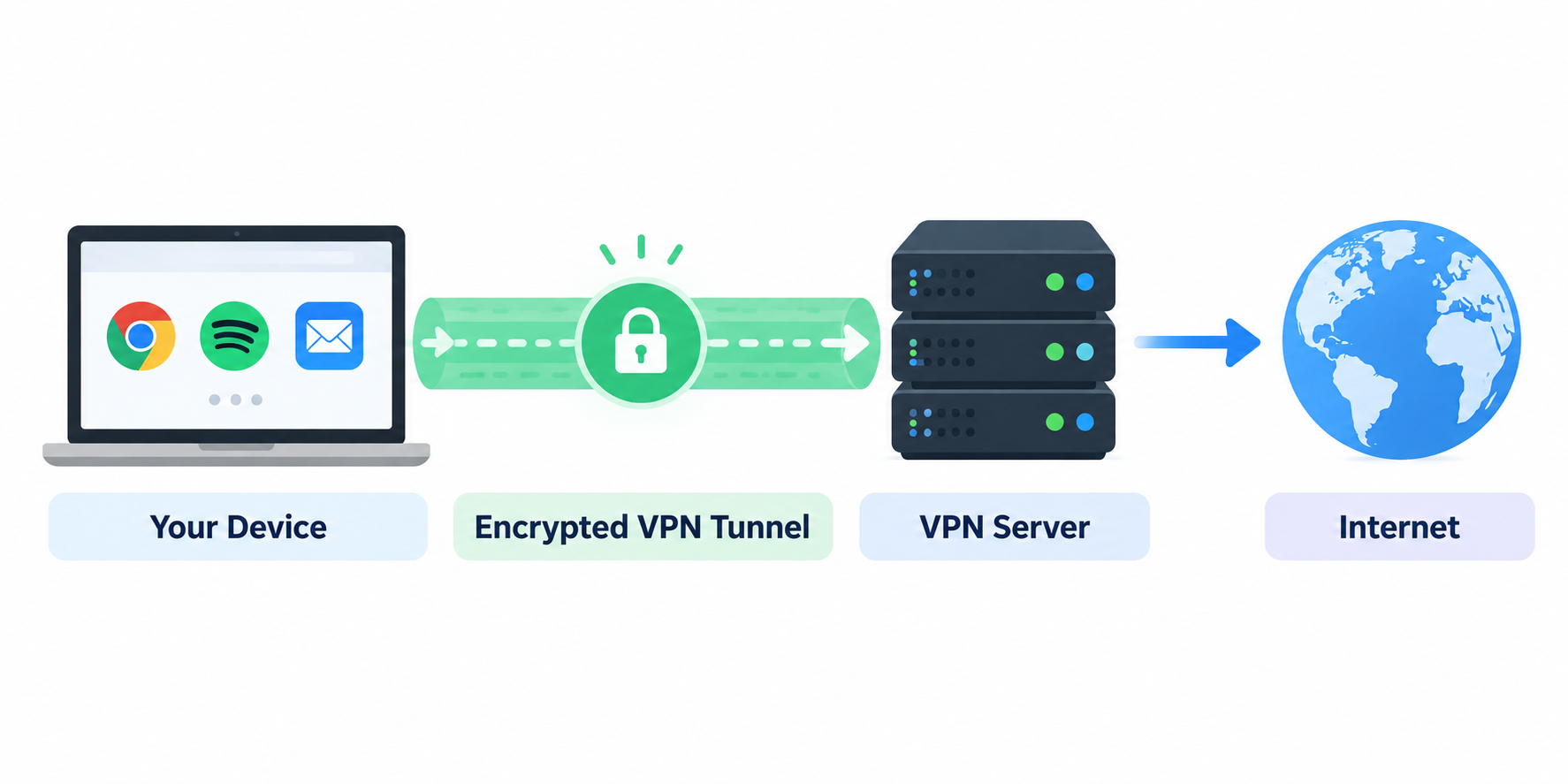
Three important things happen here:
- 🔐 Encryption: Traffic between your device and the VPN server is encrypted.
- 🌐 Routing: Your internet traffic is routed through the VPN server.
- 📍 IP replacement: Websites generally see the VPN server's public IP rather than your original public IP.
The practical difference becomes obvious when you're using several apps at once.
Imagine you're sitting at an airport and have Chrome, email, Spotify, and a messaging app open. Configuring a browser proxy may only affect Chrome. With a typical consumer VPN connection, traffic from multiple supported apps can go through the encrypted VPN tunnel without you configuring every application individually.
Consumer VPN apps such as UFO VPN are designed to handle this process automatically: choose a server, connect, and the VPN establishes the tunnel for you.
That's why the VPN vs proxy question isn't really just “which one changes my IP?” Both can do that. The more useful question is: Do you only need to reroute certain traffic, or do you want to protect your internet connection more broadly?
VPN vs Proxy: 5 Key Differences Explained
Encryption and traffic coverage are the two biggest differences, but they're not the only ones. Here's how proxy vs VPN plays out in situations you'll actually encounter.
🔐 1. Encryption and Security
Winner for security: VPN.
A typical proxy changes the route your configured traffic takes, but doesn't create the same device-to-server encrypted tunnel as a VPN. A VPN is specifically designed to encrypt traffic between your device and its VPN server.
Say you're at an airport and need to connect to public Wi-Fi to check work messages. Your immediate problem isn't just that websites can see your IP address. You're also using a network you don't control. Changing your browser's IP through a proxy doesn't solve that broader problem. A VPN creates an encrypted connection from your device to the VPN server, making it the more appropriate choice when connection security matters.
HTTPS still plays an important role in securing connections to websites, so a VPN shouldn't be treated as a substitute for HTTPS or general online safety. But if you're choosing specifically between a proxy or VPN for public Wi-Fi, use a VPN.
👀 2. Privacy
Winner for everyday privacy: VPN—but neither makes you completely anonymous.
Both tools can hide your original public IP from the websites you access through them. That makes it harder for a website to determine your approximate location from your original IP alone.
But three concepts shouldn't be confused: Hiding your IP ≠ encrypting your connection ≠ becoming anonymous.
For example, imagine you connect to a proxy in Canada and then sign in to your Google account. The website may see the Canadian proxy IP, but you've still explicitly told the service who you are by logging into your account.
A VPN doesn't magically erase that identity either. VPNs offer stronger connection privacy because they add encryption between your device and the VPN server. But cookies, browser fingerprinting, account logins and information you voluntarily provide can still identify or track you.
📱 3. Traffic Coverage
Winner for whole-device coverage: VPN.
This is one of the easiest proxy server vs VPN differences to overlook.
Suppose you're using Chrome, Spotify, and Email at the same time. If only Chrome is configured to use a proxy, only Chrome's traffic goes through the proxy server, while Spotify and Email connect to the internet normally. With a device-level VPN, however, traffic from all three apps can pass through the encrypted VPN tunnel.
Here's what that difference looks like in practice:
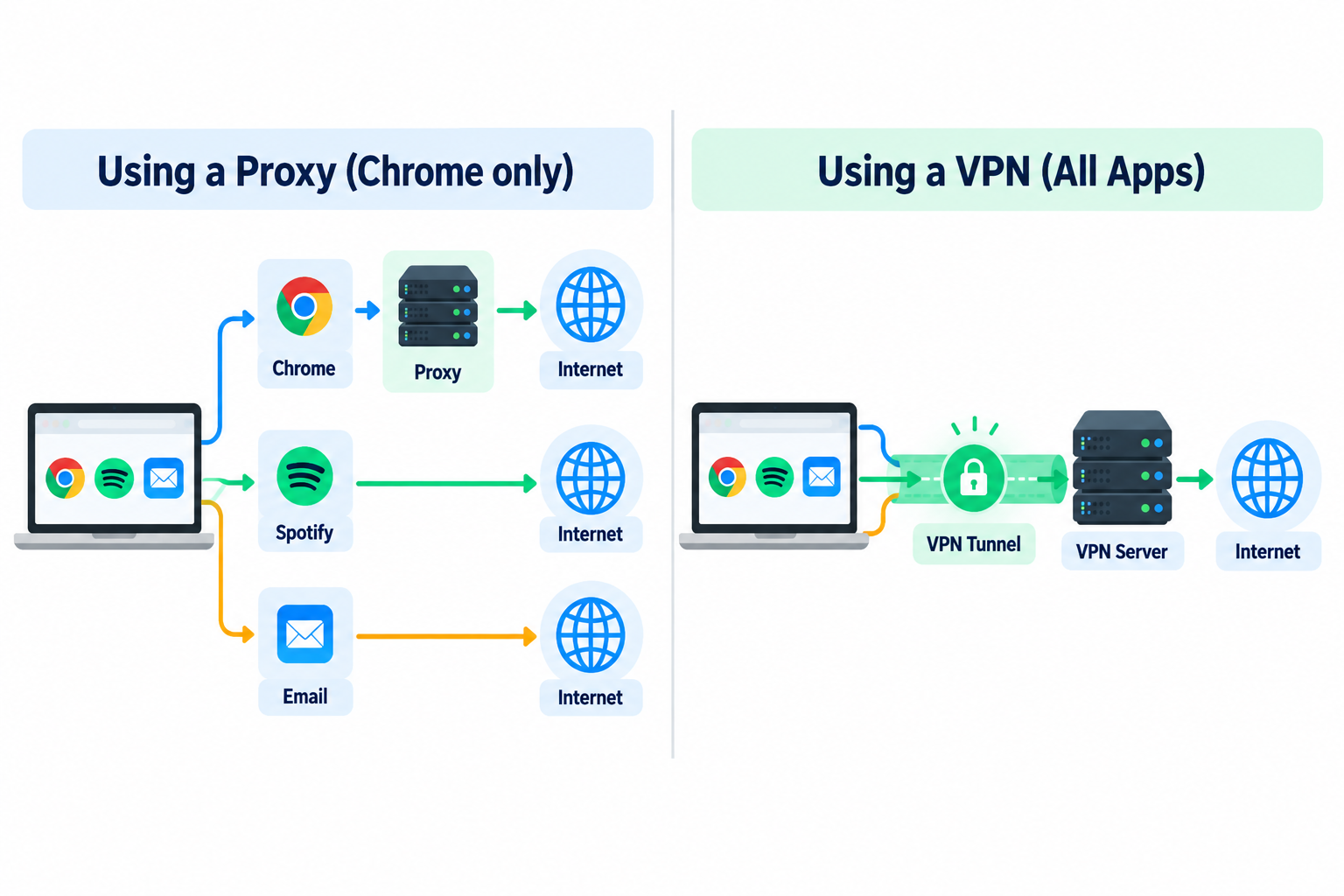
That difference matters if your goal is broader protection. You don't want to configure every individual application before opening it.
There are exceptions: some VPNs offer split tunneling that deliberately lets you exclude certain apps, and system-level proxy configurations can cover more than a single browser. But for a typical consumer setup, VPNs are designed for broader traffic coverage, while proxies are often configured for particular applications or tasks.
⚡ 4. Speed
Winner: It depends—don't assume a proxy is automatically faster.
Because a proxy generally doesn't perform the same VPN-style encryption, it can have less processing overhead. That's why you'll often hear the simple claim: “Proxies are faster than VPNs.”
However, in real-world use, it's not that simple. Your actual speed depends heavily on server distance, server load, provider infrastructure, your original connection, and the protocol or proxy type you're using. Current proxy-focused comparisons similarly note that performance varies substantially by proxy type.
Imagine you have two choices:
- Proxy A: Free, overloaded server thousands of miles away
- VPN B: Fast, lightly loaded server in your city
The lack of VPN encryption doesn't magically make Proxy A faster.
Don't choose between a proxy and VPN based on theoretical speed alone. For either one, a nearby, well-maintained, uncongested server often matters more to your everyday experience.
💻 5. Ease of Use and Setup
Winner for everyday users: usually VPN.
A proxy can be extremely convenient when you only need to route one browser or application. Configure the proxy details for that app and you're done.
The inconvenience starts when you want the same behavior across your entire device. You may need to configure different applications or system settings and keep track of which traffic is actually using the proxy. For example, if you're traveling and want your laptop's browser, messaging apps, and other supported services to use the VPN connection, connecting through a VPN app is easier than manually configuring separate proxies for each application.
So proxy vs VPN isn't about one technology being universally better. It's about scope: a proxy's narrower control can be an advantage for specialized jobs; a VPN's broader coverage is more convenient for everyday privacy and security.
Proxy vs VPN: Which Should You Use?
For most everyday privacy and security needs, choose a VPN. For specialized IP routing or automation tasks, a proxy often makes more sense. Instead of choosing based on technical specifications, start with what you're actually trying to accomplish:
| What You Want to Do | Better Choice | Why |
|---|---|---|
| Use public Wi-Fi | VPN | Encrypts your connection to the VPN server |
| Protect your connection while banking | VPN | Adds encrypted device-to-VPN protection |
| Protect traffic across your device | VPN | Broader traffic coverage |
| Hide your IP in one configured browser | Proxy | Simple, task-specific routing |
| Access region-specific websites | Either | Both can change your visible IP/location |
| Stream while traveling | VPN | Easier across apps/devices |
| Web scraping / large-scale IP rotation | Proxy | Better suited to specialized routing at scale |
| Improve everyday online privacy | VPN | Encryption + IP masking |
| Work remotely on an untrusted network | VPN | Better suited to protecting the connection |
| Test how a website appears in another region | Proxy | Often enough for a browser-based test |
Free Proxy vs Free VPN: Which Is Safer?
Neither is automatically safe just because it calls itself a proxy or VPN. The provider matters as much as the technology.
Free web proxies can look tempting: open a website, enter the URL you want to visit, and browse through another IP without installing anything. That's convenient for a low-risk, one-off task, but it also means you're trusting the proxy operator with part of your browsing path. Potential warning signs include excessive ads, unclear ownership, vague privacy policies, poor server performance, or no explanation of how the service is funded.
Free VPNs require the same scrutiny. A service being a “VPN” doesn't automatically make its business practices trustworthy. Encryption protects the route between you and the VPN server; it doesn't remove the need to trust whoever operates that server.
Before using either a free proxy or free VPN, check:
- 🔎 Who operates the service?
- 📄 Is there a clear privacy policy?
- 📝 What connection or activity data does it say it collects?
- 💰 How does the service make money?
- 🔐 What encryption does it actually provide?
- ⭐ Does the provider have an established reputation?
This is especially important before entering passwords, payment details or other sensitive information. If you can't work out who runs a free proxy or what happens to your data, don't use convenience as a reason to trust it.
Can You Use a Proxy and VPN at the Same Time?
Yes, you can—but most everyday users don't need to.
Depending on your configuration, your connection could look something like:
Your Device → VPN Tunnel → VPN Server → Proxy → Internet
That gives you another routing layer, but more layers don't automatically mean more privacy or security.
For an ordinary user who simply wants to browse securely on hotel Wi-Fi, adding a proxy on top of a trusted VPN can create extra configuration, introduce another party you need to trust, and potentially slow down the connection without solving a meaningful additional problem.
There are specialized situations where someone may intentionally combine the two—for example, a particular application may need a specific proxy while the rest of the device remains connected to a VPN. But that's a workflow requirement rather than something everyone should copy.
Proxy vs VPN: Final Verdict
There's no universal winner in the VPN vs proxy debate because these tools were designed for different jobs.
Choose a proxy when you need to reroute specific traffic, change the IP used by one application, test websites from another location, rotate IP addresses, or perform specialized tasks such as web scraping.
Choose a VPN when you want stronger everyday privacy and security, especially on public Wi-Fi, while traveling, streaming, working remotely, or protecting traffic across multiple apps.
For most everyday users, a VPN is the more complete option because it combines IP masking with an encrypted connection and broader traffic coverage.
FAQs
Can a Proxy Server See My Browsing History?
Potentially, yes. A proxy sits between your configured application and its destination, so the operator may be able to observe certain connection information depending on the proxy type, encryption used by the destination, and how the service is configured.
That's why the operator matters. Don't assume that hiding your IP from the destination means you're hiding your activity from the intermediary you've chosen to route traffic through.
Can Websites Tell If I'm Using a Proxy or VPN?
Sometimes. Websites and online services may identify known proxy or VPN server IP addresses, especially when many users share the same address. They can also use other signals when assessing a connection.
However, detection varies significantly between websites, providers, server types and IP addresses. Changing your IP doesn't guarantee that a website will be unable to recognize that you're using an intermediary service.
Does a Proxy Hide My IP Address From My ISP?
Not in the same way it hides your IP from the destination website.
Your ISP provides your internet connection, so it necessarily knows the public IP assigned to you. When you use a proxy, the destination website may see the proxy's IP instead of yours, while your ISP can still see that your connection is communicating with the proxy service.
Is SOCKS5 a VPN?
No. SOCKS5 is a proxy protocol, not a VPN.
A SOCKS5 proxy can route different types of application traffic through a proxy server and change the IP address seen by the destination. However, SOCKS5 itself doesn't provide the same device-wide encrypted tunnel that defines a typical consumer VPN connection.
If you need flexible application-level routing, SOCKS5 can be useful. If you need encrypted, broader protection for everyday internet traffic, a VPN is generally the more appropriate choice.