What Is Torlock? How Does Torlock Work?
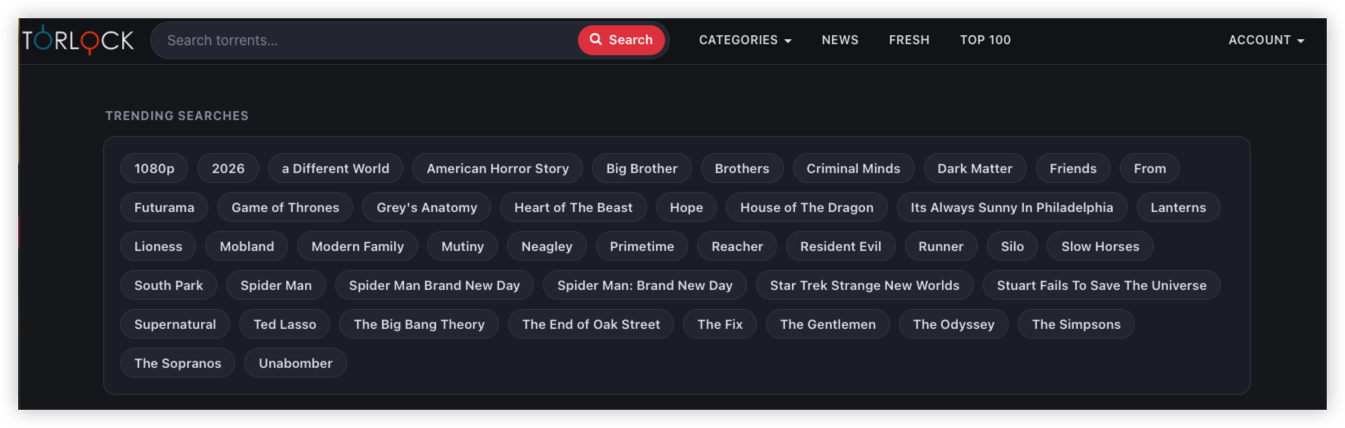
Torlock is primarily a torrent search engine and directory. Instead of streaming a movie, TV show, song, game, or other file directly in your browser, a torrent index helps users locate torrent information that can be opened with a compatible BitTorrent client.
Torlock's official FAQ states that it is a torrent search engine and directory and says that the service does not host the underlying files or torrents itself.
Its current categories include:
- Movies
- Television
- Anime
- Music
- Games
- Software
- eBooks
- Audiobooks
- Images
- Other content
🔍Torlock vs. Streaming Websites:Key Differences
Someone searching for “Torlock site unblocked” may initially think Torlock works like a streaming website. It does not.
| Feature | Torlock | Streaming Website |
|---|---|---|
| Main function | Torrent discovery | Video/audio playback |
| Delivery method | BitTorrent/P2P | Direct streaming |
| Download required | Usually | Usually no |
| Other peers involved | Yes | Usually no |
| Public IP exposure to peers | Possible | Generally not through ordinary streaming |
| File-related malware risk | Possible | Lower direct file-download exposure |
| Privacy considerations | Higher for P2P use | Generally simpler |
| Torrent client | Usually required | Not normally required |
Is Torlock Site Safe? Torrent Risks Explained
The answer depends on whether you mean the website or the files found through it.
These should be evaluated separately.
Is Torlock.com Safe to Visit?
A PCrisk scan conducted on July 29, 2026 reported:
| Security Check | Reported Result |
|---|---|
| Trust score | 90/100 at time of scan |
| Security engines checked | 91 |
| Engines flagging domain | 1 |
| Malware file scan | No threats detected in the scanned file |
| TLS certificate | Valid |
| Major blacklist checks | No listed detections in the report |
| Domain age | About 16 years |
PCrisk classified the domain as low risk based on the scan findings at that time. However, the same report explicitly recommends a fresh scan because security status can change.
Therefore, the more accurate conclusion is: The available domain-level scan did not show broad evidence of malicious activity, but it should not be interpreted as a permanent security guarantee for the website or its downloads.
One security engine flagging a domain does not by itself establish that a site is malicious, just as a largely clean scan does not prove that every linked file is safe.
💡Website Safety vs. Torrent Safety
This distinction is one of the most important points in the entire article.
| Question | What Matters |
|---|---|
Is torlock.com safe to visit? |
Domain reputation and website-level threats |
| Is a Torlock page safe to open? | Page content, redirects, scripts, ads, and links |
| Is a torrent legitimate? | Whether the torrent matches its stated content |
| Is a downloaded file safe? | Malware, unwanted software, modified content |
| Is the download legal? | Copyright and applicable law |
| Is torrenting private? | IP exposure and network configuration |
A clean website scan cannot answer all six questions.
Does “Verified Torrent” Mean a Torrent Is Completely Safe?
No.
Torlock currently promotes its VeriPLUS system as an automated torrent-verification technology.
According to Torlock, VeriPLUS evaluates multiple signals, including:
- Reputation and cross-referencing
- Metadata and naming patterns
- File-list and size patterns
- Swarm and peer behavior
- Tracker responses
- User reports
Torlock says its current system uses machine learning and does not list torrents that remain unverified. It also explicitly acknowledges that automated verification is not perfect and that verification does not guarantee every download is safe.
That creates an important three-way distinction:
Verified ≠ Malware-free ≠ Legally authorized
A verification label can be useful information, but it should be treated as one safety signal, not a substitute for checking the actual files.
Are Torlock Torrents Safe to Download?
Torrent safety depends heavily on the individual download.
Common Torrent Risks
1. Malware and Malicious Files
Potential warning signs include:
- Unexpected
.exefiles - Modified installers
- Password-protected archives
- Fake codecs
- Fake media players
- Cracked software
- Files requesting unnecessary administrator privileges
- Executables disguised with misleading names
This is especially relevant when downloading software.
For example, if you expect a video file but the torrent contains an executable installer, stop and investigate before opening it.
2. Fake or Misleading Torrents
A torrent can use a legitimate-looking title while containing files that do not match the description.
Torrent verification can reduce some fake-content risks, but it cannot replace local security checks.
3. Malvertising and Suspicious Redirects
There is another risk that is easy to confuse with torrent safety.
A torrent website may contain:
- Advertising
- Pop-ups
- Redirects
- Fake download buttons
- External links
Those elements are different from the torrent metadata itself. Always make sure you understand what you are clicking before downloading anything.

Is Torlock Legal? A Quick Review
1. Is Torlock Itself Illegal?
It is more accurate to separate the torrent technology, indexing website, and specific content.
BitTorrent is a peer-to-peer networking technology. The U.S. Copyright Office defines P2P networking as communication between computers that can be used to exchange files.
The legal question depends heavily on what content is being downloaded or shared and whether the user has the necessary authorization.
Torlock itself states that it respects copyrights and has a takedown process for copyright owners.
That does not mean every torrent indexed by a torrent site is automatically authorized.
2. Is Torrenting Copyrighted Material Legal?
The answer depends on the applicable law and the rights associated with the specific material.
For example, the U.S. Copyright Office states that downloading or uploading copyright-protected works through P2P networks without authorization can infringe the copyright owner's exclusive rights.
Therefore, before downloading a torrent, consider whether:
- You created the content yourself
- The content is in the public domain
- The copyright owner authorized the distribution
- The content is distributed under a license that permits downloading/sharing
- Another legal basis applies in your jurisdiction
Torlock Site Unblocked: Why Is Torlock Not Working?
If Torlock is not loading, that does not automatically mean that Torlock is completely offline. There are several possible explanations.
Torlock Blocked vs. Torlock Down
| Symptom | More Likely Explanation |
|---|---|
| Torlock fails only on your home Wi-Fi | Local network or ISP issue |
| Works on mobile data but not Wi-Fi | Network or DNS filtering may be involved |
| Works on another device | Browser/device configuration issue is possible |
| Works on another network | Current network may be blocking or filtering access |
| Other websites also fail | General connectivity problem |
| Domain loads but individual torrent pages fail | Page-specific or site-side issue |
| No network can access the domain | A broader outage or domain-side problem is possible |
These symptoms are clues rather than definitive diagnoses.
Is Torlock Down Right Now?
A website can be online while still being inaccessible from a particular network.
Common possibilities include:
- ISP-level blocking
- DNS filtering
- Regional restrictions
- School or workplace network policies
- Hotel or public Wi-Fi filtering
- Local firewall rules
- Browser or DNS cache problems
- Temporary server or routing issues
- Page-specific problems
A useful first step is to determine whether Torlock is unavailable everywhere or only from your current connection.
1. Try the Main Domain
Enter the current Torlock domain directly: torlock.com
Avoid assuming that an unofficial mirror or proxy is the same service.
2. Try Another Browser
A browser extension, cached redirect, DNS cache, or security setting can sometimes affect one browser while another works normally.
3. Switch Networks
Compare: Wi-Fi → Mobile Data
If Torlock works on mobile data but not on your Wi-Fi connection, the problem may be specific to the Wi-Fi network, DNS resolver, ISP, or filtering policy.
4. Test Another Device
Try the same connection from a phone, tablet, or another computer.
If only one device has the problem, troubleshoot that device before assuming Torlock itself is down.
5. Check DNS and Connectivity
A domain-resolution problem can prevent a website from loading even when the server itself is online.
6. Try Again Later
Temporary routing, server, or regional connectivity problems can resolve without any changes on your side.
[Bonus] How to Access Torlock When It Is Blocked
A VPN may help when Torlock access is restricted by your current network or ISP. UFO VPN generally works by creating an encrypted connection between your device and a VPN server. Your internet traffic is then routed through that server instead of directly through your normal network path.


UFO VPN is an all-in-one VPN that offers unlimited access to 4K streaming like Netlfix, Disney Plus, no-ping gaming as PUBG, Roblox, CODM and social networking for YouTube, X, Facebook and more.




Unlock Pro Features
If you have upgraded to premium plan , feel free to enjoy premium servers for 4K streaming and advanced features like Kill Switch, Split Tunneling, and gaming acceleration. Your Mac is now fully optimized and protected. Inaddition to basic functions, we recommend you turn on

Verify Your IP Now
Use UFO VPN's " What is My IP " feature to see your new IP and location. This confirms your connection is secure, anonymous, and ready for safe browsing online anywhere at any time.







At the same time, a VPN should not be presented as a guarantee that Torlock will become accessible. A website can still be unavailable because of server-side problems, regional restrictions, VPN IP blocking, or other technical issues.
Free & Legal Torlock Alternatives for Streaming
| Service | Best For | Ads? | Account Needed | Availability | Notes |
|---|---|---|---|---|---|
| Tubi | Largest free movie & TV catalog | ✅ | Optional | US, Canada, UK, Australia + | Strong on-demand library |
| Pluto TV | Live channels + on-demand | ✅ | Optional | ~30 countries | Feels like traditional TV |
| The Roku Channel | Movies, shows & Roku Originals | ✅ | Optional | US, Canada, UK, Mexico | Great if you already use Roku |
| Plex | Free catalog + personal media | ✅ | Recommended | Wide international | Also lets you stream your own files |
| Xumo Play | Live free TV channels | ✅ | No | Mostly US | Simple live channel experience |
| Kanopy | Indie films, documentaries, classics | ❌ | Library card | US, Canada, UK, Australia + | Ad-free via public library |
| Hoopla | Movies, TV, audiobooks, comics | ❌ | Library card | Participating libraries | Monthly borrow limits |
| Prime Video Free | Free movies & shows section | ✅ | Amazon account | Wide | Freevee content now folded in |
| Internet Archive | Public domain & classic films | ❌ | Optional | Global | Fully legal older content |
| Crackle | Movies & original series | ✅ | Optional | Limited regions | Sony-backed free service |
Key Takeaways
- Torlock is a torrent search engine and directory, not a conventional streaming platform.
- If Torlock does not load, the problem may be related to your ISP, DNS configuration, network filtering, regional access, browser, or a temporary website issue.
- The current Torlock domain is
torlock.com. - Torlock's VeriPLUS system uses multiple signals, including torrent reputation, metadata, file patterns, swarm behavior, and user reports, to identify potentially fake torrents. Torlock itself says automated verification is not a guarantee that every download is safe.
- Torrent privacy is different from ordinary website browsing because BitTorrent clients can communicate directly with other peers.
- A VPN can mask your public IP and encrypt the connection between your device and the VPN server, and may help when access is restricted at the network or ISP level.
Final Thoughts
Torlock currently describes itself as a torrent search engine and directory, rather than a conventional streaming platform. For safer torrent use, combine network privacy, file scanning, cautious downloading, and copyright awareness rather than relying on any single “verified” label or security tool.
FAQs
Does a VPN make Torlock safe?
Not by itself. A VPN can improve network privacy, but it cannot determine whether a torrent contains malware or whether the content is legally authorized.
Does Torlock hide your IP?
No. Torlock is primarily a torrent indexing and discovery service. Potential IP exposure occurs mainly after a torrent client connects to the BitTorrent swarm and communicates with other peers.
Can I use Tor Browser for Torlock torrents?
Using Tor for torrenting is not recommended. The Tor Project warns that torrent clients can make direct connections that expose the user's real IP and can place unnecessary load on the Tor network.