Key Takeaways
🔑 Learn about age-related, account, regional, and network restrictions that may affect your gameplay.
🔑 Try practical fixes, including account checks, DNS changes, connection troubleshooting, and VPNs.
🔑 Explore bonus tips for finding new content, saving tuning setups, creating EventLab experiences, and finding promotions.
🔑 See how UFO VPN can provide another connection option when network or IP-related issues affect your FH6 experience.
Why Is Forza Horizon 6 Gameplay Trending?

Forza Horizon 6 is trending because it takes the Horizon Festival to Japan and gives you a much larger world to explore, collect, customize, and share with other players. Beyond racing, you can build your own spaces, create events, join Car Meets, and explore community-made content.
- A new open world in Japan: You can explore Tokyo City, mountain roads, rural areas, and other Japanese-inspired locations in the largest urban area ever featured in a Forza Horizon game.
- 550+ cars at launch: You can collect more than 550 cars, including JDM classics and other real-world models, then customize them with updated Forza Aero, body kits, and window liveries.
- More ways to customize: You can do more than tune your cars. FH6 lets you customize garages, build in The Estate, and create spaces that you can share with friends.
- More community-created content: EventLab has been expanded with Horizon CoLab, allowing you and your friends to build custom experiences together and share them with the wider community.
- A stronger social experience: Car Meets, Convoys, multiplayer modes, LINK Skills, Drag Meets, and Time Attack Circuits give you more reasons to play with other people instead of racing alone.
With so many features tied to online services and community content, access issues can affect more than just your ability to join a race.
Common Restrictions When Playing Forza Horizon 6
Not every access problem comes from the game itself. Your Xbox account, family settings, location, network, or temporary service issues can all affect what you can access.
1. Age-Related Restrictions
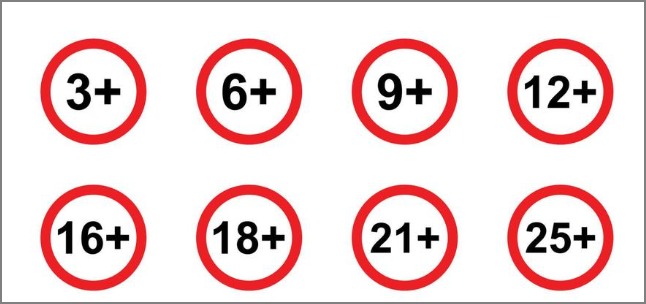
In the UK, age-assurance and child-safety requirements under the Online Safety Act can affect how certain online and user-generated content is accessed on covered services. This does not mean that the law directly bans specific Forza Horizon 6 features. However, some FH6 players have recently reported restrictions affecting community-driven features when their age or account status has not been verified.
Depending on your account and current settings, players have reported problems with features such as:
- Auction House: You may be unable to browse or trade cars through the community marketplace.
- EventLab: You may have trouble accessing community-created events.
- Gift Drops: You may be unable to send or receive certain community gifts.
- Liveries: Community-created designs may not be available.
- Tuning Setups: Shared tuning presets may be blocked.
- Upgrade Presets: Some community-shared upgrade options may also be unavailable.
2. Account Settings Restrictions
Your Xbox account settings can affect which online and community features you can use. This is especially relevant if you use a family-managed account or have stricter privacy controls.
- Xbox privacy settings: Restrictions on multiplayer, communication, or community content can limit some FH6 features.
- Family Safety settings: Family-managed accounts may have additional controls over online interactions and content.
- Account age and verification: Some features may require your account information or age status to meet the relevant requirements.
3. Regional Restrictions
Some FH6 services and promotions may vary depending on your country or region. Your Microsoft or Xbox account region can also affect the content and services available to you.
For example, you may encounter differences in:
- Game or add-on availability
- Promotional offers
- Online services
- Community features
- Local content requirements
4. Network and ISP Restrictions

Your internet provider and network route can also affect how you connect to FH6 services. Even when the game itself is available in your region, a poor route can make online features difficult to use.
You may notice:
- High latency during online play
- Frequent disconnections
- Failed matchmaking
- Problems connecting to community content
5. DNS Restrictions
Your DNS service helps your device find the servers and services it needs. If DNS resolution fails or becomes unstable, FH6 or related Xbox services may have trouble connecting.
Changing to a reliable public DNS can be a simple troubleshooting step when other online services are working normally.
6. Server-Side Restrictions
Sometimes the problem is not on your side at all. Maintenance, updates, outages, or temporary server issues can affect FH6 online features.
If a feature suddenly stops working, check the official Forza and Xbox channels before changing your account or network settings.
Best Ways to Access More Forza Horizon 6 Features
You can usually start with simple troubleshooting before making bigger changes. If the problem appears to be related to your network or region, switching your connection may give you another way to test the affected feature.
Way 1. Activate a VPN
A VPN like UFO VPN routes your connection through a server in another location and gives you a different IP address. This can help you test whether a local network route or IP-based regional issue is affecting your connection to FH6 services.
Activating such a reliable VPN can also add another layer of privacy by encrypting your internet traffic and masking your IP address. Depending on the server and network route you choose, it may also provide a more stable connection or reduce lag in some cases. Together, these benefits can help create a smoother and more private gaming experience.
👉 To try it:


UFO VPN is an all-in-one VPN that offers unlimited access to 4K streaming like Netlfix, Disney Plus, no-ping gaming as PUBG, Roblox, CODM and social networking for YouTube, X, Facebook and more.




Unlock Pro Features
If you have upgraded to premium plan , feel free to enjoy premium servers for 4K streaming and advanced features like Kill Switch, Split Tunneling, and gaming acceleration. Your Mac is now fully optimized and protected. Inaddition to basic functions, we recommend you turn on

Verify Your IP Now
Use UFO VPN's " What is My IP " feature to see your new IP and location. This confirms your connection is secure, anonymous, and ready for safe browsing online anywhere at any time.







Way 2. Switch Your Server to a Country Where FH6 Is Accessible
If your connection or IP address appears to be the problem, changing your IP by switching to a VPN server in another supported location can help you test a different network route. The countries below are practical locations to try, but they should not be treated as a guarantee that every feature will work for every account.
| Location | Highlights | 🔥 Get an IP |
|---|---|---|
| United States | A major supported gaming market with broad Xbox service availability. | |
| Japan | The game's main setting and a natural location to test a Japan-based connection. | |
| Canada | A supported Xbox gaming market that gives you another North American route. | |
| Germany | A supported European market and another route to test within Europe. | |
| France | Another European location you can try if your local route is unstable. | |
| Australia | A supported gaming market that provides a different regional connection. | |
| Singapore | A nearby option for testing a different Asian network route. |
Way 3. Check Your Xbox Account and Privacy Settings
Before changing your network, check whether your Xbox account is causing the problem.
Review your:
- Multiplayer permissions
- Communication settings
- Community-content permissions
- Family Safety controls
- Account age and verification information
If you use a family-managed account, the family organizer may need to update some settings.
Way 4. Check Your Internet Connection
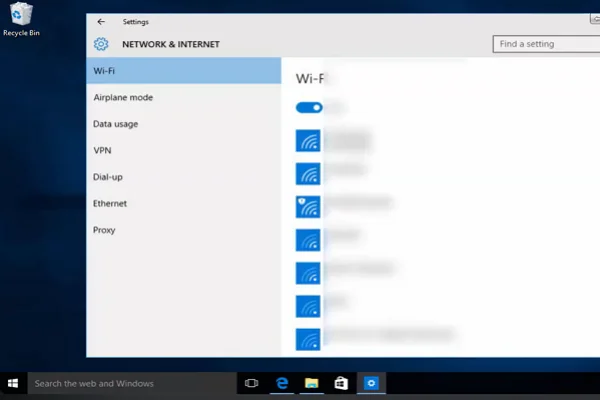
A slow or unstable connection can make FH6 online features appear unavailable even when your account is fine.
Try these quick fixes:
- Restart your router.
- Use a wired connection if possible.
- Pause large downloads or streaming services.
- Restart FH6 after your connection stabilizes.
- Check whether other Xbox online services are working.
Way 5. Try Another DNS
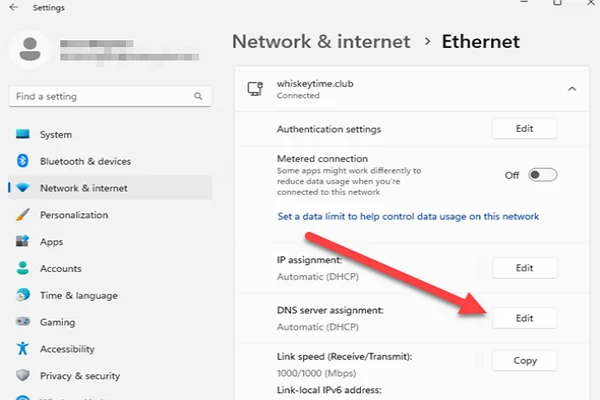
If your current DNS has trouble resolving Xbox or game-related services, switching to a reputable public DNS may help.
After changing your DNS, restart your device and test FH6 again. If the connection improves, your previous DNS configuration may have contributed to the problem.
Way 6. Check for Regional or Service Issues
Before changing your settings, check whether the problem is caused by maintenance, an update, or a temporary service issue.
You should also check whether the feature is available on your platform and in your region. FH6 is currently available on Xbox Series X|S and PC, while the PS5 version is scheduled for later in 2026.
Bonus Tips for a Better Forza Horizon 6 Experience
Once your connection is working normally, a few simple habits can help you get more from FH6.
1. Check the Festival Playlist Regularly
The Festival Playlist gives you new activities and rewards on a regular basis. You can complete races, stunts, photo challenges, and other tasks to expand your collection.
A simple routine can help:
- Check the current Playlist when you start the game.
- Look at the reward cars first.
- Complete limited-time activities before they disappear.
- Check the next Playlist reset so you can plan ahead.
2. Watch for Codes and Promotions
FH6 promotions can give you access to special cars and other rewards, but codes are usually connected to specific campaigns rather than being permanent universal codes.
For example, official Forza promotions and brand partnerships may offer limited-time rewards or redemption codes. Always check the original promotion page for its eligibility, region, and expiration date before using a code.
Avoid relying on random "free FH6 code" lists that do not identify the original promotion. If you need some codes now, you can explore some of the platforms below:
- G2A — Offers game keys, DLC, Game Pass, etc. Deals are directly related to FH6.
- Loaded (formerly CDKeys) — Focuses mainly on game keys and digital products.
- Eneba — Offers game keys, DLC, gift cards, and other digital products.
- Instant Gaming — Offers game keys and discounts on digital games.
- GG.deals — Useful for comparing game prices and finding discounts.
- IsThereAnyDeal — Mainly focuses on tracking PC game prices and deals.
- Green Man Gaming — An authorized digital game retailer that offers games and regular promos.
- Humble Bundle — Offers game discounts, bundles, and promotional deals.
3. Keep an Eye on New Car Drops
FH6 continues to receive new cars through Festival Playlist rewards, Car Pass additions, and other post-launch content. The official car list is updated as new models are announced.
Follow official Forza announcements so you know when new cars arrive and how you can unlock them.
4. Save Your Favorite Tuning Setups
If you can access community tuning normally, save the setups you like instead of searching for them every time.
You can keep separate setups for:
- Road racing
- Drift events
- Off-road driving
- High-speed runs
- Specific car classes
This makes it easier to switch between events without rebuilding your car each time.
5. Build Your Own EventLab Content
You do not have to rely entirely on community-created events. FH6 lets you create your own experiences through EventLab, while Horizon CoLab lets you build together with friends.
Try starting with something simple:
- Choose a familiar location.
- Add checkpoints or basic obstacles.
- Adjust the weather, time, or traffic.
- Test the event yourself.
- Share it when everything works as expected.
Summary
Forza Horizon 6 is trending because the game gives you a large Japanese world to explore and plenty of ways to make your own experience. The range of online, creative, and social features also means that access problems can have different causes. Once you identify where the problem comes from, you can choose a more targeted solution instead of changing everything at once. For network or IP-related issues, UFO VPN gives you another connection option to explore.
FAQs
What is the setting of Forza Horizon 6?
Forza Horizon 6 is set in Japan. You can explore Tokyo City, rural areas, mountain roads, and other environments inspired by Japanese landscapes and car culture.
When did Forza Horizon 6 launch?
Forza Horizon 6 launched on May 19, 2026, for Xbox Series X|S and PC. Premium Edition players received up to four days of early access.
Is Forza Horizon 6 included with Game Pass?
Yes. The Standard Edition is included with Game Pass Ultimate and PC Game Pass. You can also purchase the game separately.
Can you play Forza Horizon 6 with friends?
Yes. You can explore Japan with friends, join Car Meets and Convoys, and use multiplayer features. Horizon CoLab also lets you build EventLab experiences together.
What is Horizon CoLab in Forza Horizon 6?
Horizon CoLab is a multiplayer building feature in EventLab. It lets you and your friends create custom experiences together in the open world instead of building separately.