Current Pricing and Plans: Is CapCut Pro Worth the Cost?
Whether you are a solo creator or part of a growing studio, there is a plan designed for your workflow. Here are the latest pricing details today:
| Plan Type | Price | Best For | Key Benefit |
|---|---|---|---|
| Monthly Plan | $19.99/month | Casual or short-term users | Flexibility, no long-term commitment |
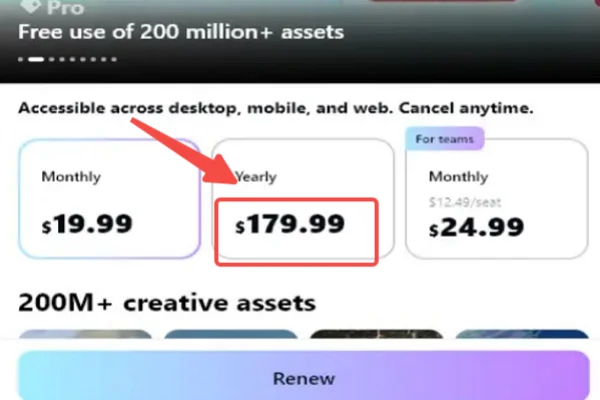
| Yearly Plan | $179.99/year | Regular creators | ~25% cheaper than monthly |
| Team Plan | From $24.99/month | Teams & agencies | Collaboration tools |
How to choose among these plans?
- Monthly → Ideal if you only need Pro features for a short project
- Yearly → Best for consistent creators (YouTubers, freelancers)
- Team Plan → Suitable for marketing teams, studios, or agencies
How Does CapCut Premium Cost Vary in Different Countries?
CapCut uses regional pricing to adjust for local purchasing power. This means users in countries like Turkey or Vietnam may pay significantly less than those in the United Kingdom or the United States, even though they receive the exact same features.
To make this difference easier to understand, the following section highlights a comparison across 10 commonly used countries. Quickly check it to get a clear and intuitive view of how pricing varies worldwide:
| Country | Monthly Price (USD) | Yearly Price (USD) | Key Insight |
|---|---|---|---|
| United Kingdom | $25.99 | ~$234.99 | One of the most expensive regions |
| United States | $19.99 | $179.99 | Standard global benchmark |
| Canada | $17.50 | ~$157.50 | Slightly cheaper than the US |
| Singapore | $12.00 | ~$108.00 | Competitive pricing for the SE Asia hub |
| Brazil | $9.50 | ~$85.50 | Strong value in South America |
| South Africa | $8.50 | ~$76.50 | Affordable entry pricing |
| Malaysia | $7.99 | ~$71.99 | Great balance of price and features |
| Philippines | $6.99 | ~$62.99 | Popular among mobile creators |
| Vietnam | $5.99 | ~$53.99 | One of the cheapest globally |
| Turkey | $5.50 | ~$49.50 | Lowest cost region overall |
Besides the region, pricing can also be affected by:
-
Platform (Mobile vs. Desktop): Buying through the iOS App Store or Google Play often costs more because of the 15-30% "Apple/Google Tax." Buying directly from the CapCut website is usually the cheapest route.
-
Taxes: Local VAT or Sales Tax is often added at checkout, depending on your residency.
-
Promotional Discounts: First-time subscribers often see "limited-time" offers that can slash the yearly price by 50%.
6 Cheaper Ways to Get Capcup Pro
If you have decided that the Pro features are a must-have, you don't necessarily have to pay the standard monthly fee. There are several ways to lower the cost or even find periods of free access through legitimate channels.
Method 1. Seasonal and Holiday Flash Sales
CapCut often runs promotions during major global events, such as:
- Black Friday / Cyber Monday → Up to 40–60% off
- Christmas Sales → Bundle deals or yearly discounts
- New Year Campaigns (“New Year, New Creator”)
- Back-to-School Offers
✅ Quick steps to get 40% - 60% off during these events:
Step 1. Download CapCut for PC
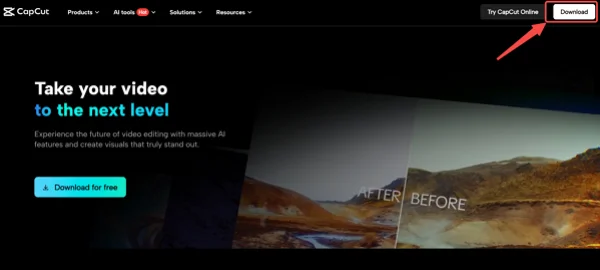
Go to the official website. Then click the download button in the top-right corner.
Step 2. Join Pro
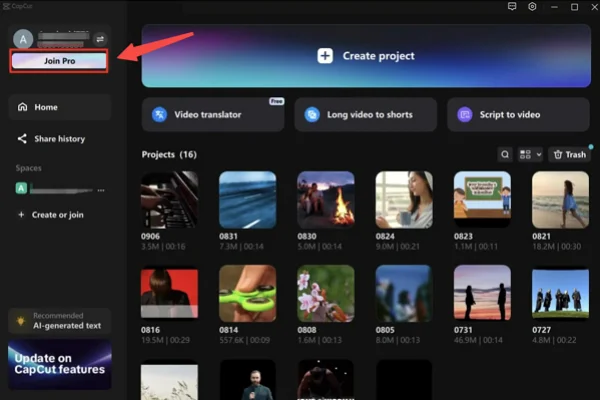
After installation, open the app and sign in. If you don’t have an account, create one first. Once logged in, look at the top-right corner or the main dashboard, where you’ll find the “Join Pro” button.
Step 3. Select the Continuous monthly Plan
On regular days, first-time users often get a discounted first month when selecting the monthly subscription. During holiday events, these discounts are usually even better.
If you only want the discount and don’t plan to continue, you can cancel the subscription right after the first payment. Doing this will not revoke your initial discount or the holiday benefits for the duration of the paid period!
Method 2. Check the CapCut Pro Cheapest Country List
To help you quickly identify where the best value lies, the table below highlights some of the most affordable countries for CapCut Pro.
| Country | Monthly Price (USD) | Yearly Price (USD) | Extra Benefit | 🔥 Quick Access |
|---|---|---|---|---|
| Turkey | $5–$7 | $45–$60 | Deep regional discounts | Turkey VPN free |
| Vietnam | $5–$7 | $50–$65 | Consistently low pricing | Vietnam VPN free |
| Philippines | $6–$8 | $60–$75 | Strong mobile-focused deals | Philippines VPN free |
| Indonesia | $6–$9 | $65–$80 | Frequent in-app promotions | Indonesia VPN free |
| India | $6–$9 | $70–$90 | Discounts for new users | India VPN free |
| Pakistan | $5–$8 | $55–$75 | Among the lowest global rates | Pakistan VPN free |
| Egypt | $7–$10 | $70–$95 | Budget-friendly subscriptions | Egypt VPN free |
| Malaysia | $7–$10 | $70–$85 | Affordable yearly plans | Malaysia VPN free |
| Brazil | $8–$11 | $80–$100 | Regular promo campaigns | Brazil VPN free |
| South Africa | $8–$11 | $75–$95 | Occasional bundle offers | South Africa VPN free |
💡 How to access the cheapest CapCut Pro country?
There are generally 4 options to enjoy a cheaper CapCut Pro account in lower pricing countries.
Option 1. Travel (Least Practical)
If you are physically in one of these countries, you can subscribe at the local price.
Option 2. Change App Store Region
Update your Google Play Store or Apple ID country settings to match a low-cost region (e.g., the Philippines) to see localized pricing in-app.
Option 3. Use Local Payment Methods
Use tools like Wise or Revolut, or purchase regional gift cards to complete the payment.
Option 4. Use a VPN (Most Convenient)
A faster way is to use a reliable VPN tool like UFO VPN to switch regions. It changes your IP address, making it appear as if you are accessing the internet from another country. Then platforms like CapCut may display localized pricing based on that region.














Method 3. Try G2G Marketplace Discount
G2G is a digital marketplace where you can find discounted subscription keys or accounts. In this way, you'll usually get 20% to 40% off.
🎯 Simple Steps to secure a deal on G2G:
Step 1. Navigate the Platform: Go to G2G.com and type "CapCut Pro" into the main search bar to pull up available listings.
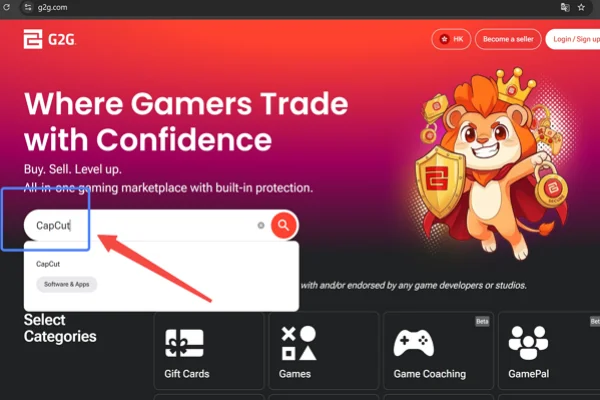
Step 2. Compare Sellers
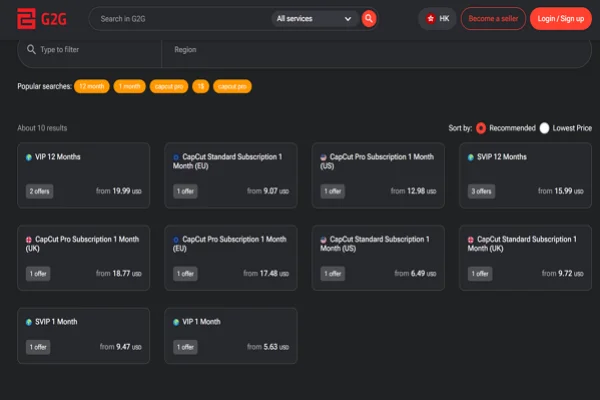
You can click each seller's profile and check for details. It's suggested that you look for listings with:
- High ratings (95%+)
- Large number of completed orders
- Positive buyer reviews
Step 3. Choose Your Tier
Select the subscription duration you need (e.g., a 1-month, 6-month, or 1-year key) and proceed to checkout using their secure payment gateway.
Step 4. Redeem Your Purchase
Follow the specific delivery instructions provided by the seller. Depending on the listing, they will either send you a direct invite link to join a premium team plan or provide login credentials for a pre-loaded Pro account.
Method 4. Buy Software and Hardware Bundle Offers
Sometimes CapCut Pro is bundled with:
- Smartphones (especially Android brands)
- Vlog Cameras
- Mocrophones
- Editing software packages
- Creator toolkits
These bundles may include a 3-6 month CapCut Pro voucher or discounted subscriptions. So remember to look for "Creator Bundles" on Amazon or B&H Photo.
🎯 Quick guide to hunt for bundles (Using Amazon as an example):
Step 1. Search Smart
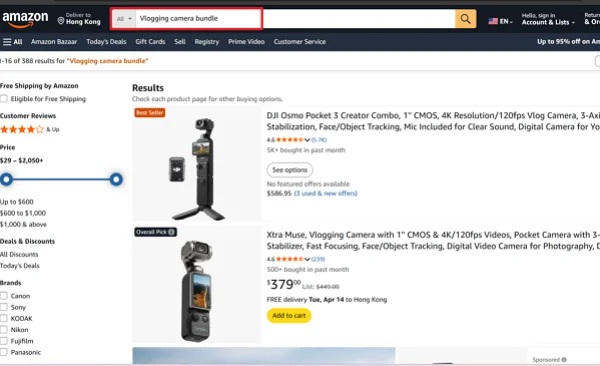
Head over to Amazon and search for targeted keywords like "Vlogging camera bundle CapCut," "Creator Toolkit," or "Podcast microphone software bundle."
Step 2. Check the Fine Print
Click on promising listings (such as a new Logitech webcam or an Android smartphone bundle). Scroll down to the "Special Offers and Product Promotions" or "What's in the Box" sections. Look explicitly for mentions of a "CapCut Pro Voucher" or "Free Subscription."
Step 3. Make the Purchase and Claim Your Code
Once your item is delivered, check your email for a digital redemption code or look for a physical scratch-off voucher card inside the packaging. Enter this promo code directly in your CapCut app's billing/promo section to activate your free Pro months.
Method 5. Commit to the Annual Billing Cycle
Switching to yearly billing is one of the simplest ways to save. Take the United States as an example:
- Monthly total: $19.99 per month, that's ~$240 in total every year
- Yearly plan: $179.99, averages out to roughly $15/month
👉 Save around $60 per year (~25%)
✅ Steps to make the switch to Annual:
1. Open your Workspace: Launch the CapCut app on your device and navigate to your account settings by clicking your profile icon.
2. Access Billing: Go to the "Manage Subscription" or "Pro" tab to view your current plan details.
3. Toggle to Yearly: You will see a side-by-side comparison of the Monthly and Yearly tiers. Click on the "Yearly" or "Annual" option. The interface will immediately show you the total upfront cost versus the savings compared to the monthly route.
4. Confirm and Save: Hit the checkout button to finalize the upgrade. If you are already on a monthly plan, the system will typically prorate your upgrade or apply the new billing cycle at the end of your current month.
Method 6. Authorized Third-Party Resellers
Sites like LootBar or GamsGo offer "shared" or "slot-based" subscriptions where you join a family/team plan at a fraction of the cost ($5-$8/month).
⭐ Getting set up via co-sharing platforms:
Step 1. Visit a Trusted Reseller: Browse to a site like GamsGo.com or LootBar.gg and locate their software or productivity section.
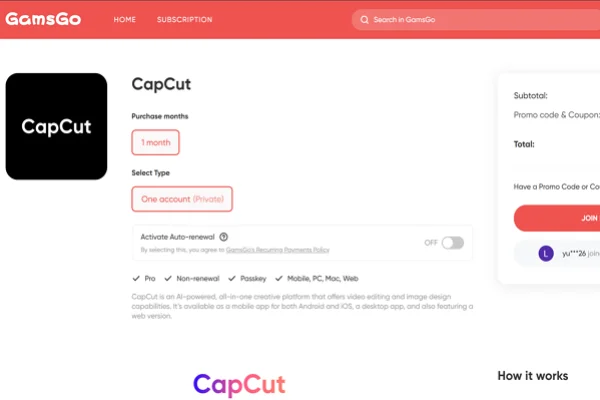
Step 2. Select a "Seat": Click on the CapCut offering to view available "slot" options. Essentially, you are purchasing a legitimate seat inside a shared Premium Team workspace.
Step 3. Complete Payment: Pay the heavily reduced fee through their secure checkout system.
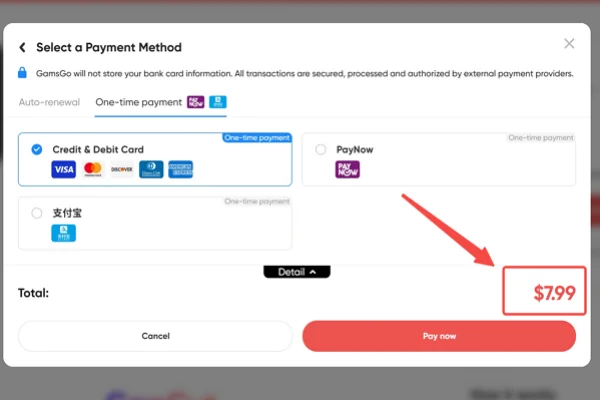
Step 4. Link Your Account: After payment is confirmed, the platform will prompt you to provide the email address associated with your personal CapCut account.
Step 5. Accept the Invite: Check your email inbox. You will receive an official invitation link directly from CapCut to join the reseller's premium workspace. Click accept, and your personal account will instantly be granted Pro status—with no need to share your own password with anyone.
⭐ Comparison Table of Methods to Get Cheaper CapCut Pro
| Method | Savings | Difficulty | Reliablity | Ratings |
|---|---|---|---|---|
| Holiday Sales | High | Easy | High | |
| Cheapest Country (via VPN) | High | Medium | Medium | |
| G2G Marketplace | Medium | Medium | Low-Med | |
| Bundle Offers | Medium | Hard | High | |
| Annual Plan | Medium | Easy | High | |
| Resellers | Low-Med | Medium | Medium |
Possible Ways to Get a 100% Free CapCut Pro Account
It is possible to access Pro features for free, but most methods require a bit of strategy—and some come with limitations or risks. Below are the most common approaches, explained in more detail so you know exactly what to expect.
Hack 1. Free CapCut Trial Plans
Almost every region offers a free trial, typically:
- 7 days on mobile (iOS/Android)
- Up to 30 days on desktop or web
💡 The simple steps to enjoy this free trial include: Log in to CapCut.com > Tap "Join Pro" or "Upgrade“ in the top-right corner > Select a plan with a free trial > Confirm and start using Pro features
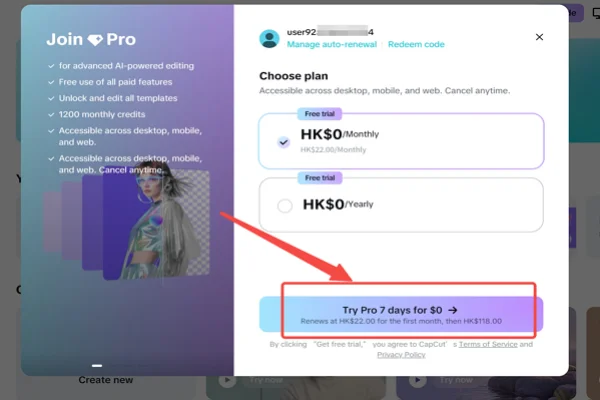
You can use UFO VPN to switch to a different country and register a new account with a different email to stack multiple trial periods.
Hack 2. Try Redeem Codes
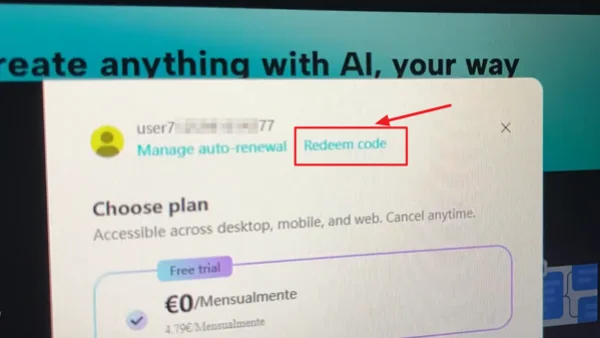
Occasionally, CapCut or its partners release redeem codes that can unlock:
- Free months of Pro
- Discounted subscriptions
- In rare cases, up to 12 months of free access
💡 Key steps: Log in to your CapCut account > Go to your Profile Settings> Find the "Redeem Code" section > Visit code-sharing platforms like Bananacodes > Search for "CapCut" > Copy a code and paste it into CapCut.
⚠️ Reality Check: Working codes are rare, but when available, they are one of the safest free methods.
These codes are often first-come, first-served. And they can expire within minutes or hours. So you may need to try multiple codes before finding a working one
Hack 3. Unblock Coupon Codes If It's Not Fully Visible
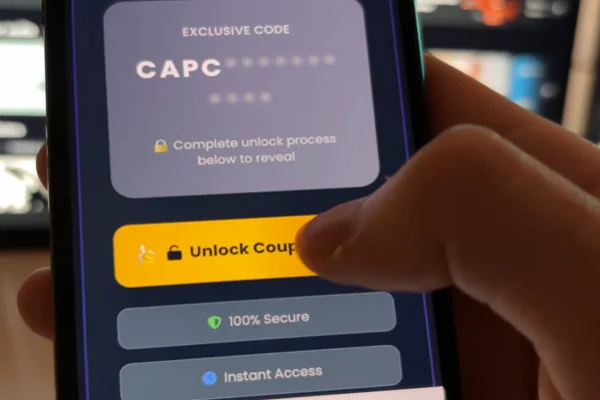
Some websites claim to “unlock” hidden coupon codes after completing tasks.
💡 Steps to follow:
-
Click “Unblock Code” on sites like Banana-related platforms
-
Complete 2–3 required actions, such as:
- Downloading an app
- Watching a short video (20–30 seconds)
- Signing up for a trial service
3. Return to the page and refresh
4. Copy the revealed code and try redeeming it
⚠️ Warning: This method is often risky. Many tasks are affiliate traps, not guaranteed to give a valid code. Even if there are some codes, they may already be expired or fake. Even worse, some downloads may include malware or unwanted software
Therefore, when you are using this method, it's key to follow some rules, such as:
Use a secondary email account for safety
Stick to well-known platforms
Enable antivirus protection before downloading anything
Never share your CapCut password on third-party sites
Never enter credit card details for “free code generators.”
Avoid downloading suspicious .exe or .apk files claiming to “unlock Pro.”
Don’t rely on this method for long-term access.
Tips for Safe & Smooth Purchase
Buying software online should be easy, but a few mistakes can lead to lost money or account issues. Follow these simple steps to make sure your upgrade goes through without any problems.
✅ Check Device Compatibility First: Before paying, ensure your phone or PC meets the hardware requirements for Pro features. Some AI tools require specific processors or a certain amount of RAM to function without crashing.
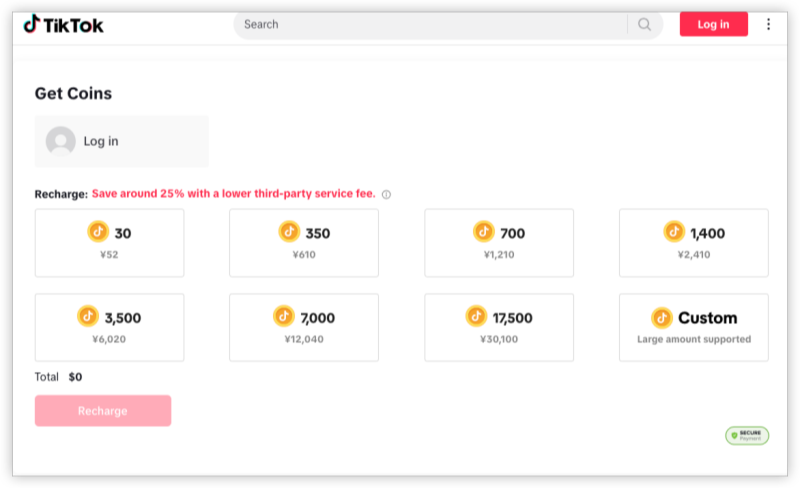
✅ Purchase Through Official Channels: Only buy through the app itself, the official CapCut website, or authorized app stores (Apple/Google). This ensures your payment information is encrypted and your subscription is linked to your account properly.
✅ Read the Terms and Conditions: Pay attention to "Auto-Renewal" settings. Most subscriptions will charge you automatically when the period ends. Know how to cancel at least 24 hours before the deadline if you don't want to continue.
✅ Use a Secure Payment Method: Use a credit card with fraud protection or a service like PayPal. Avoid using direct bank transfers or debit cards that don't offer a way to dispute a charge if something goes wrong.
✅ Save Your Receipts and Keys: If you receive a discount code or a digital key, take a screenshot of the confirmation page. Keep your email receipt in a separate folder in case you need to prove your purchase to customer support later.
Final Words
Upgrading to CapCut Pro does not always mean paying the highest price. With the right timing and method, you can access premium tools at a lower cost while still staying safe and within official guidelines.
FAQs
Can I use one CapCut Pro subscription on both my phone and my PC?
Yes. As long as you log in with the same account (TikTok, Google, or Email), your Pro status should sync across all devices, including the mobile app, desktop version, and web editor.
Does CapCut Pro work if I don't have an internet connection?
Most basic Pro editing tools will work offline once they are downloaded. However, many AI-driven features (like auto-captions or cloud-based effects) require an active internet connection to process the data on their servers.
Is there a way to get a permanent "Lifetime" license for CapCut Pro?
Generally, CapCut operates on a subscription model (monthly or yearly). While they occasionally offer "one-time" payment deals during special promotions in specific regions, most users will need to maintain a recurring subscription to keep Pro access.
What happens to my Pro projects if I stop paying for the subscription?
Your projects will not be deleted. However, if you used Pro-only effects or transitions in those projects, you will not be able to export or save the video until you either remove the Pro elements or renew your subscription.
Can I get a refund if I don't like the Pro features?
Refund policies depend on where you bought the subscription. If you purchased through the Apple App Store or Google Play Store, you must request a refund through their respective platforms. If bought directly from the CapCut website, you will need to contact their support team.