What Is Among Us Unblocked Game?
“Among Us unblocked” refers to versions of the popular multiplayer game that can be accessed from restricted networks—like school, work, or public Wi-Fi—where gaming sites are often filtered.
Educational institutions and offices usually block online games to prevent distractions and conserve bandwidth. As a result, players turn to “unblocked” versions hosted on third-party platforms such as Unblocked Games 66, Unblocked Games 67, Classroom 6x, or even GitHub mirrors.
These “unblocked” sites let you play Among Us online in a browser, without installing anything. However, not all of them are trustworthy—some may contain ads, fake game links, or even malware. That’s why it’s crucial to know where and how to access Among Us safely, especially if you’re using a school Chromebook.
If your school blocks the Among Us game, try a free proxy VPN in UFO VPN to hide your real IP address and get your game traffic encrypted.
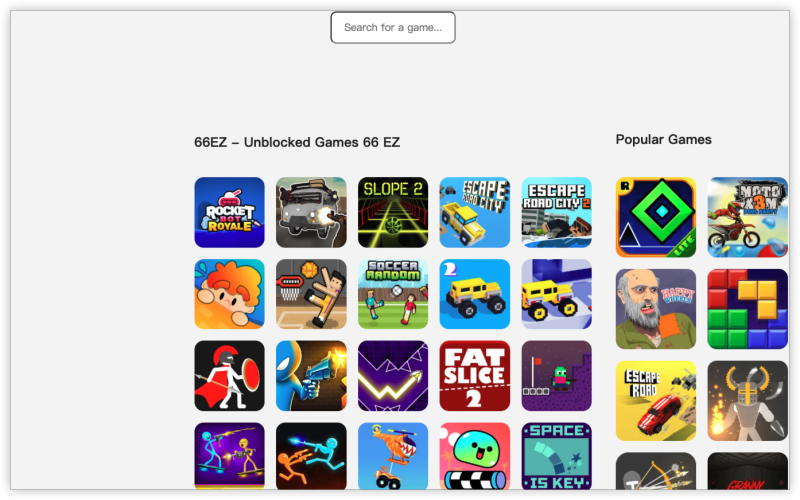
Where Can You Play Among Us Unblocked Games? (Platforms & Mirror Sites)
If your school blocks gaming sites, you’ve probably seen terms like “Among Us unblocked 66,” “Among Us unblocked WTF,” or “Classroom 6x.”
These are third-party mirror platforms that let students play Among Us online unblocked versions directly in a browser—no download needed.
Here’s a quick comparison of the most popular unblocked sites and what to expect:
| Platform/Mirror Site | Accessibility at School | Game Version | Safety & Reliability | Notes |
|---|---|---|---|---|
| Unblocked Games 66 / 76 |
⭐⭐⭐⭐ (Often works) | HTML5 browser version | ⚠️ Mixed — may contain ads or pop-ups | Popular among students; some links break frequently. |
| Classroom 6x | ⭐⭐⭐⭐⭐ (Best for Chromebook) | Full browser-based gameplay | ✅ Generally safe and stable | Works on many school networks; minimal setup needed. |
| GitHub Pages | ⭐⭐⭐ (Varies by project) | Clones / fan-made mods | ⚠️ Depends on source | Some updated regularly, others outdated or unofficial. |
| Unblocked Games WTF | ⭐⭐⭐⭐ | Simplified web version | ⚠️ Ad-heavy; not official | Easy to load but may be unstable during gameplay. |
| Among Us Soccer Unblocked | ⭐⭐⭐ | Mod / variation (sports theme) | ⚠️ Moderate | Fun twist but not the original game mechanics. |
While these sites can temporarily bypass school restrictions, remember they’re not official sources. Many include ads, pop-ups, or even security risks.
If you’d prefer a safe and consistent experience, consider using a secure VPN connection to reach the official Among Us servers through Steam or the InnerSloth website.
That way, you enjoy the real game, stable performance, and complete privacy.
How to Safely Unblock Among Us Games for School or Chromebook
Many students use school-issued Chromebooks, which come with strong network restrictions and firewalls. Here’s how you can play Among Us unblocked safely:
Step 1: Understand the Restriction
School networks use filters that block specific ports, gaming domains, or keywords. This prevents direct access to game servers or websites hosting online games.
Step 2: Use a Secure Connection
To bypass these restrictions safely, you need a private and encrypted connection. That’s where a VPN (Virtual Private Network) comes in—it creates a secure tunnel that hides your online activity from network filters.
When you connect through a secure VPN like UFO VPN, the school system sees only encrypted traffic, not the game’s domain. This allows you to access Among Us without triggering blocks.
How to Play Among Us games with UFO VPN:


UFO VPN is an all-in-one VPN that offers unlimited access to 4K streaming like Netlfix, Disney Plus, no-ping gaming as PUBG, Roblox, CODM and social networking for YouTube, X, Facebook and more.




Unlock Pro Features
If you have upgraded to premium plan , feel free to enjoy premium servers for 4K streaming and advanced features like Kill Switch, Split Tunneling, and gaming acceleration. Your Mac is now fully optimized and protected. Inaddition to basic functions, we recommend you turn on

Verify Your IP Now
Use UFO VPN's " What is My IP " feature to see your new IP and location. This confirms your connection is secure, anonymous, and ready for safe browsing online anywhere at any time.







Step 3: Choose a Safe Server Location
Connect to a server in your region (like the U.S. or U.K.) for lower latency. This helps maintain a smooth game experience without lag.
Step 4: Launch Among Us
Once connected, open Steam, Epic Games, or a verified browser version. You can also join a friend’s private lobby by entering their code.
If you’re using a Chromebook, open your VPN app or Chrome extension first, then visit the official game link or InnerSloth’s web page.
💡 Pro tip: Some VPNs, like UFO VPN, offer one-click access and automatic encryption on restricted networks—perfect for quick gaming sessions without technical setup.
Safety Tips for Playing Unblocked Among Us Games Online
When accessing unblocked sites, it’s essential to keep your device and data secure. Here are a few practical safety reminders:
-
Avoid suspicious websites. Only use well-known sources like Classroom 6x or official Steam pages. If a site asks for login credentials or redirects multiple times, leave immediately.
-
Use encryption. Even if the site loads fine, network administrators can still monitor traffic. A VPN helps protect your identity and prevents data leaks.
-
Watch for clones. Many “unblocked” versions are fan-made or altered. Stick to official servers or community-trusted platforms.
-
Clear browser data regularly. Cached cookies or saved sessions might reveal what sites you visited.
-
Don’t share your credentials. Some fake mirrors try to imitate login pages. Always double-check the URL.
Playing safely is about more than unblocking access—it’s about protecting your privacy and keeping your school device secure.
FAQs
What does “Among Us unblocked” mean?
It means a version of the game that can be played from restricted networks like school or office Wi-Fi, often via mirror sites or VPNs.
Can I play Among Us unblocked on a school Chromebook?
Yes. Chromebook browsers support web-based versions of the game. If your school blocks them, a secure VPN connection can help you access them safely.
Why is Among Us blocked at school?
Schools use network filters to block games and social sites to keep students focused and protect bandwidth.
What’s the safest way to unblock Among Us?
Avoid random “unblocked” sites and use a trusted VPN to connect to official Among Us servers or reliable mirrors.
Is playing Among Us unblocked free?
Yes, most browser-based versions are free to access, though they may show ads. The official version via Steam or Epic Games requires purchase.
Conclusion
Playing Among Us unblocked at school or on a Chromebook is easy if you know where to look and how to stay safe. While unblocked sites offer quick fun, the best way to play securely is through a private connection like a VPN. Stay protected, access the real game, and enjoy smooth Among Us sessions anywhere in 2026.